Join us at FabCon Atlanta from March 16 - 20, 2026, for the ultimate Fabric, Power BI, AI and SQL community-led event. Save $200 with code FABCOMM.
Register now!The Power BI Data Visualization World Championships is back! Get ahead of the game and start preparing now! Learn more
Hi I'm working on a report to measure the ratio of tickets with issue over total tickets processed. These 2 values are coming from 2 different data sources. I was able to create a weekly summary of the tickets with issue and a summary for the total tickets processed. How do I create a summary table showing the ratio of total tickets issued over the total tickets processed? Appreciate
Solved! Go to Solution.
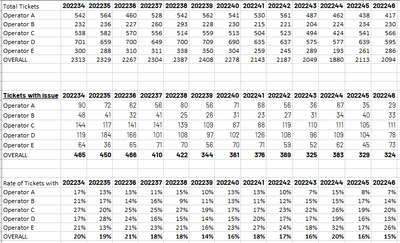
Here's the data I generated in excel.
Total Tickets is from one data source and Tickets with issue is from another data source. The bottom table is the ratio of the 2 tables. How can I do this in Power BI?
Thank you for your inputs.
@Vlapena , Add both of them as tables, Unpivot to get a week on rows. Create common dimesions
Power Query- Pivot, Unpivot Data: https://www.youtube.com/watch?v=FUaGQBG5YnI&list=PLPaNVDMhUXGbfdGuSsfPR1qKBRT5Ywlki&index=3
refer
The Power BI Data Visualization World Championships is back! Get ahead of the game and start preparing now!
| User | Count |
|---|---|
| 60 | |
| 44 | |
| 40 | |
| 37 | |
| 21 |
| User | Count |
|---|---|
| 178 | |
| 127 | |
| 116 | |
| 77 | |
| 54 |