This is best Fabric, Power BI, SQL and AI community event. How do we know? The last event sold out! Save €200 with code FABCMTY200.
Register nowA new Data Days event is coming soon! This time we’re going bigger than ever. Fabric, Power BI, SQL, AI and more. Don't miss out.
Hello,
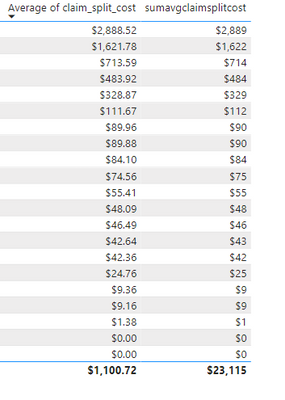
I have a category column, subcategory column, and a cost column. I have a slicer to choose a specific category, and I have a chart below it that showcases the average cost for each subcategory. I am trying to see the total sum of the average cost but the resulting total is not what I'm expecting.
The formula I'm using is SUMX(VALUES([subcategory column]),AVERAGE([cost column]))
Below is a snippit of what I'm getting. The left column is the standard Average of the cost column and the right column is the calculated measure I'm trying to create.
Any help would be super. Thanks!
Solved! Go to Solution.
Hi @rjaramillo ,
I think there are two kinds of ways to create measures to calculate correct average total.
Measure1:
Measure 2 =
SUMX(VALUES('Table'[subcategory]),CALCULATE( AVERAGE('Table'[cost])))
You need to add "CALCULATE" function before "AVERAGE", it will consider filter context and give you correct result.
Measure2:
Measure1 =
VAR _SUMMARIZE = SUMMARIZE('Table','Table'[subcategory],"Avg by subcategory",CALCULATE(AVERAGE('Table'[cost])))
RETURN
SUMX(_SUMMARIZE,[Avg by subcategory])
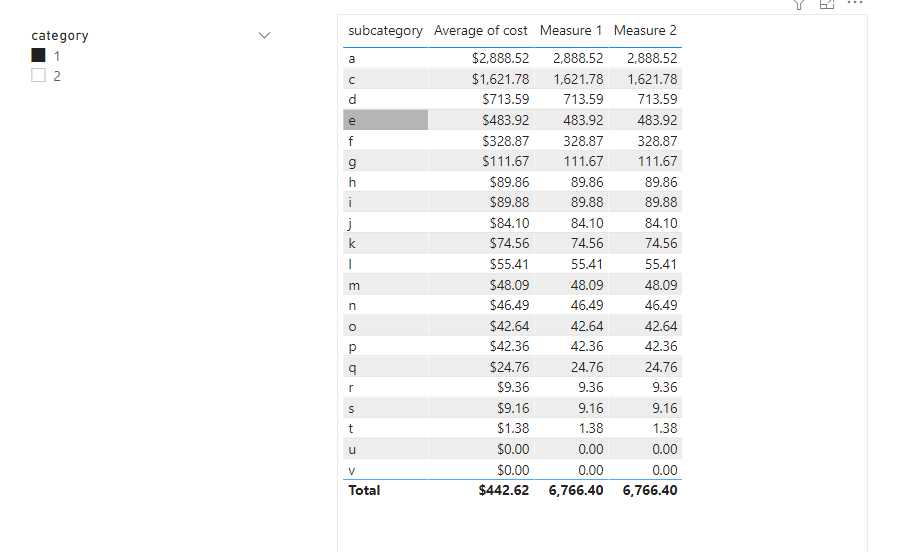
Result is as below.
Best Regards,
Rico Zhou
If this post helps, then please consider Accept it as the solution to help the other members find it more quickly.
hI @rjaramillo,
I tested your approach and the formula worked find on my end. I did get the expected result which is the sum of the average. Here is a sample pbix - https://drive.google.com/file/d/11e0N1DPmJyr7k1U2rFlwFuTvhivv3yYq/view?usp=sharing
So that's what I'm expecting as well I thought it would be pretty straightforward but maybe there's something behind the scenes? I'm not sure if there's another way to get the answer
Hi @rjaramillo ,
I think there are two kinds of ways to create measures to calculate correct average total.
Measure1:
Measure 2 =
SUMX(VALUES('Table'[subcategory]),CALCULATE( AVERAGE('Table'[cost])))
You need to add "CALCULATE" function before "AVERAGE", it will consider filter context and give you correct result.
Measure2:
Measure1 =
VAR _SUMMARIZE = SUMMARIZE('Table','Table'[subcategory],"Avg by subcategory",CALCULATE(AVERAGE('Table'[cost])))
RETURN
SUMX(_SUMMARIZE,[Avg by subcategory])
Result is as below.
Best Regards,
Rico Zhou
If this post helps, then please consider Accept it as the solution to help the other members find it more quickly.
the CALCULATE part is what I was missing! Thank you so much!
Check out the May 2026 Power BI update to learn about new features.
Sign up to receive a private message when registration opens and key events begin.
If you have recently started exploring Fabric, we'd love to hear how it's going. Your feedback can help with product improvements.
| User | Count |
|---|---|
| 30 | |
| 28 | |
| 23 | |
| 19 | |
| 17 |
| User | Count |
|---|---|
| 49 | |
| 47 | |
| 41 | |
| 21 | |
| 19 |