Join us at FabCon Atlanta from March 16 - 20, 2026, for the ultimate Fabric, Power BI, AI and SQL community-led event. Save $200 with code FABCOMM.
Register now!The Power BI Data Visualization World Championships is back! Get ahead of the game and start preparing now! Learn more
Hi everyone,
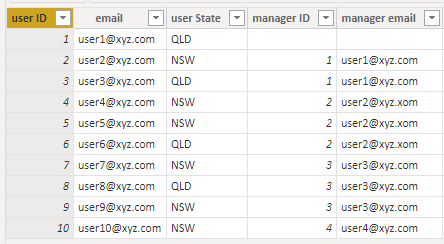
I have following user table and I have applied Row Level Security based on Organisational Hierarchy. I would like to create a slicer based on logged in user as if logged in person's state is same as user's state then "Domestic" else "International". However, I can't use USERPRINCIPALNAME in calculated columns/tables. so any idea if that's doable? thanks
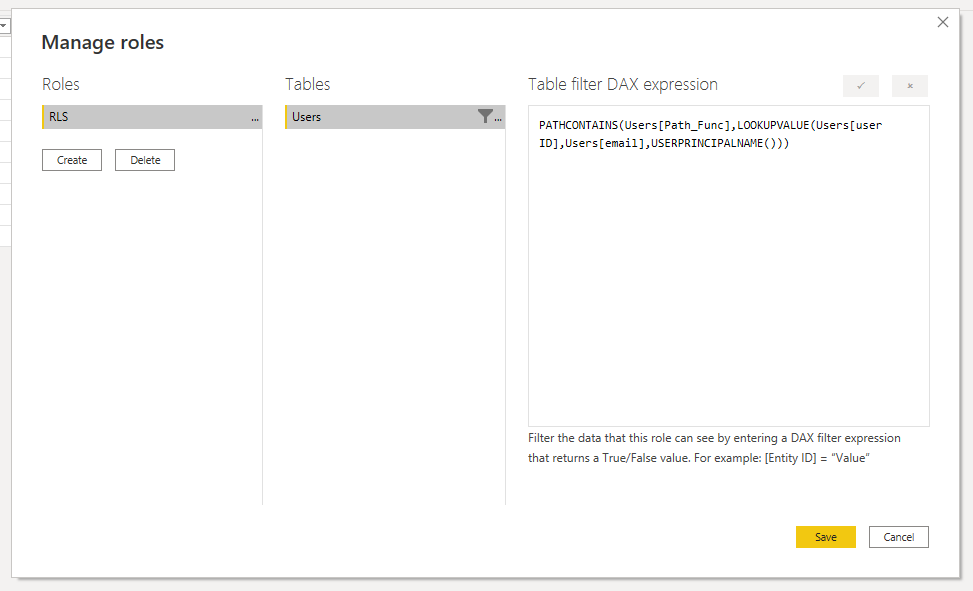
PATHCONTAINS(Users[Path_Func],LOOKUPVALUE(Users[user ID],Users[email],USERPRINCIPALNAME()))
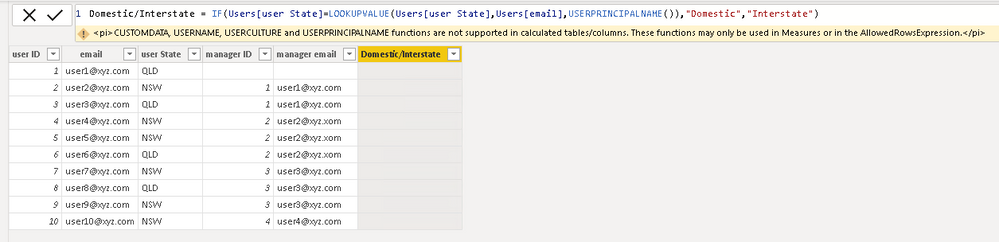
Formula not working beacuse we can't use USERPRINCIPALNAME in calculated columns/tables.
Hi @Anonymous ,
Has your problem been solved, if so, please consider Accept a correct reply as the solution or share your own solution to help others find it.
Best Regards
Lucien
Hi @Anonymous ,
As we can see from the error message, it isn't supported. What's your purpose? Maybe there are other approaches. For example, we can use a measure like this, then we can filter out these 0s in the Filters.
Measure =
CALCULATE (
IF (
MIN ( Users[email])
=USERPRINCIPALNAME (),
1,
0
)
)
Did I answer your question? Mark my post as a solution!
Best Regards
Lucien
The Power BI Data Visualization World Championships is back! Get ahead of the game and start preparing now!
Check out the November 2025 Power BI update to learn about new features.
| User | Count |
|---|---|
| 69 | |
| 46 | |
| 44 | |
| 28 | |
| 19 |
| User | Count |
|---|---|
| 199 | |
| 129 | |
| 102 | |
| 69 | |
| 55 |