Join us at FabCon Atlanta from March 16 - 20, 2026, for the ultimate Fabric, Power BI, AI and SQL community-led event. Save $200 with code FABCOMM.
Register now!The Power BI Data Visualization World Championships is back! Get ahead of the game and start preparing now! Learn more
Hi everyone,
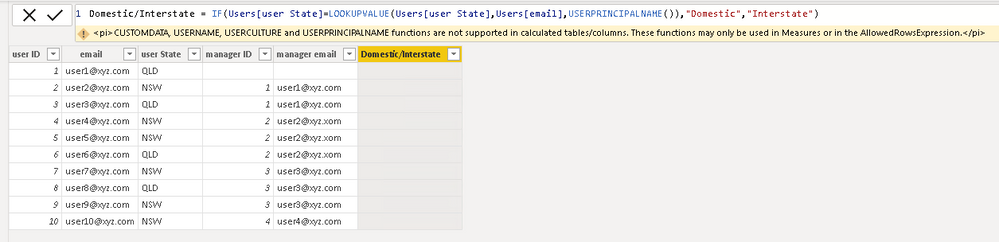
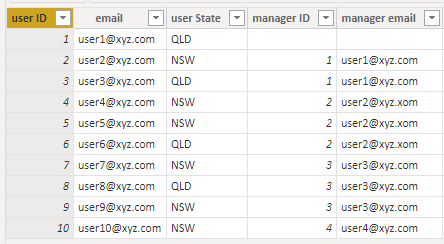
I have following user table and I have applied Row Level Security based on Organisational Hierarchy. I would like to create a slicer based on logged in user as if logged in person's state is same as user's state then "Domestic" else "International". However, I can't use USERPRINCIPALNAME in calculated columns/tables. so any idea if that's doable? thanks
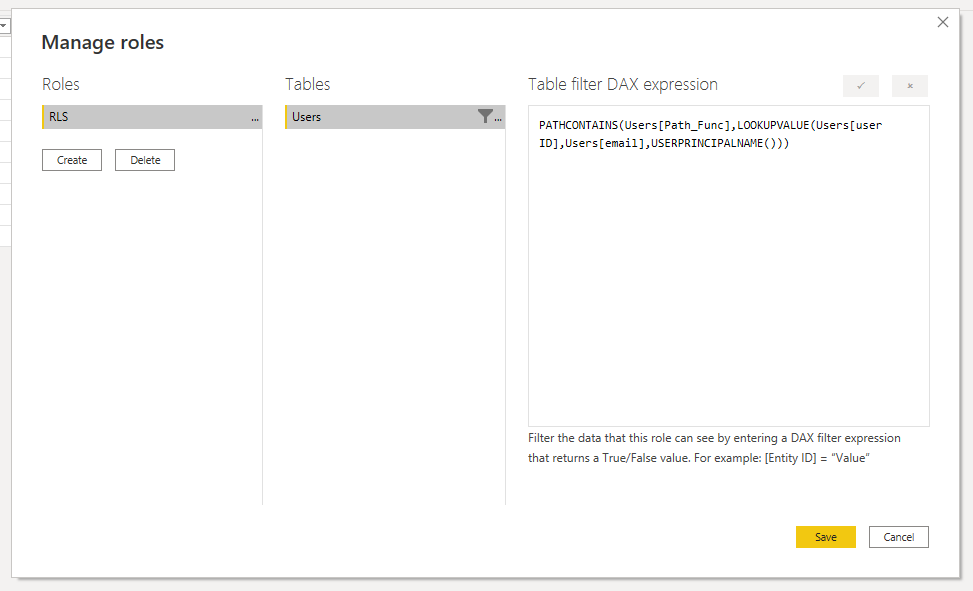
PATHCONTAINS(Users[Path_Func],LOOKUPVALUE(Users[user ID],Users[email],USERPRINCIPALNAME()))
Formula not working beacuse we can't use USERPRINCIPALNAME in calculated columns/tables.
Hi @Anonymous ,
Has your problem been solved, if so, please consider Accept a correct reply as the solution or share your own solution to help others find it.
Best Regards
Lucien
Hi @Anonymous ,
As we can see from the error message, it isn't supported. What's your purpose? Maybe there are other approaches. For example, we can use a measure like this, then we can filter out these 0s in the Filters.
Measure =
CALCULATE (
IF (
MIN ( Users[email])
=USERPRINCIPALNAME (),
1,
0
)
)
Did I answer your question? Mark my post as a solution!
Best Regards
Lucien
The Power BI Data Visualization World Championships is back! Get ahead of the game and start preparing now!
| User | Count |
|---|---|
| 63 | |
| 55 | |
| 42 | |
| 41 | |
| 23 |
| User | Count |
|---|---|
| 171 | |
| 136 | |
| 119 | |
| 80 | |
| 54 |