Join us at FabCon Atlanta from March 16 - 20, 2026, for the ultimate Fabric, Power BI, AI and SQL community-led event. Save $200 with code FABCOMM.
Register now!Get Fabric Certified for FREE during Fabric Data Days. Don't miss your chance! Request now
Hey everyone,
I have a short question of what the best way would be to eachieve something like this.
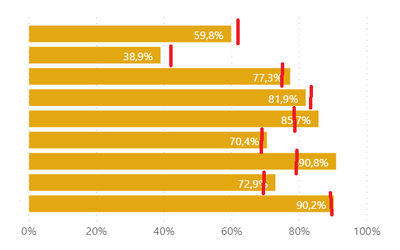
In my report I have a Bar chart, with 10 different bars. I'm looking to create a target line for each individual bar (illustrated below with red lines)
So for the first bar, they have achieved 59,8%, when their target was 61%.
For the second bar, they have achieved 38,9%, when their target was 41%, Etc.
As far as I'm aware, this is not possible with the default bar chart in Powerbi. So maybe I need to create 10 individual bullet charts?
Any suggestions? 😄
thanks.
Solved! Go to Solution.
Hi @Anonymous
Try the custom visual bullet chart.
https://appsource.microsoft.com/en-us/product/power-bi-visuals/WA104380755?tab=Overview
Regards
Miguel Félix
Proud to be a Super User!
Check out my blog: Power BI em PortuguêsHi @Anonymous
Try the custom visual bullet chart.
https://appsource.microsoft.com/en-us/product/power-bi-visuals/WA104380755?tab=Overview
Regards
Miguel Félix
Proud to be a Super User!
Check out my blog: Power BI em PortuguêsAh I see. I checked out another bulletchart and that supported the features that I needed.
Thanks.
To my knowledge it is not possible to have multiple constant lines in the way that the image is displaying. What you could do instead is create another measure that calculates the difference between target and actual.
The only concern about this is that you will no longer see the target line once it's passed.
Br,
J
Check out the November 2025 Power BI update to learn about new features.
Advance your Data & AI career with 50 days of live learning, contests, hands-on challenges, study groups & certifications and more!