Join us at FabCon Atlanta from March 16 - 20, 2026, for the ultimate Fabric, Power BI, AI and SQL community-led event. Save $200 with code FABCOMM.
Register now!The Power BI Data Visualization World Championships is back! It's time to submit your entry. Live now!
Hi
Can anyone help with this query? I need to produce a scatter which relies on the user defining x and y axis (using slicers) - is there any way to do this without creating a summarised table of data from the original? The data is formatted a little like below:
Category Score
1 5
2 4
3 3
3 2
4 3
4 4
5 3
6 4
6 6
I need the user to pick a category 1-6 for 'x axis' and then a category 1-6 for 'y axis' which then plots the score on a scatter.
Thanks for any help
Solved! Go to Solution.
Hi @MrBenn,
With current table format, it might not possible to create such a scatter chart. You may need to generate a new calculated table with a new structure.
Test3 =
FILTER (
CROSSJOIN (
FILTER ( Test2, Test2[Name] = "Actual" ),
SELECTCOLUMNS (
FILTER ( Test2, Test2[Name] = "Expected" ),
"Name2", Test2[Name],
"Phase2", Test2[Phase],
"Score2", Test2[Score]
)
),
Test2[Phase] = [Phase2]
)
Best regards,
Yuliana Gu
Hi @MrBenn,
I get below result if directly placing [category] onto X-axis and Y-axis, and plotting [Score] into Details.
Is that what you want? If not, would you please show us your desired output? If you want to show total score per Category in scatter chart, I think you should create a summarised table.
Regards,
Yuliana Gu
Hi Yuliana
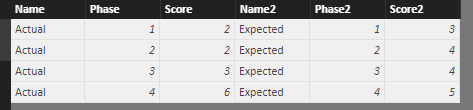
Thank you for your reply, but I wasn't very clear and this isn't what I was looking for. I have the data table below and the scatter chart I'd need. Does this help? I'm thinking I may have to use parameters, but I'm not sure how to do this.
Hi @MrBenn,
With current table format, it might not possible to create such a scatter chart. You may need to generate a new calculated table with a new structure.
Test3 =
FILTER (
CROSSJOIN (
FILTER ( Test2, Test2[Name] = "Actual" ),
SELECTCOLUMNS (
FILTER ( Test2, Test2[Name] = "Expected" ),
"Name2", Test2[Name],
"Phase2", Test2[Phase],
"Score2", Test2[Score]
)
),
Test2[Phase] = [Phase2]
)
Best regards,
Yuliana Gu
The Power BI Data Visualization World Championships is back! It's time to submit your entry.
Check out the January 2026 Power BI update to learn about new features.
| User | Count |
|---|---|
| 56 | |
| 42 | |
| 41 | |
| 21 | |
| 21 |
| User | Count |
|---|---|
| 150 | |
| 107 | |
| 64 | |
| 36 | |
| 36 |