Learn from the best! Meet the four finalists headed to the FINALS of the Power BI Dataviz World Championships! Register now
Hi
Can anyone help with this query? I need to produce a scatter which relies on the user defining x and y axis (using slicers) - is there any way to do this without creating a summarised table of data from the original? The data is formatted a little like below:
Category Score
1 5
2 4
3 3
3 2
4 3
4 4
5 3
6 4
6 6
I need the user to pick a category 1-6 for 'x axis' and then a category 1-6 for 'y axis' which then plots the score on a scatter.
Thanks for any help
Solved! Go to Solution.
Hi @Anonymous,
With current table format, it might not possible to create such a scatter chart. You may need to generate a new calculated table with a new structure.
Test3 =
FILTER (
CROSSJOIN (
FILTER ( Test2, Test2[Name] = "Actual" ),
SELECTCOLUMNS (
FILTER ( Test2, Test2[Name] = "Expected" ),
"Name2", Test2[Name],
"Phase2", Test2[Phase],
"Score2", Test2[Score]
)
),
Test2[Phase] = [Phase2]
)
Best regards,
Yuliana Gu
Hi @Anonymous,
I get below result if directly placing [category] onto X-axis and Y-axis, and plotting [Score] into Details.
Is that what you want? If not, would you please show us your desired output? If you want to show total score per Category in scatter chart, I think you should create a summarised table.
Regards,
Yuliana Gu
Hi Yuliana
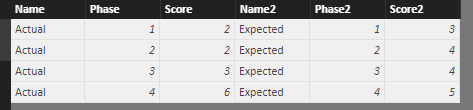
Thank you for your reply, but I wasn't very clear and this isn't what I was looking for. I have the data table below and the scatter chart I'd need. Does this help? I'm thinking I may have to use parameters, but I'm not sure how to do this.
Hi @Anonymous,
With current table format, it might not possible to create such a scatter chart. You may need to generate a new calculated table with a new structure.
Test3 =
FILTER (
CROSSJOIN (
FILTER ( Test2, Test2[Name] = "Actual" ),
SELECTCOLUMNS (
FILTER ( Test2, Test2[Name] = "Expected" ),
"Name2", Test2[Name],
"Phase2", Test2[Phase],
"Score2", Test2[Score]
)
),
Test2[Phase] = [Phase2]
)
Best regards,
Yuliana Gu
| User | Count |
|---|---|
| 58 | |
| 45 | |
| 31 | |
| 17 | |
| 16 |
| User | Count |
|---|---|
| 73 | |
| 63 | |
| 46 | |
| 23 | |
| 22 |