cancel
Showing results for 
Search instead for 
Did you mean: 

The Power BI Data Visualization World Championships is back! It's time to submit your entry. Live now!

Reply
Lorraine
Helper I
Helper I

Creating a Slicer

Hi all,


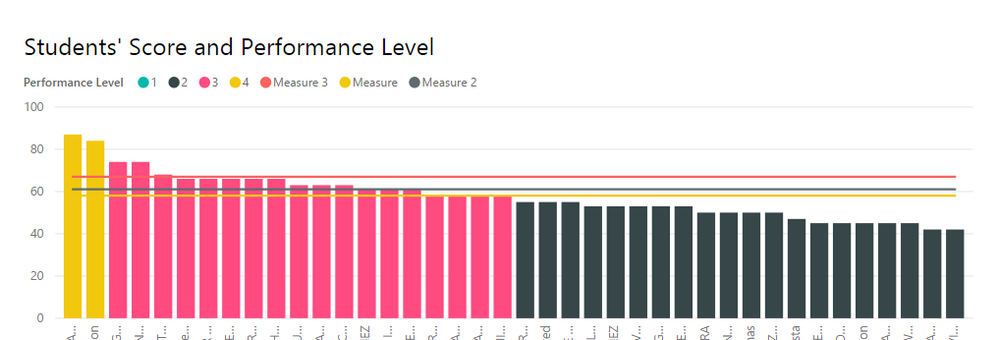
This is a line and stacked column visual I'm working on right now:

Screenshot (5).png


For the line values I've created three measures and given them the values 58, 61, and 67. Is there a way to create a slicer that will allow me to select a line measure value and have only the selected line display with the column values?


Thanks in advance!

1 ACCEPTED SOLUTION
dani0010
Advocate II
Advocate II

You could create a table like this:


UI Compare Line = DataTable(
"Label", STRING, 
"Value", INTEGER 
,{ 
{"Keyword 1","61"}, 
{"Keyword 2","58"}, 
{"Keyword 3","67"} 
} 
)


Bind that Label field to your slicer.


Create a measure like this:

UI Compare Line Selected = max('UI Compare Line'[Value])

Use the measure as the line value in your chart.

View solution in original post

4 REPLIES 4
dani0010
Advocate II
Advocate II

You could create a table like this:


UI Compare Line = DataTable(
"Label", STRING, 
"Value", INTEGER 
,{ 
{"Keyword 1","61"}, 
{"Keyword 2","58"}, 
{"Keyword 3","67"} 
} 
)


Bind that Label field to your slicer.


Create a measure like this:

UI Compare Line Selected = max('UI Compare Line'[Value])

Use the measure as the line value in your chart.

@dani0010 Thank you so much, that worked perfectly! You're a genius

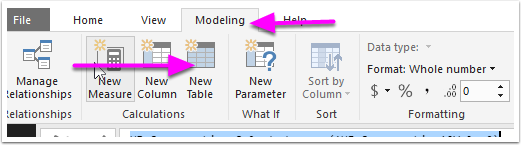
@dani0010 Thanks! This makes sense, but how do I create a table in Power BI? I've only been importing them.

datatable.png


@Lorraine You're in for a whole new world!

Helpful resources

Announcements
FabCon Atlanta 2026 carousel

FabCon Atlanta 2026

Join us at FabCon Atlanta, March 16-20, for the ultimate Fabric, Power BI, AI and SQL community-led event. Save $200 with code FABCOMM.