This time we’re going bigger than ever. Fabric, Power BI, SQL, AI and more. We're covering it all. You won't want to miss it.
Learn moreDid you hear? There's a new SQL AI Developer certification (DP-800). Start preparing now and be one of the first to get certified. Register now
Hi all,
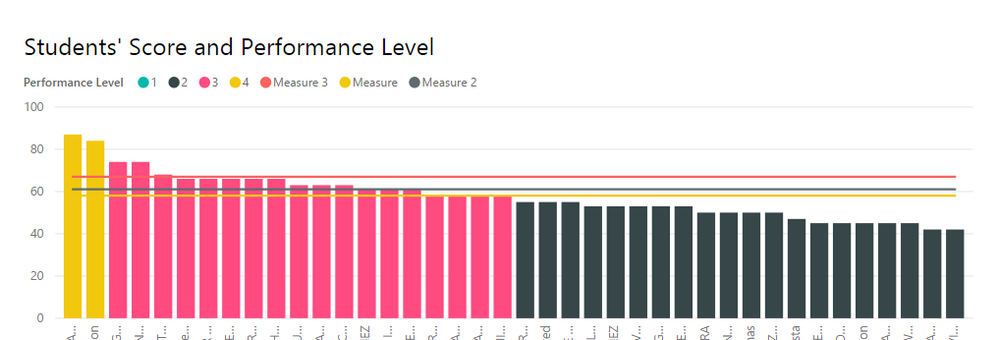
This is a line and stacked column visual I'm working on right now:
For the line values I've created three measures and given them the values 58, 61, and 67. Is there a way to create a slicer that will allow me to select a line measure value and have only the selected line display with the column values?
Thanks in advance!
Solved! Go to Solution.
You could create a table like this:
UI Compare Line = DataTable(
"Label", STRING,
"Value", INTEGER
,{
{"Keyword 1","61"},
{"Keyword 2","58"},
{"Keyword 3","67"}
}
)
Bind that Label field to your slicer.
Create a measure like this:
UI Compare Line Selected = max('UI Compare Line'[Value])Use the measure as the line value in your chart.
You could create a table like this:
UI Compare Line = DataTable(
"Label", STRING,
"Value", INTEGER
,{
{"Keyword 1","61"},
{"Keyword 2","58"},
{"Keyword 3","67"}
}
)
Bind that Label field to your slicer.
Create a measure like this:
UI Compare Line Selected = max('UI Compare Line'[Value])Use the measure as the line value in your chart.
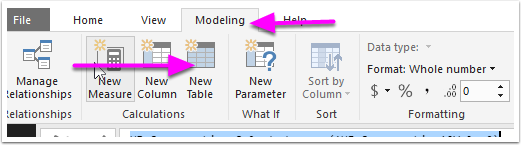
@dani0010 Thanks! This makes sense, but how do I create a table in Power BI? I've only been importing them.
Check out the April 2026 Power BI update to learn about new features.
If you have recently started exploring Fabric, we'd love to hear how it's going. Your feedback can help with product improvements.
| User | Count |
|---|---|
| 37 | |
| 37 | |
| 31 | |
| 21 | |
| 16 |
| User | Count |
|---|---|
| 66 | |
| 56 | |
| 31 | |
| 26 | |
| 23 |