cancel
Showing results for 
Search instead for 
Did you mean: 

Learn from the best! Meet the four finalists headed to the FINALS of the Power BI Dataviz World Championships! Register now

Reply
ankitkagarwal88
Regular Visitor

Creating a Single Slicer for Multiple Column

Hi,


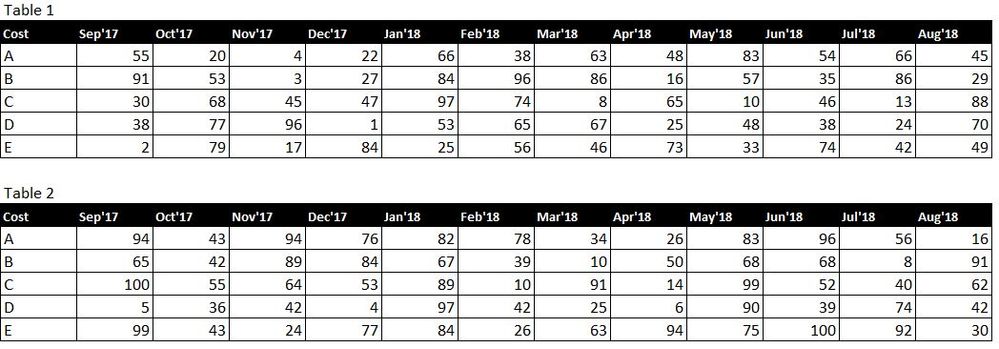
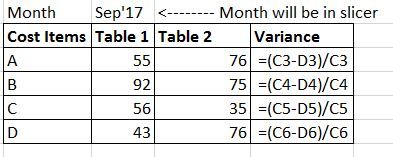
I have data in two different tables in two different file as mentioned below. Want to put one common slicer for both on the month to show the monthly variance for below two tables. If I select any month from the slicer the graph will show that month data only from Table 1 & Table 2.

Capture.JPG

Crux: need to put slicer for the data in columns.


Thanks

1 ACCEPTED SOLUTION
Anonymous
Not applicable

@ankitkagarwal88,

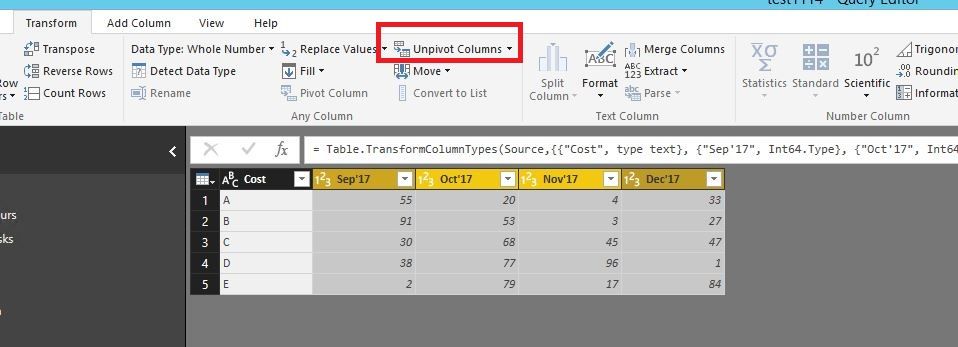
1. Unpivot your columns of Table 1 and Table 2 in Query Editor of Power BI Desktop.
1.JPG

2. Rename Attribute column in Table 1 and Table 2 to Month.

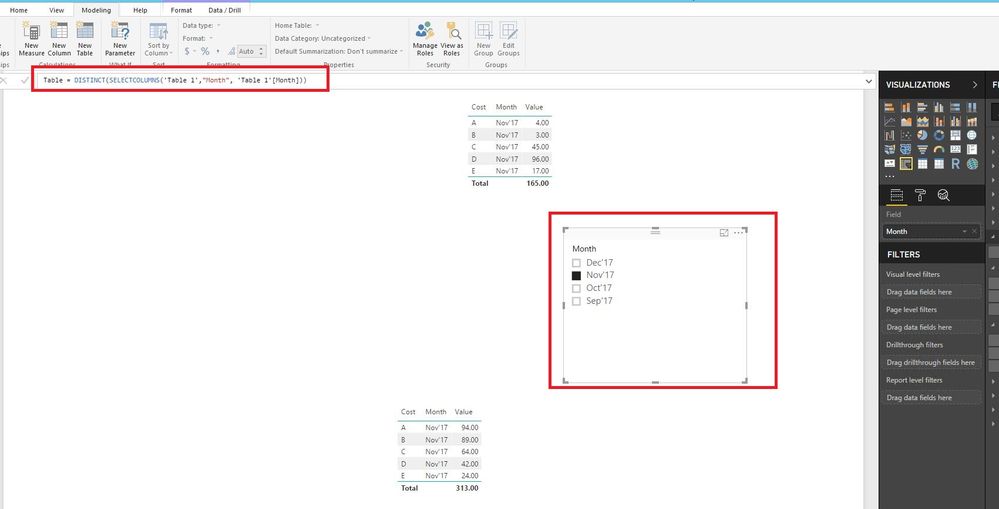
3. Create a new table using DAX below.
Table = DISTINCT(SELECTCOLUMNS('Table 1',"Month", 'Table 1'[Month]))

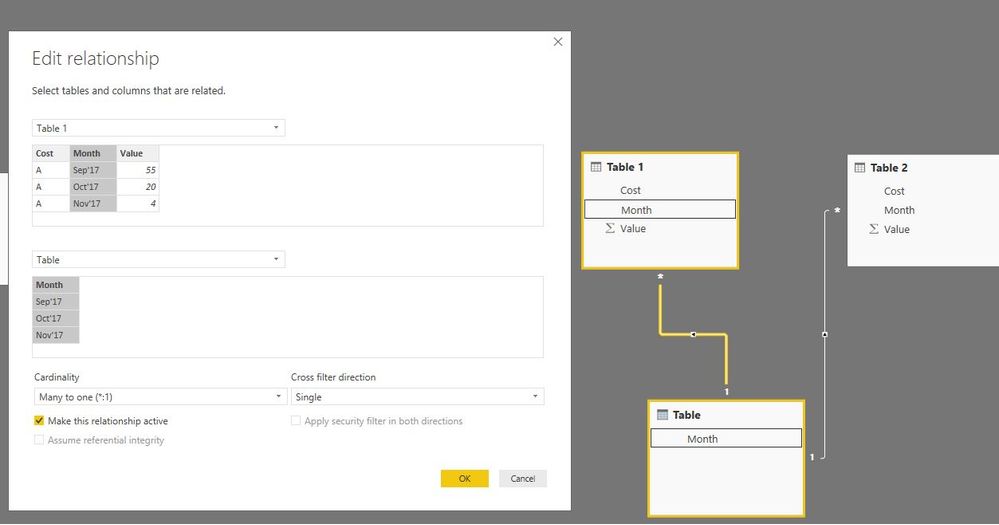
4. Create relationship using Month field among the three tables.
2.JPG

5. Create slicer using the Month field of the new table, then you are able to use the slicer to filter your visuals.
3.JPG

Regards,
Lydia

View solution in original post

5 REPLIES 5
Anonymous
Not applicable

@ankitkagarwal88,

1. Unpivot your columns of Table 1 and Table 2 in Query Editor of Power BI Desktop.
1.JPG

2. Rename Attribute column in Table 1 and Table 2 to Month.

3. Create a new table using DAX below.
Table = DISTINCT(SELECTCOLUMNS('Table 1',"Month", 'Table 1'[Month]))

4. Create relationship using Month field among the three tables.
2.JPG

5. Create slicer using the Month field of the new table, then you are able to use the slicer to filter your visuals.
3.JPG

Regards,
Lydia

Hi Lydia,


Thanks for your help!!


Can you please help me with the variance calcualtion between the tables.


Like (Value of table 1-value of table 2)/value of table 1


ThanksCapture1.JPG

Anonymous
Not applicable

@ankitkagarwal88,

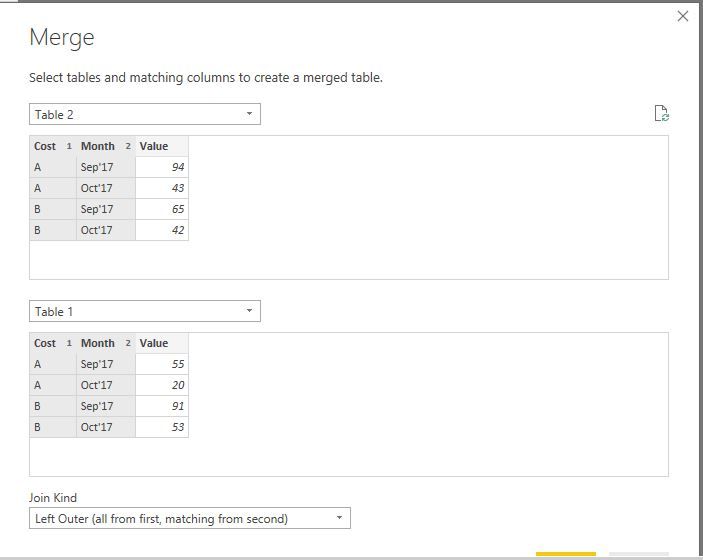
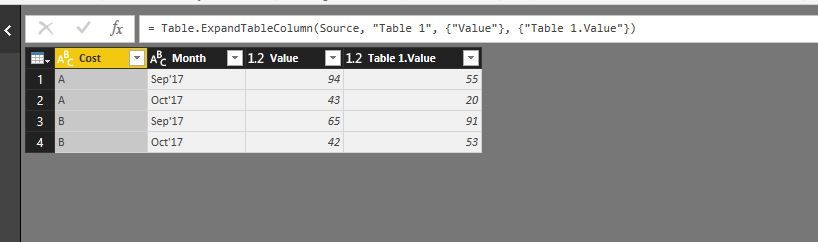
1. Merge the two tables in Query Editor useing Merge Queries->Merge as new functionality, then expand the value field in the Merged table.
1.JPG2.JPG

2. Create relationship between the Table and Merged table using Month field, create a calculated column in the merged table using dax below.

Column = (Merge1[Table 1.Value]-Merge1[Value])/Merge1[Table 1.Value]
3.JPG

Regards,
Lydia

Thanks for your help....It is working now.:smileyhappy 🙂

BeemsC
Resolver III
Resolver III

Hello,

If you create a relationship between the tables, filters will work on both.

Alternatively you can create a new date table and link them both to your new table.
Then you use that data for filtering purposes.
Use this link for more information about a date table:
https://kohera.be/nl/blog/business-intelligence-nl/how-to-create-a-date-table-in-power-bi-in-2-simpl...


Good luck

Helpful resources

Announcements
Power BI DataViz World Championships carousel

Power BI DataViz World Championships - June 2026

A new Power BI DataViz World Championship is coming this June! Don't miss out on submitting your entry.

Join our Fabric User Panel

Join our Fabric User Panel

Share feedback directly with Fabric product managers, participate in targeted research studies and influence the Fabric roadmap.

March Power BI Update Carousel

Power BI Community Update - March 2026

Check out the March 2026 Power BI update to learn about new features.