cancel
Showing results for 
Search instead for 
Did you mean: 

The Power BI Data Visualization World Championships is back! Get ahead of the game and start preparing now! Learn more

Reply
mnijskens
Frequent Visitor

Power BI "Sometimes difficult to work with" tool because refresh data fails over and over again

Hi 

My first experience with Power BI  was positive. fiddling around with data from my 150Mb access database,

but the last day's it is becoming pretty useless. In the desktop version I can't refresh (DataFormat.Error the database has been placed in a state by user "Admin...." which is a silly error because there is no user Admin, and the db is never opened ! Sometime after 5 or 6 times it works but after that it fails again and again.


So I switched to the online PowerBI, but that also fails refreshing the data with the gateway. Als sorts of error and no solution !

Searched the internet for days but found no solution.. (and I tried a lot of suggestions). It doesn;t make a difference if I put the data 


What a shame Microsoft.!


6 REPLIES 6
Anonymous
Not applicable

@mnijskens

Based on your reply in this similar thread, you are trying to use Binary.Buffer() to solve the above issue and get error message.

Please perform the following steps, then check if you can refresh Access database in Desktop and Power BI Service.

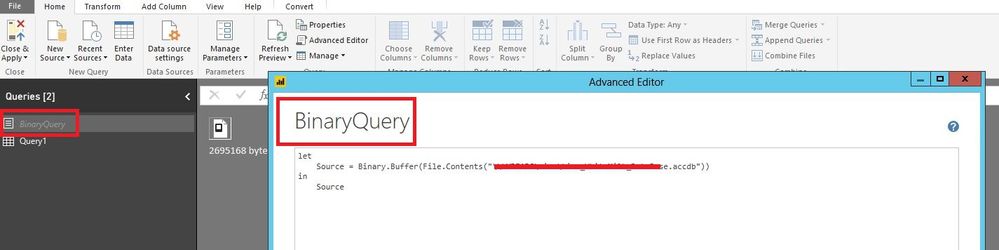
1. Add a new blank query in Power BI Desktop and paste the following code to the Advanced Editor of the blank query.

let
    Source = Binary.Buffer(File.Contents("\\Folder\TiReDat.accdb"))
in
    Source

1.JPG

2. Rename the blank query to BinaryQuery.

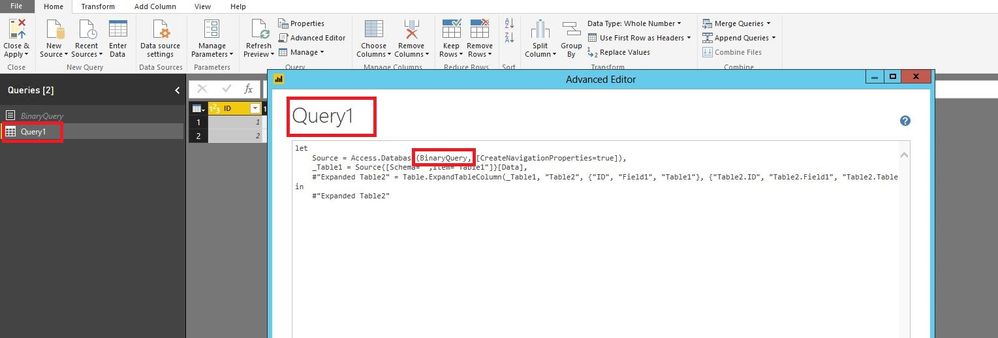
3. Add another new blank query in Power BI Desktop and paste the following code to Advanced Editor of this blank query. There is an example for  your reference.

let
    Source = Access.Database(BinaryQuery, [CreateNavigationProperties=true]),
    _tblNessieHours = Source{[Schema="",Item="tblNessieHours"]}[Data],
    #"Renamed Columns" = Table.RenameColumns(_tblNessieHours,{{"dblHours", "Hours"}})
in
    #"Renamed Columns"

2.JPG


Regards,
Lydia

Thanks for the info. The code was ok but did not solve the issueSmiley Sad

Anonymous
Not applicable

@mnijskens,

Could you please share the Access database so that I can test?

Regards,
Lydia

Hi Lydia, 

Thanks for the efffort but I think I’m probably not allowed to share this database as it contains information which is not allowed to share.


After having strugllng a long time with 32 and 64 bit Office 2013 and Office365 installations on my laptop. I finnaly had Office365(32 bit)  in good working order.

Installed PowerBI(32 bits)  and tried to get it working with the database on my laptop. That worked time after time.

Next effort was to get the data from my server again. Refreshing the data had de following results 
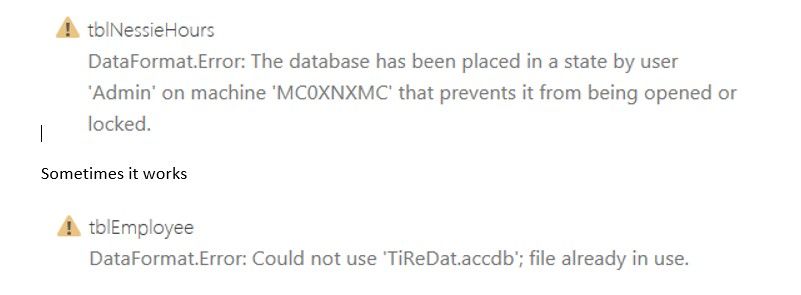
 2017-11-22_134935.jpg

 So I tried the I looked at the BinaryQuery again. Got a better idea of what it was supposed to do. So adjusted all my queries with better results. It worked !!

So it is a good work arround. 

But I still think the errors I got previously are wrong. My guts say it the "slowness" of our network. Because db local works fine and on a server it works sometimes after multiple tries.

Is there a way to measure the times PowerBI needs to get the data ?


But thanks again   Smiley Happy

Marcel 


Anonymous
Not applicable

@mnijskens,

Please take a look at the following similar thread.

https://community.powerbi.com/t5/Desktop/Data-Loading-Times/td-p/80917

Regards,
Lydia

unfortunatly that did not help.  Getting the same error or the error that the database is already in use !

The Db is now located on a server. When I locate the db on my laptop it al seems to work ok.

So looks like that it does not work over network (or our company network) , which is a pitty.

So it's a bit disappointing to say the least. Smiley Mad 

Errors ; file in use.  then , datbase has been placed in a state .... 

Helpful resources

Announcements
Power BI DataViz World Championships

Power BI Dataviz World Championships

The Power BI Data Visualization World Championships is back! Get ahead of the game and start preparing now!

November Power BI Update Carousel

Power BI Monthly Update - November 2025

Check out the November 2025 Power BI update to learn about new features.

FabCon Atlanta 2026 carousel

FabCon Atlanta 2026

Join us at FabCon Atlanta, March 16-20, for the ultimate Fabric, Power BI, AI and SQL community-led event. Save $200 with code FABCOMM.