

cancel
Showing results for 
Search instead for 
Did you mean: 

July 28 - August 9 | Final Round of the Power BI Dataviz World Championships. This is your chance. Learn more

Reply
lauravd
Frequent Visitor

Creating Upcoming Events Calendar

Hi, 


I need some help creating a calendar with upcoming events date calculation. I am new to Power BI, so just can't get my head around it. 

An Event needs to happen every three weeks from start date, so I need to create a calendar view. 


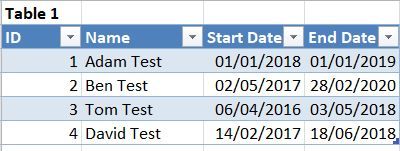
I have a table:
table 1.JPG


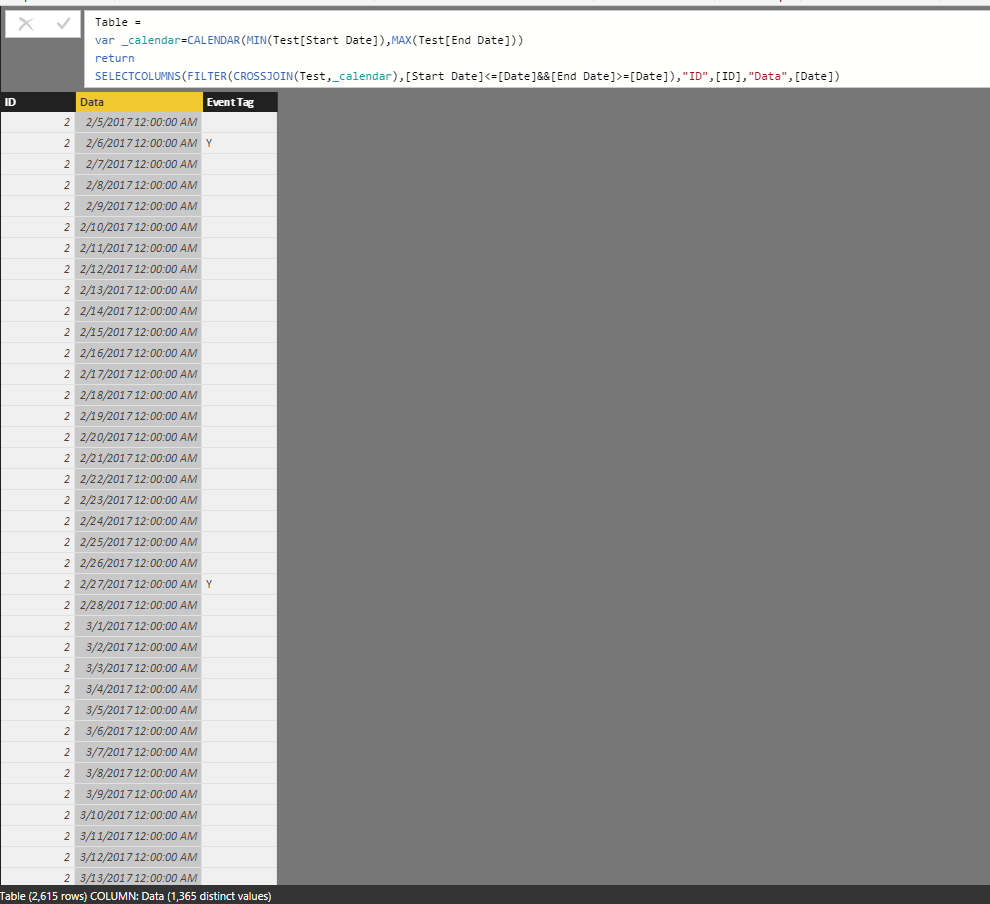
As my events need to happen every three weeks from start date, so I created a calendar table as per picture below.

2.JPG


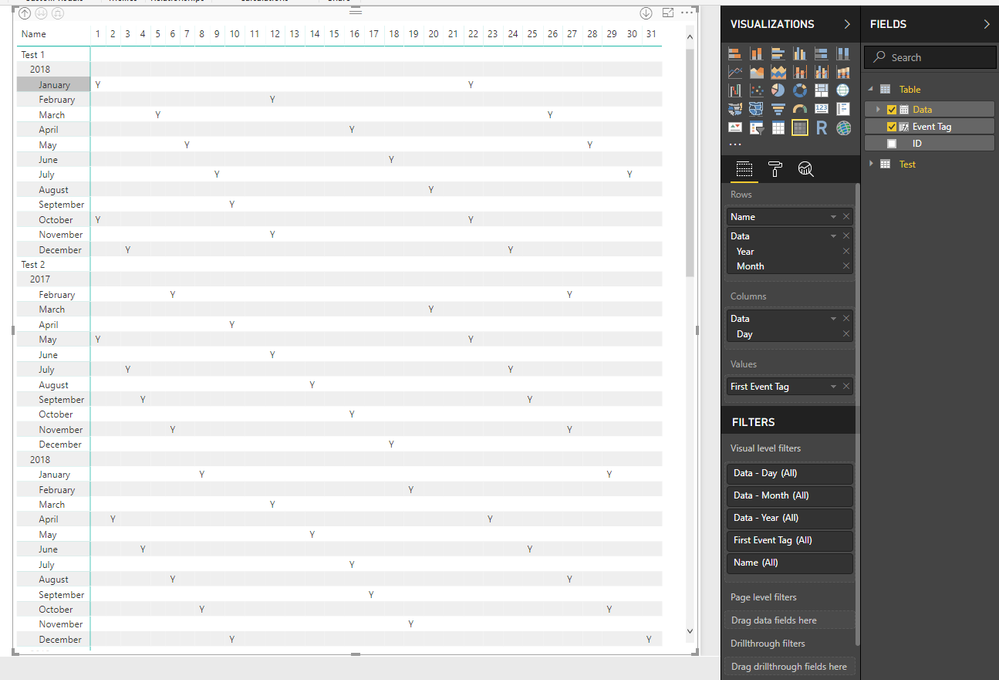
My report has to look like picture below:Requirement.JPG


Any Ideas how to link these two tables?


Thanks in advance.


1 ACCEPTED SOLUTION
Anonymous
Not applicable

HI @lauravd,


You can use below formula to create calendar table and add event tag.


Table formula:

Table =
VAR _calendar =
    CALENDAR ( MIN ( Test[Start Date] ), MAX ( Test[End Date] ) )
RETURN
    SELECTCOLUMNS (
        FILTER (
            CROSSJOIN ( Test, _calendar ),
            [Start Date] <= [Date]
                && [End Date] >= [Date]
        ),
        "ID", [ID],
        "Data", [Date]
    )


Calculate column:

Event Tag =
VAR _count =
    COUNTROWS (
        FILTER (
            ADDCOLUMNS ( 'Table', "WeekDay", WEEKDAY ( [Data], 2 ) ),
            [WeekDay] = 1
                && [Data] <= EARLIER ( 'Table'[Data] )
                && [ID] = EARLIER ( 'Table'[ID] )
        )
    )
RETURN
    IF ( MOD ( _count - 1, 3 ) = 0 && WEEKDAY ( [Data], 2 ) = 1, "Y" )

13.PNG


Result:

14.PNG


Regards,

Xiaoxin Sheng

View solution in original post

5 REPLIES 5
Anonymous
Not applicable

Hi @lauravd,


I'd like to suggest you take a look at below link to know how to expand detail date range form start date and end date.

Convert date ranges into list of dates?


After above steps, you can use detail date to link calendar table.


Regards,

Xiaoxin Sheng

Hi, thank you for your advive. I still can't think of how to calculate this every 3 weeks bit..

So I've created the calendar, but I cant figure out how to have this 'Event is due' visible only every 3 weeks in this calendar view.  I was thinking to use If statement, but it just doesnt do the job.4


Col = if( DATEADD('Events2'[start_date],21,DAY),"Event is Due",Blank())


Any ideas anyone?

Anonymous
Not applicable

HI @lauravd,


You can use below formula to create calendar table and add event tag.


Table formula:

Table =
VAR _calendar =
    CALENDAR ( MIN ( Test[Start Date] ), MAX ( Test[End Date] ) )
RETURN
    SELECTCOLUMNS (
        FILTER (
            CROSSJOIN ( Test, _calendar ),
            [Start Date] <= [Date]
                && [End Date] >= [Date]
        ),
        "ID", [ID],
        "Data", [Date]
    )


Calculate column:

Event Tag =
VAR _count =
    COUNTROWS (
        FILTER (
            ADDCOLUMNS ( 'Table', "WeekDay", WEEKDAY ( [Data], 2 ) ),
            [WeekDay] = 1
                && [Data] <= EARLIER ( 'Table'[Data] )
                && [ID] = EARLIER ( 'Table'[ID] )
        )
    )
RETURN
    IF ( MOD ( _count - 1, 3 ) = 0 && WEEKDAY ( [Data], 2 ) = 1, "Y" )

13.PNG


Result:

14.PNG


Regards,

Xiaoxin Sheng

Thank you.

Helpful resources

Announcements
FabCon and SQLCon Barcelona 2026

FabCon & SQLCon – Barcelona 2026

Join us in Barcelona for FabCon and SQLCon, the Fabric, Power BI, SQL, and AI community event. Save €200 with code FABCMTY200.

Fabric Community Sticker Design Challenge Barcelona Carousel

Fabric Community Sticker Challenge - Barcelona 2026

If you love stickers, then you will definitely want to check out our community sticker challenge, Barcelona edition!

July Power BI Update Carousel

Power BI Monthly Update - July 2026

Check out the July 2026 Power BI update to learn about new features.

Power BI DataViz World Championships carousel

Power BI DataViz World Championships - June 2026

A new Power BI DataViz World Championship is coming this June! Don't miss out on submitting your entry.

Top Solution Authors