cancel
Showing results for 
Search instead for 
Did you mean: 

July 7 - July 17 | Round 2 of the Power BI Dataviz World Championships. Don't miss your chance! Learn more

Reply
jbezos
New Member

Creating Measures


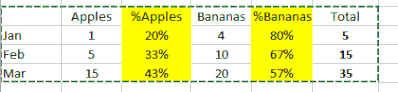
Hi, First time using Power BI.  I'm trying to calculate the % distribution based on the values found in a column.  For example, I have a column of Fruits with Apples and Bananas as values.  I am trying to calulate the % highlighted in yellow.


Capture.GIF

THanks!

1 ACCEPTED SOLUTION
v-sihou-msft
Microsoft Employee
Microsoft Employee

@jbezos


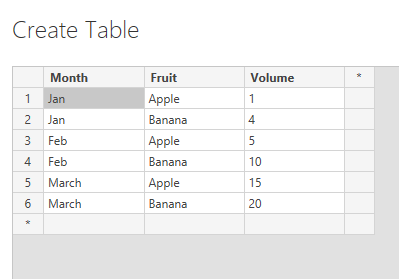
As @Phil_Seamark said, it's better to pivot your dataset like:


67.PNG


You can use a matrix to render your data. Then you just need to create a measure to calculate the percentage of month total for current fruit.


Pct Of Month Total = SUM(Fruits[Volume])/CALCULATE(SUM(Fruits[Volume]),ALLEXCEPT(Fruits,Fruits[Month]))

8.PNG


Regards,

View solution in original post

2 REPLIES 2
v-sihou-msft
Microsoft Employee
Microsoft Employee

@jbezos


As @Phil_Seamark said, it's better to pivot your dataset like:


67.PNG


You can use a matrix to render your data. Then you just need to create a measure to calculate the percentage of month total for current fruit.


Pct Of Month Total = SUM(Fruits[Volume])/CALCULATE(SUM(Fruits[Volume]),ALLEXCEPT(Fruits,Fruits[Month]))

8.PNG


Regards,

Phil_Seamark
Microsoft Employee
Microsoft Employee

Hi @jbezos


I suggest you pivot your data to the following structure.


Month    , Fruit  , Value
------------------------------
1 Jan 17 , Apples , 1
1 Feb 17 , Apples , 5
1 Mar 17 , Apples , 15
1 Jan 17 , Bananas, 4
1 Feb 17 , Bananas, 10
1 Feb 17 , Bananas, 20

Once you have this structure you can create some measures like


Sum of Value = CALCULATE(SUM([Value]))

which you can drag to a matrix visual (Month on Rows, Fruit on Columns), twice.  The second time you add the measure to the grid, set the "show as percentage"


I think that will be close.


You can change the structure of your data in the Query Editor using the Unpivot function.


To learn more about DAX visit : aka.ms/practicalDAX

Proud to be a Datanaut!

Helpful resources

Announcements
FabCon and SQLCon Barcelona 2026

FabCon & SQLCon – Barcelona 2026

Join us in Barcelona for FabCon and SQLCon, the Fabric, Power BI, SQL, and AI community event. Save €200 with code FABCMTY200.

60 days of Data Days Carousel

Data Days 2026

Join Fabric Data Days 2026: 60 days of free live/on-demand sessions, challenges, study groups, and certification opportunities.

Power BI DataViz World Championships carousel

Power BI DataViz World Championships - June 2026

A new Power BI DataViz World Championship is coming this June! Don't miss out on submitting your entry.