cancel
Showing results for 
Search instead for 
Did you mean: 

The FabCon + SQLCon recap series starts April 14th at 8am Pacific. If you’re tracking where AI is going inside Fabric, this first session is a can't miss. Register now

Reply
ThomasDay
Impactful Individual

Creating Child Field

Hello Fellow Dax'ers,


I've been spinning on this one and it seems silly so I thought I'd catch my breath and ask for a bit of help.


I have a file which has a bunch of records:  They look like this in a Matrix--that's three records.  When I'm in the top row's record, I want to retrieve the ReptRecNo of the next ranking row and put it in a column.  


I know that the same Provdrno(50002) and the next RankRow..(This row plus 1) will find that single record or nothing.  That's it.  How do I retrieve that as a column definition?

Capture.PNG


PriorReptRecNo = 
		VAR RankOfNextRow = HOSP10_2014_RPT[RankReportFYEnds] +1
		VAR SameProvdrNo = HOSP10_2014_RPT[ProvdrNo]
		RETURN
		Calculate (VALUES(HOSP10_2014_RPT[ReptRecNo]),HOSP10_2014_RPT[RankReportFYEnds] = RankOfNextRow, 
			HOSP10_2014_RPT[ProvdrNo] = SameProvdrNo)

The column is blank...it's also blank with MIN instead of Values.


Any thoughts?  Thanks in advance...Tom


1 ACCEPTED SOLUTION

@ThomasDay


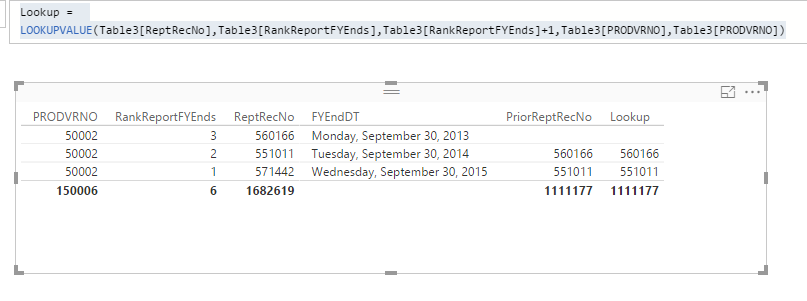
In your formula, the issue is on  "HOSP10_2014_RPT[Hosp Type] =  VALUES ( HOSP10_2014_RPT[RankReportFYEnds] ) + 1". The VALUES() function returns a column of data, you can't have compare current row context with a column of values. Just remove the Values() in your variable, it should work. 


PriorReptRecNo = 
VAR RankOfNextRow =
    Table3[RankReportFYEnds] + 1
VAR SameProvdrNo =
    Table3[PRODVRNO]
RETURN
    CALCULATE (
        VALUES ( Table3[ReptRecNo] ),
        FILTER (
            ALL ( Table3 ),
            Table3[RankReportFYEnds] = RankOfNextRow
                && Table3[PRODVRNO] = SameProvdrNo
        )
    )

You can also try another way  by using LOOKUPVALUE. 


Lookup = 
LOOKUPVALUE(Table3[ReptRecNo],Table3[RankReportFYEnds],Table3[RankReportFYEnds]+1,Table3[PRODVRNO],Table3[PRODVRNO])

Both formulas work properly.

23.PNG

Regards,

View solution in original post

3 REPLIES 3
Vvelarde
Community Champion
Community Champion

@ThomasDay


hi:


PriorReptRecNo =
VAR RankOfNextRow =
    VALUES ( HOSP10_2014_RPT[RankReportFYEnds] ) + 1
VAR SameProvdrNo =
    VALUES ( HOSP10_2014_RPT[PROVDRNO] )
RETURN
    CALCULATE (
        VALUES ( HOSP10_2014_RPT[ReptRecNo] ),
        FILTER (
            ALL ( HOSP10_2014_RPT ),
            HOSP10_2014_RPT[RankReportFYEnds] = RankOfNextRow
                && HOSP10_2014_RPT[ProvdrNo] = SameProvdrNo
        )
    )


Lima - Peru
ThomasDay
Impactful Individual

@Vvelarde  Thanks very much.  


I get a "A table of multiple values was supplied where a single value was expected." so I'll have to see where my description went awry and add "filters" to get to one value.  


PriorReptRecNo = 
	VAR RankOfNextRow = VALUES ( HOSP10_2014_RPT[RankReportFYEnds] ) + 1
	VAR SameProvdrNo = VALUES ( HOSP10_2014_RPT[PROVDRNO] )
	RETURN
		CALCULATE (
			VALUES ( HOSP10_2014_RPT[ReptRecNo] ),
			FILTER (
				ALL ( HOSP10_2014_RPT ),
				HOSP10_2014_RPT[Hosp Type] = "  Genl_Short Term" &&
				HOSP10_2014_RPT[RankReportFYEnds] = RankOfNextRow
                && HOSP10_2014_RPT[ProvdrNo] = SameProvdrNo
			)
		)

You can see I added one additional filter already for  "  Genl_Short Term" but couldn't clear the error right off...so I'll tease apart and see what the components yield in the am.  If anything hits you between now and then, let me know.  Thanks again, Tom


@ThomasDay


In your formula, the issue is on  "HOSP10_2014_RPT[Hosp Type] =  VALUES ( HOSP10_2014_RPT[RankReportFYEnds] ) + 1". The VALUES() function returns a column of data, you can't have compare current row context with a column of values. Just remove the Values() in your variable, it should work. 


PriorReptRecNo = 
VAR RankOfNextRow =
    Table3[RankReportFYEnds] + 1
VAR SameProvdrNo =
    Table3[PRODVRNO]
RETURN
    CALCULATE (
        VALUES ( Table3[ReptRecNo] ),
        FILTER (
            ALL ( Table3 ),
            Table3[RankReportFYEnds] = RankOfNextRow
                && Table3[PRODVRNO] = SameProvdrNo
        )
    )

You can also try another way  by using LOOKUPVALUE. 


Lookup = 
LOOKUPVALUE(Table3[ReptRecNo],Table3[RankReportFYEnds],Table3[RankReportFYEnds]+1,Table3[PRODVRNO],Table3[PRODVRNO])

Both formulas work properly.

23.PNG

Regards,

Helpful resources

Announcements
New to Fabric survey Carousel

New to Fabric Survey

If you have recently started exploring Fabric, we'd love to hear how it's going. Your feedback can help with product improvements.

Power BI DataViz World Championships carousel

Power BI DataViz World Championships - June 2026

A new Power BI DataViz World Championship is coming this June! Don't miss out on submitting your entry.

Join our Fabric User Panel

Join our Fabric User Panel

Share feedback directly with Fabric product managers, participate in targeted research studies and influence the Fabric roadmap.

March Power BI Update Carousel

Power BI Community Update - March 2026

Check out the March 2026 Power BI update to learn about new features.