Join us at FabCon Atlanta from March 16 - 20, 2026, for the ultimate Fabric, Power BI, AI and SQL community-led event. Save $200 with code FABCOMM.
Register now!The Power BI Data Visualization World Championships is back! Get ahead of the game and start preparing now! Learn more
Hi all,
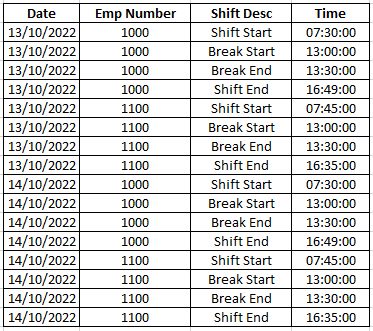
I have a dataset that looks like the one below. (Below is a sample of my real data):
As you can see, for every unique employee and date combination, we have four sets of times. Shift Start time, Break Start time, Break End time and Shift End time.
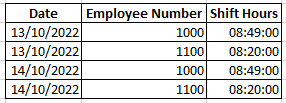
I want a seperate calculated table that has the total shift hours for every unique employee - date combination. Shift hours is calculated as Shift End time minus Shift Start time minus 30 minutes.
The desired output for my sample is below:
It doesn't matter if the solution is on Power Query level. As long as I get the desired output I'm happy.
Any help is highly appreciated.
Thanks a lot in advance!
Midhun
Solved! Go to Solution.
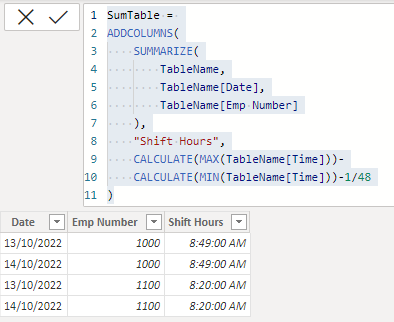
@Anonymous indeed, there are some misconderation and i have updated the reply. see if it is torwards the target.
Hi @Anonymous
Hi @FreemanZ ,
I am trying the SUMMARIZE() approach but i think you misunderstood the shift hours thing. I think your logic prints the difference between the largest and smallest times in the entire dataset.
My shift hours logic is Shift End minus Shift Start minus 30 mins, where Shift Start and Shift End are times for each employee for that particular day. (see sample data I posted above).
Kind regards,
Midhun
@Anonymous indeed, there are some misconderation and i have updated the reply. see if it is torwards the target.
Hey @FreemanZ
Looks like I was wrong about the CALCULATE() bit. Seems to be working fine!
Thanks a lot
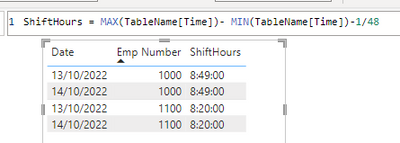
@Anonymous if you feel more comfortable with measure + visual, you may also plot a table visual with a measure like this:
Check out the November 2025 Power BI update to learn about new features.
Advance your Data & AI career with 50 days of live learning, contests, hands-on challenges, study groups & certifications and more!
| User | Count |
|---|---|
| 57 | |
| 43 | |
| 40 | |
| 21 | |
| 17 |