cancel
Showing results for 
Search instead for 
Did you mean: 

We've captured the moments from FabCon & SQLCon that everyone is talking about, and we are bringing them to the community, live and on-demand. Starts on April 14th. Register now

Reply
Anonymous
Not applicable

Creating Calculated Table with Shift Hours

Hi all,


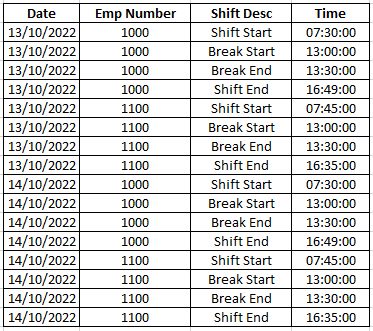
I have a dataset that looks like the one below. (Below is a sample of my real data):

midmurali_0-1671103467374.png

As you can see, for every unique employee and date combination, we have four sets of times. Shift Start time, Break Start time, Break End time and Shift End time.


I want a seperate calculated table that has the total shift hours for every unique employee - date combination. Shift hours is calculated as Shift End time minus Shift Start time minus 30 minutes.


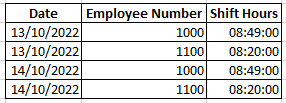
The desired output for my sample is below:

midmurali_1-1671103670526.png

It doesn't matter if the solution is on Power Query level. As long as I get the desired output I'm happy.


Any help is highly appreciated. 


Thanks a lot in advance!

Midhun

1 ACCEPTED SOLUTION

@Anonymous  indeed, there are some misconderation and i have updated the reply. see if it is torwards the target. 

View solution in original post

5 REPLIES 5
FreemanZ
Community Champion
Community Champion

Hi   @Anonymous 


try to create a table with:
SumTable =
ADDCOLUMNS(
    SUMMARIZE(
        TableName,
        TableName[Date],
        TableName[Emp Number]
    ),
    "Shift Hours",
    CALCULATE(MAX(TableName[Time]))-
    CALCULATE(MIN(TableName[Time]))-1/48
)
 
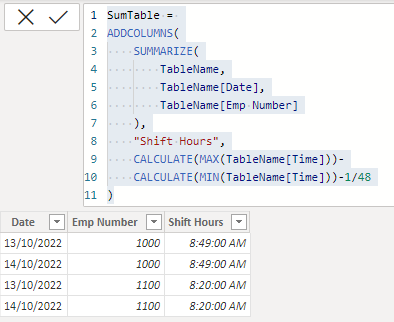
i tried and it worked like this:
FreemanZ_0-1671105228005.png
Anonymous
Not applicable

Hi @FreemanZ ,


I am trying the SUMMARIZE() approach but i think you misunderstood the shift hours thing. I think your logic prints the difference between the largest and smallest times in the entire dataset.

My shift hours logic is Shift End minus Shift Start minus 30 mins, where Shift Start and Shift End are times for each employee for that particular day. (see sample data I posted above).


Kind regards,

Midhun

@Anonymous  indeed, there are some misconderation and i have updated the reply. see if it is torwards the target. 

Anonymous
Not applicable

Hey @FreemanZ 


Looks like I was wrong about the CALCULATE() bit. Seems to be working fine!

Thanks a lot

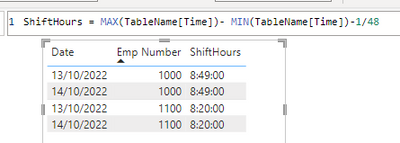
@Anonymous if you feel more comfortable with measure + visual, you may also plot a table visual with a measure like this:

ShiftHours = MAX(TableName[Time])- MIN(TableName[Time])-1/48
 
i tried and it worked like this:
FreemanZ_0-1671157052362.png

Helpful resources

Announcements
New to Fabric survey Carousel

New to Fabric Survey

If you have recently started exploring Fabric, we'd love to hear how it's going. Your feedback can help with product improvements.

Power BI DataViz World Championships carousel

Power BI DataViz World Championships - June 2026

A new Power BI DataViz World Championship is coming this June! Don't miss out on submitting your entry.

Join our Fabric User Panel

Join our Fabric User Panel

Share feedback directly with Fabric product managers, participate in targeted research studies and influence the Fabric roadmap.