FabCon is coming to Atlanta
Join us at FabCon Atlanta from March 16 - 20, 2026, for the ultimate Fabric, Power BI, AI and SQL community-led event. Save $200 with code FABCOMM.
Register now!- Power BI forums
- Get Help with Power BI
- Desktop
- Service
- Report Server
- Power Query
- Mobile Apps
- Developer
- DAX Commands and Tips
- Custom Visuals Development Discussion
- Health and Life Sciences
- Power BI Spanish forums
- Translated Spanish Desktop
- Training and Consulting
- Instructor Led Training
- Dashboard in a Day for Women, by Women
- Galleries
- Data Stories Gallery
- Themes Gallery
- Contests Gallery
- QuickViz Gallery
- Quick Measures Gallery
- Visual Calculations Gallery
- Notebook Gallery
- Translytical Task Flow Gallery
- TMDL Gallery
- R Script Showcase
- Webinars and Video Gallery
- Ideas
- Custom Visuals Ideas (read-only)
- Issues
- Issues
- Events
- Upcoming Events
The Power BI Data Visualization World Championships is back! Get ahead of the game and start preparing now! Learn more
- Power BI forums
- Forums
- Get Help with Power BI
- Desktop
- Re: Creating Buckets based on Date DIFF formula th...
- Subscribe to RSS Feed
- Mark Topic as New
- Mark Topic as Read
- Float this Topic for Current User
- Bookmark
- Subscribe
- Printer Friendly Page


- Mark as New
- Bookmark
- Subscribe
- Mute
- Subscribe to RSS Feed
- Permalink
- Report Inappropriate Content
Creating Buckets based on Date DIFF formula that calculates by filtering two different tables
Hi all,


Solved! Go to Solution.

- Mark as New
- Bookmark
- Subscribe
- Mute
- Subscribe to RSS Feed
- Permalink
- Report Inappropriate Content
Hi @aggiebrown ,
Do you mean to sum up [# Cancelletions on Retention Plan],if so,you could create measures by the following formula:
Cancelled #30 Days2 = SUMX(FILTER(ALL('Acc_ID'),[# Cancelled within x days]<=30),[# Cancelletions on Retention Plan])Cancelled #61-90 Days2 = SUMX(FILTER(ALL('Acc_ID'),[# Cancelled within x days]<=90&&[# Cancelled within x days]>60),[# Cancelletions on Retention Plan])Cancelled #90+ Days = SUMX(FILTER(ALL('Acc_ID'),[# Cancelled within x days]>90),[# Cancelletions on Retention Plan])The final output is shown below:
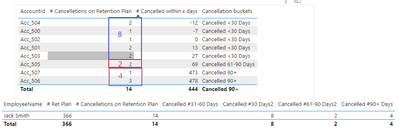
if not ,Can you share the result and logic you want?
Best Regards,
Community Support Team_ Yalan Wu
If this post helps, then please consider Accept it as the solution to help the other members find it more quickly.
- Mark as New
- Bookmark
- Subscribe
- Mute
- Subscribe to RSS Feed
- Permalink
- Report Inappropriate Content
Hi @aggiebrown ,
You could create measures by the following formula:
Cancelled #30 Days2 = COUNTX(FILTER(ALL('Acc_ID'),[# Cancelled within x days]<=30),[# Cancelled within x days])Cancelled #61-90 Days2 = COUNTX(FILTER(ALL('Acc_ID'),[# Cancelled within x days]<=90&&[# Cancelled within x days]>60),[# Cancelled within x days])Cancelled #90+ Days = COUNTX(FILTER(ALL('Acc_ID'),[# Cancelled within x days]>90),[# Cancelled within x days])The final output is shown below:
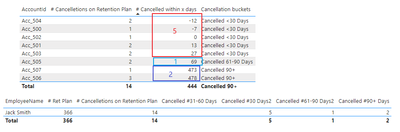
Best Regards,
Community Support Team_ Yalan Wu
If this post helps, then please consider Accept it as the solution to help the other members find it more quickly.
- Mark as New
- Bookmark
- Subscribe
- Mute
- Subscribe to RSS Feed
- Permalink
- Report Inappropriate Content
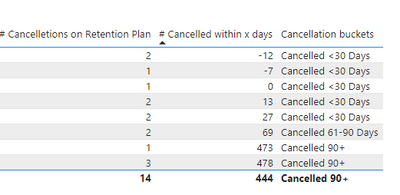
@v-yalanwu-msft Many thanks for that, we are almost there but it needs to calc the actual #cancellations so there is 8 Cancellations within 30 days in that example if that makes sense?
- Mark as New
- Bookmark
- Subscribe
- Mute
- Subscribe to RSS Feed
- Permalink
- Report Inappropriate Content
Hi @aggiebrown ,
Do you mean to sum up [# Cancelletions on Retention Plan],if so,you could create measures by the following formula:
Cancelled #30 Days2 = SUMX(FILTER(ALL('Acc_ID'),[# Cancelled within x days]<=30),[# Cancelletions on Retention Plan])Cancelled #61-90 Days2 = SUMX(FILTER(ALL('Acc_ID'),[# Cancelled within x days]<=90&&[# Cancelled within x days]>60),[# Cancelletions on Retention Plan])Cancelled #90+ Days = SUMX(FILTER(ALL('Acc_ID'),[# Cancelled within x days]>90),[# Cancelletions on Retention Plan])The final output is shown below:
if not ,Can you share the result and logic you want?
Best Regards,
Community Support Team_ Yalan Wu
If this post helps, then please consider Accept it as the solution to help the other members find it more quickly.
- Mark as New
- Bookmark
- Subscribe
- Mute
- Subscribe to RSS Feed
- Permalink
- Report Inappropriate Content
That has worked - thank you!


- Mark as New
- Bookmark
- Subscribe
- Mute
- Subscribe to RSS Feed
- Permalink
- Report Inappropriate Content
@aggiebrown , You need to have datediff column on some common dimension say order number
average(values(Order[Order ID], datediff(min(Sales[salesdate]), max(account[cancel date]), day))
refer my blog for that: https://community.powerbi.com/t5/Community-Blog/Decoding-Direct-Query-in-Power-BI-Part-2-Date-Differ...
Once you have this measure; create an independent bucket with start and end limit. You have to create new measures that can use this bucket.
I have explained the same here
Dynamic Segmentation, Bucketing or Binning: https://youtu.be/CuczXPj0N-k
- Mark as New
- Bookmark
- Subscribe
- Mute
- Subscribe to RSS Feed
- Permalink
- Report Inappropriate Content
@amitchandak Hey, I saw your video, but you're creating an extra table, which I don't want to do. I want to be able to achieve this with a measures instead.
If you open my sample, you will see I already have a date diff calculation that works. I just need help with bucketing based on that. The data model is not a snowflake - there is 2 data tables that need to be filtered out.

Helpful resources

Power BI Monthly Update - November 2025
Check out the November 2025 Power BI update to learn about new features.

Fabric Data Days
Advance your Data & AI career with 50 days of live learning, contests, hands-on challenges, study groups & certifications and more!

FabCon Atlanta 2026
Join us at FabCon Atlanta, March 16-20, for the ultimate Fabric, Power BI, AI and SQL community-led event. Save $200 with code FABCOMM.

| User | Count |
|---|---|
| 58 | |
| 45 | |
| 42 | |
| 20 | |
| 18 |


