
Learn from the best! Meet the four finalists headed to the FINALS of the Power BI Dataviz World Championships! Register now
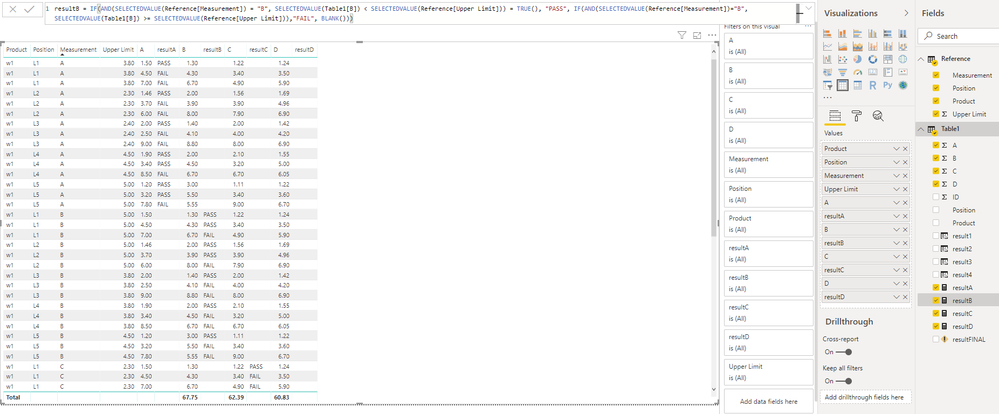
Below is a measure I tried making, but I'm not sure where/how to put it in the visual.
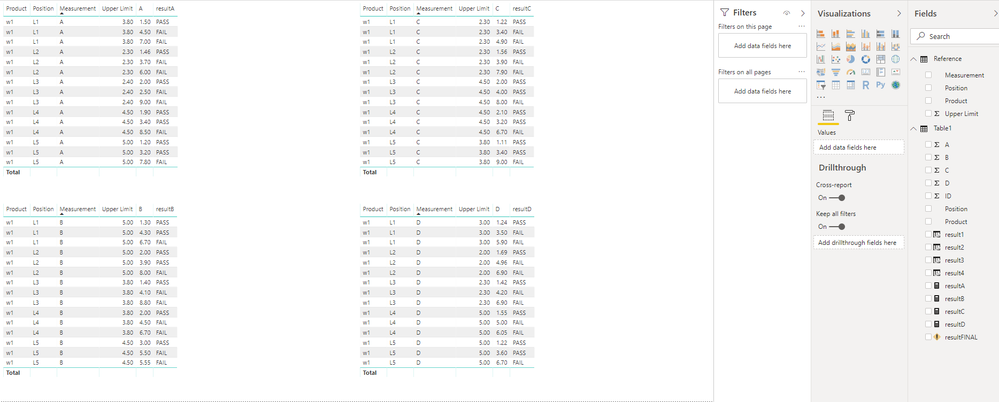
The reason I have 2 different ways of doing it is because when I add more data, the method in the first picture below takes too much memor to display. Therefore, I prefer to find a way to show this resultFINAL column using the style of the second picture.
Hi @Anonymous ,
If I understand your requirement correctly that you want to know how to show the resultFINAL measure in the visual.
Actually, I think that should be based on what data you want to see.
In addition, from my point, you could show the resultFINAL measure as the first image and you could not put the resultA, resultB, resultC, and resultD in the table visual so that I think the performance will be better.
If you still need help, feel free to ask.
Best Regards,
Cherry
Hello, @v-piga-msft ,
I tried what you mentioned and it's giving me all fails. Clearly it shouldn't be, because all of the values are less than my Upper Limit. See below
I would like to know why it is still incorrect.
thank you
If you have recently started exploring Fabric, we'd love to hear how it's going. Your feedback can help with product improvements.
A new Power BI DataViz World Championship is coming this June! Don't miss out on submitting your entry.
Share feedback directly with Fabric product managers, participate in targeted research studies and influence the Fabric roadmap.
| User | Count |
|---|---|
| 57 | |
| 33 | |
| 33 | |
| 18 | |
| 16 |
| User | Count |
|---|---|
| 66 | |
| 65 | |
| 44 | |
| 30 | |
| 29 |