cancel
Showing results for 
Search instead for 
Did you mean: 

We've captured the moments from FabCon & SQLCon that everyone is talking about, and we are bringing them to the community, live and on-demand. Starts on April 14th. Register now

Reply
vstopp
Helper I
Helper I

Create table based on an input

I have a table with a field length of stay (LOS).  I would like to have all patients with a LOS > X put into another table.  I believe I would use power query editor for this using the Table.selectedRows, but I don't know where to start.  


I would then like to use this table for another form to show data related to the users selected.


Thank you in advance.


Valerie


1 ACCEPTED SOLUTION
Greg_Deckler
Community Champion
Community Champion

In DAX you could create a new Table and use this formula:


New Table = FILTER('Old Table', [LOS] > X)


In Power Query, create a new query as a reference of your existing query then just use the GUI to filter to LOS > X 


Follow on LinkedIn
@ me in replies or I'll lose your thread!!!
Instead of a Kudo, please vote for this idea
Become an expert!: Enterprise DNA
External Tools: MSHGQM
YouTube Channel!: Microsoft Hates Greg
Latest book!:
DAX For Humans

DAX is easy, CALCULATE makes DAX hard...

View solution in original post

3 REPLIES 3
v-lili6-msft
Community Support
Community Support

HI  @vstopp 

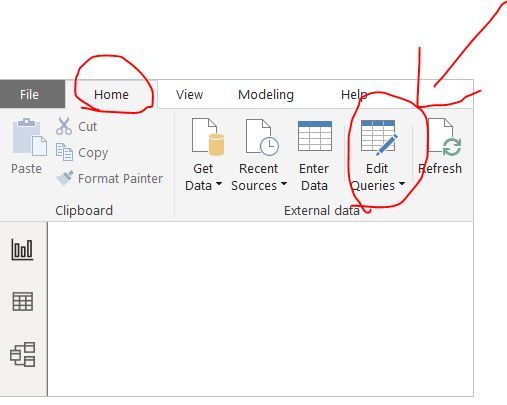
You could use this button to go to power query in power bi desktop.


In Updated ribbon, use this button

1.JPG

In old version

2.JPG

https://docs.microsoft.com/en-us/power-bi/desktop-query-overview#power-query-editor


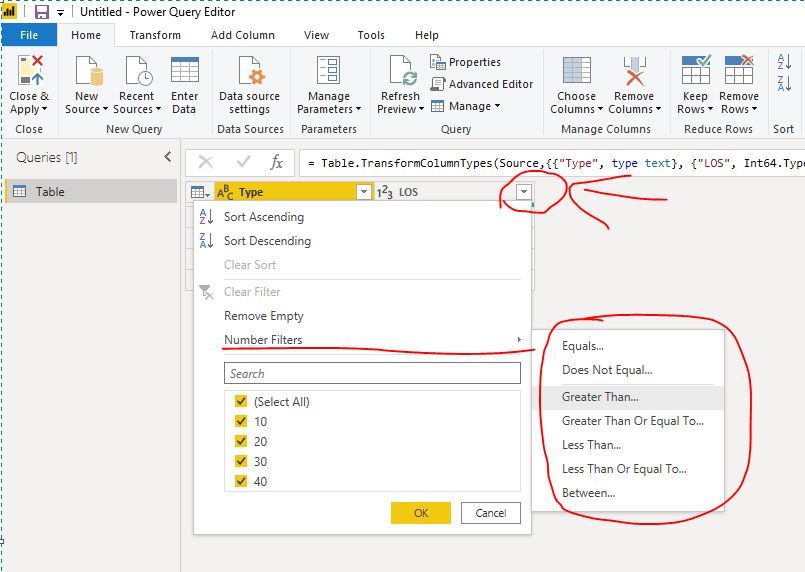
Then in power query, you could use built-in function to get it as below:

3.JPG


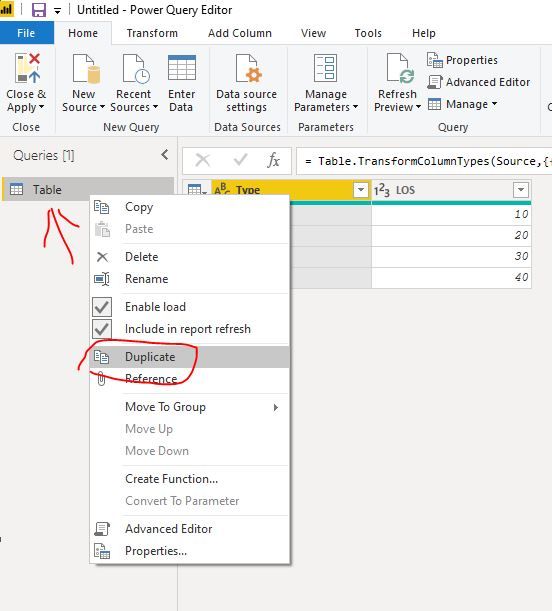
of course, you duplicate the basic table and do the filter on that duplicate table.

4.JPG


Regards,

Lin


Community Support Team _ Lin
If this post helps, then please consider Accept it as the solution to help the other members find it more quickly.
Greg_Deckler
Community Champion
Community Champion

In DAX you could create a new Table and use this formula:


New Table = FILTER('Old Table', [LOS] > X)


In Power Query, create a new query as a reference of your existing query then just use the GUI to filter to LOS > X 


Follow on LinkedIn
@ me in replies or I'll lose your thread!!!
Instead of a Kudo, please vote for this idea
Become an expert!: Enterprise DNA
External Tools: MSHGQM
YouTube Channel!: Microsoft Hates Greg
Latest book!:
DAX For Humans

DAX is easy, CALCULATE makes DAX hard...

I did create the table (using the new table button).  Now how do I add an input box for X and incorporate it into the create table verbage?


tableLOS = Filter (CostUtilization_LOS, [losNumberDays] >= 500)


Helpful resources

Announcements
New to Fabric survey Carousel

New to Fabric Survey

If you have recently started exploring Fabric, we'd love to hear how it's going. Your feedback can help with product improvements.

Power BI DataViz World Championships carousel

Power BI DataViz World Championships - June 2026

A new Power BI DataViz World Championship is coming this June! Don't miss out on submitting your entry.

Join our Fabric User Panel

Join our Fabric User Panel

Share feedback directly with Fabric product managers, participate in targeted research studies and influence the Fabric roadmap.

March Power BI Update Carousel

Power BI Community Update - March 2026

Check out the March 2026 Power BI update to learn about new features.