FabCon is coming to Atlanta
Join us at FabCon Atlanta from March 16 - 20, 2026, for the ultimate Fabric, Power BI, AI and SQL community-led event. Save $200 with code FABCOMM.
Register now!- Power BI forums
- Get Help with Power BI
- Desktop
- Service
- Report Server
- Power Query
- Mobile Apps
- Developer
- DAX Commands and Tips
- Custom Visuals Development Discussion
- Health and Life Sciences
- Power BI Spanish forums
- Translated Spanish Desktop
- Training and Consulting
- Instructor Led Training
- Dashboard in a Day for Women, by Women
- Galleries
- Data Stories Gallery
- Themes Gallery
- Contests Gallery
- QuickViz Gallery
- Quick Measures Gallery
- Visual Calculations Gallery
- Notebook Gallery
- Translytical Task Flow Gallery
- TMDL Gallery
- R Script Showcase
- Webinars and Video Gallery
- Ideas
- Custom Visuals Ideas (read-only)
- Issues
- Issues
- Events
- Upcoming Events
Get Fabric Certified for FREE during Fabric Data Days. Don't miss your chance! Request now
- Power BI forums
- Forums
- Get Help with Power BI
- Desktop
- Re: Create "others" in Pie Chart
- Subscribe to RSS Feed
- Mark Topic as New
- Mark Topic as Read
- Float this Topic for Current User
- Bookmark
- Subscribe
- Printer Friendly Page


- Mark as New
- Bookmark
- Subscribe
- Mute
- Subscribe to RSS Feed
- Permalink
- Report Inappropriate Content
Create "others" in Pie Chart
Hello,
unfortunately PBI doesn't let you chose TOPN with "Others", when I use that function in the inbuild filter panel its will only show the TOPN number ratio without the "others".
In my example I have a table with three companies:
| Supplier | Date | Bookingnumbers | ||
| Company A | 01.01.2021 | 23424 | ||
| Company A | 02.01.2021 | 16372 | ||
| Company A | 03.01.2021 | 2645 | ||
| Company B | 04.01.2021 | 23455 | ||
| Company B | 05.01.2021 | 6565 | ||
| Company B | 06.01.2021 | 35345 | ||
| Company B | 07.01.2021 | 76575 | ||
| Company C | 08.01.2021 | 345435 | ||
| Company C | 09.01.2021 | 745745 | ||
| Company C | 10.01.2021 | 3453465 |
I tried to calculate a pie chart with the companies as a dimension and the unique count of the bookingnumbers of the top 2 and the rest is displayed as the "others".
Help is very appreciated.
Best.
Solved! Go to Solution.

- Mark as New
- Bookmark
- Subscribe
- Mute
- Subscribe to RSS Feed
- Permalink
- Report Inappropriate Content
Hi @Applicable88 ,
Create a calculated column to take the company name according to the top two in the ranking, and change the other company names to "other". For example:
Column =
var _rank = rankx('Table',CALCULATE(SUM('Table'[Bookingnumber]),FILTER('Table','Table'[Supplier]=EARLIER('Table'[Supplier]))),,,Dense)
return
IF(_rank<=2,'Table'[Supplier],"other")
Then use this column in pie chart instead of [supplier].
Best Regards,
Jay

- Mark as New
- Bookmark
- Subscribe
- Mute
- Subscribe to RSS Feed
- Permalink
- Report Inappropriate Content
Here is one way to make it dynamic.
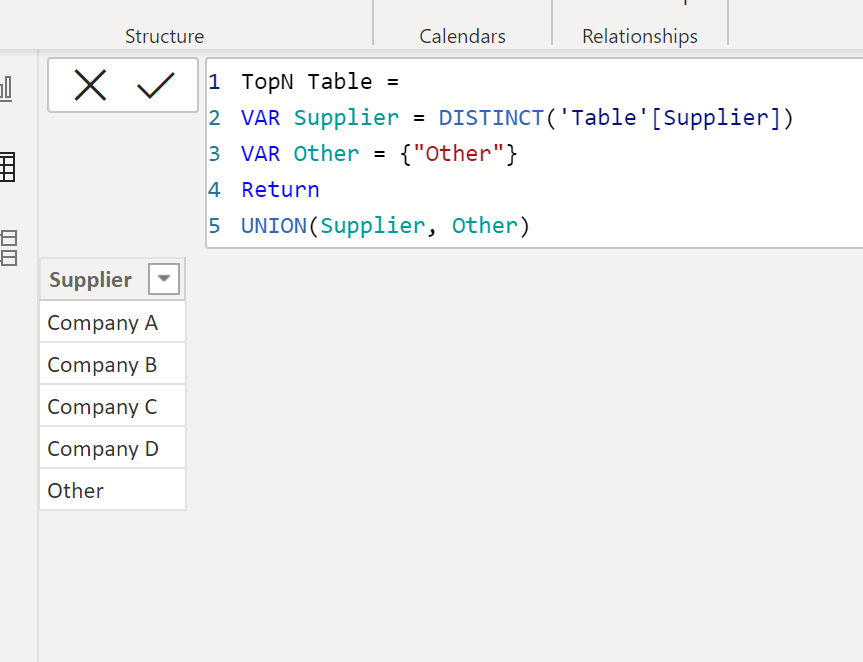
1) create a table with the supplier & a row for "Other".
TopN Table =
VAR Supplier = DISTINCT('Table'[Supplier])
VAR Other = {"Other"}
Return
UNION(Supplier, Other)
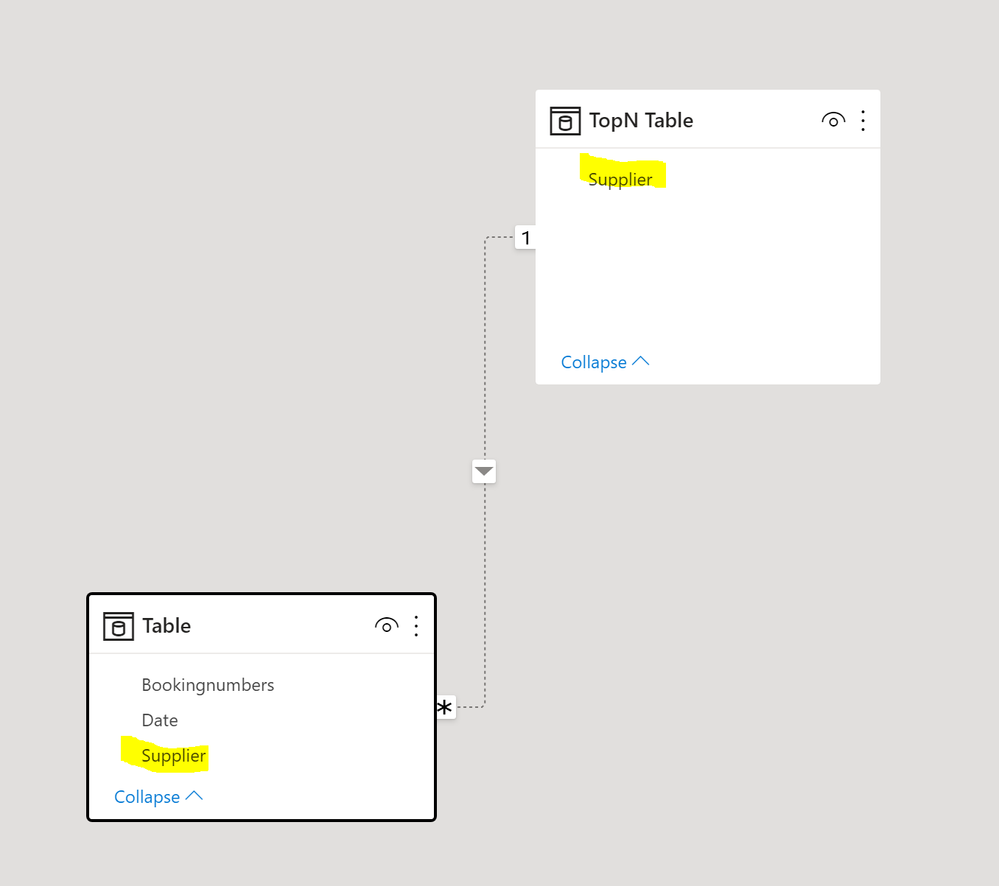
Create an inactive relationhsip between this table an the supplir filed in the main fact table:
2) now the following measures:
Booking number Distinct count = DISTINCTCOUNT('Table'[Bookingnumbers])Rnk =
IF (
SELECTEDVALUE ( 'TopN Table'[Supplier] ) = "Other",
1,
RANKX (
ALL ( 'TopN Table'[Supplier] ),
CALCULATE (
[Booking number Distinct count],
USERELATIONSHIP ( 'TopN Table'[Supplier], 'Table'[Supplier] )
)
)
)
DistinctCount TopN =
VAR _All =
    CALCULATE ( [Booking number Distinct count], ALL ( 'Table'[Supplier] ) )
VAR Supplier =
    CALCULATE (
        [Booking number Distinct count],
        USERELATIONSHIP ( 'TopN Table'[Supplier], 'Table'[Supplier] )
    )
RETURN
    IF (
        SELECTEDVALUE ( 'TopN Table'[Supplier] ) = "Other",
        _All
            - SUMX (
                FILTER (
                    ALL ( 'TopN Table' ),
                    [Rnk] <= SELECTEDVALUE ( 'TopN Value'[TopN Value] )
                ),
                CALCULATE (
                    [Booking number Distinct count],
                    USERELATIONSHIP ( 'TopN Table'[Supplier], 'Table'[Supplier] )
                )
            ),
        Supplier
    )
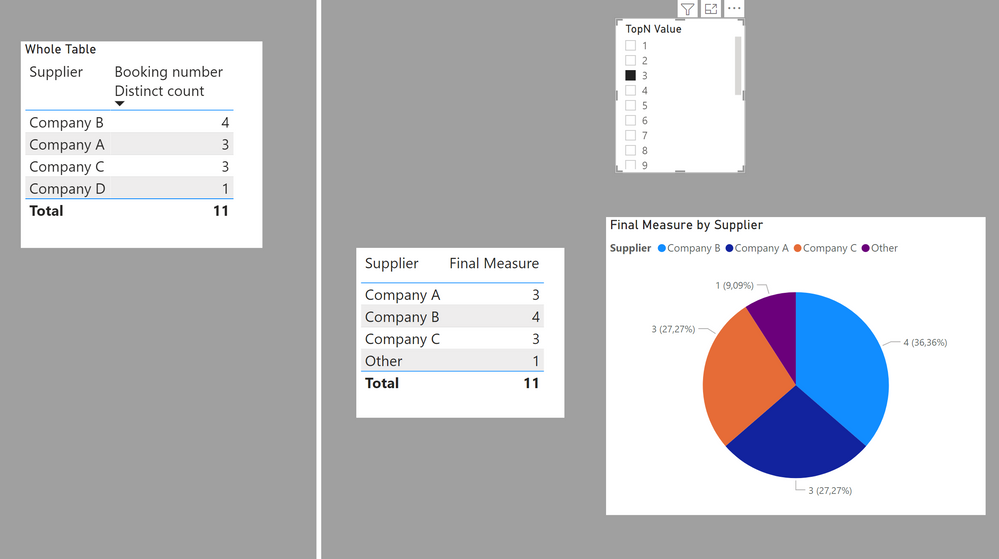
Final Measure = IF([rnk] <= SELECTEDVALUE('TopN Value'[TopN Value]), [DistinctCount TopN])
This is intended to work on a selection of the TopN value from a slicer (created using the "New Parameter" option under Modeling. If it's to remain static, you can hard code the value instead of the SELECTEDVALUE ( 'TopN Value'[TopN Value] ) in the measures.

I've attached a sample PBIX file
Did I answer your question? Mark my post as a solution!
In doing so, you are also helping me. Thank you!
Proud to be a Super User!
Paul on Linkedin.
- Mark as New
- Bookmark
- Subscribe
- Mute
- Subscribe to RSS Feed
- Permalink
- Report Inappropriate Content
Here is one way to make it dynamic.
1) create a table with the supplier & a row for "Other".
TopN Table =
VAR Supplier = DISTINCT('Table'[Supplier])
VAR Other = {"Other"}
Return
UNION(Supplier, Other)
Create an inactive relationhsip between this table an the supplir filed in the main fact table:
2) now the following measures:
Booking number Distinct count = DISTINCTCOUNT('Table'[Bookingnumbers])Rnk =
IF (
SELECTEDVALUE ( 'TopN Table'[Supplier] ) = "Other",
1,
RANKX (
ALL ( 'TopN Table'[Supplier] ),
CALCULATE (
[Booking number Distinct count],
USERELATIONSHIP ( 'TopN Table'[Supplier], 'Table'[Supplier] )
)
)
)
DistinctCount TopN =
VAR _All =
    CALCULATE ( [Booking number Distinct count], ALL ( 'Table'[Supplier] ) )
VAR Supplier =
    CALCULATE (
        [Booking number Distinct count],
        USERELATIONSHIP ( 'TopN Table'[Supplier], 'Table'[Supplier] )
    )
RETURN
    IF (
        SELECTEDVALUE ( 'TopN Table'[Supplier] ) = "Other",
        _All
            - SUMX (
                FILTER (
                    ALL ( 'TopN Table' ),
                    [Rnk] <= SELECTEDVALUE ( 'TopN Value'[TopN Value] )
                ),
                CALCULATE (
                    [Booking number Distinct count],
                    USERELATIONSHIP ( 'TopN Table'[Supplier], 'Table'[Supplier] )
                )
            ),
        Supplier
    )
Final Measure = IF([rnk] <= SELECTEDVALUE('TopN Value'[TopN Value]), [DistinctCount TopN])
This is intended to work on a selection of the TopN value from a slicer (created using the "New Parameter" option under Modeling. If it's to remain static, you can hard code the value instead of the SELECTEDVALUE ( 'TopN Value'[TopN Value] ) in the measures.
I've attached a sample PBIX file
Did I answer your question? Mark my post as a solution!
In doing so, you are also helping me. Thank you!
Proud to be a Super User!
Paul on Linkedin.
- Mark as New
- Bookmark
- Subscribe
- Mute
- Subscribe to RSS Feed
- Permalink
- Report Inappropriate Content
@PaulDBrown there is indeed many use cases for that dynamic version of yours. Thank you so much.
Best.
- Mark as New
- Bookmark
- Subscribe
- Mute
- Subscribe to RSS Feed
- Permalink
- Report Inappropriate Content
@PaulDBrown , sorry for the late reply.
Thank you very much for the effort and explanation. Fits perfectly!
- Mark as New
- Bookmark
- Subscribe
- Mute
- Subscribe to RSS Feed
- Permalink
- Report Inappropriate Content
Hi @Applicable88 ,
Create a calculated column to take the company name according to the top two in the ranking, and change the other company names to "other". For example:
Column =
var _rank = rankx('Table',CALCULATE(SUM('Table'[Bookingnumber]),FILTER('Table','Table'[Supplier]=EARLIER('Table'[Supplier]))),,,Dense)
return
IF(_rank<=2,'Table'[Supplier],"other")
Then use this column in pie chart instead of [supplier].
Best Regards,
Jay
- Mark as New
- Bookmark
- Subscribe
- Mute
- Subscribe to RSS Feed
- Permalink
- Report Inappropriate Content
@Anonymous Thanks! very straightforward approach. Big like.
- Mark as New
- Bookmark
- Subscribe
- Mute
- Subscribe to RSS Feed
- Permalink
- Report Inappropriate Content
Hello @Applicable88
You can create a calculated column and use the same in the Pie Chart.
- Mark as New
- Bookmark
- Subscribe
- Mute
- Subscribe to RSS Feed
- Permalink
- Report Inappropriate Content
@Anonymous How would be implemented. Via TOPN or kind of ranking function?
Can you show me example?
Helpful resources

Power BI Monthly Update - November 2025
Check out the November 2025 Power BI update to learn about new features.

Fabric Data Days
Advance your Data & AI career with 50 days of live learning, contests, hands-on challenges, study groups & certifications and more!

FabCon Atlanta 2026
Join us at FabCon Atlanta, March 16-20, for the ultimate Fabric, Power BI, AI and SQL community-led event. Save $200 with code FABCOMM.


