
This time we’re going bigger than ever. Fabric, Power BI, SQL, AI and more. We're covering it all. You won't want to miss it.
Learn moreDid you hear? There's a new SQL AI Developer certification (DP-800). Start preparing now and be one of the first to get certified. Register now
Hello, all!
In PBI I have the following Tables:
Table1
| Product number | Net weight | Weight unit |
| A | 15 | G |
| B | 20 | KG |
Table2
| Product number | Packaging unit | Length | Width | Height | Dimension unit |
| A | Piece | 15 | 20 | 15 | mm |
| A | Box | - | - | - | - |
| A | Pallet | 5 | 25 | 20 | cm |
| B | Piece | 20 | 54 | 21 | mm |
| B | Box | 52 | 41 | 20 | cm |
| B | Pallet | - | - | - | - |
First question: is there a way to include the dimension unit into Lenght, Width and Height cells? So that Table2 would look like:
| Product number | Packaging unit | Length | Width | Height |
| A | Piece | 15 mm | 20 mm | 15 mm |
| A | Box | - | - | - |
| A | Pallet | 5 cm | 25 cm | 20 cm |
| B | Piece | 20 mm | 54 mm | 21 mm |
| B | Box | 52 cm | 41 cm | 20 cm |
| B | Pallet | - | - | - |
Second question: I want to create a visual that would look like this:
| Product Number | Net weight | Piece | Box | Pallet | ||||||
| Length | Width | Height | Length | Width | Height | Length | Width | Height | ||
| A | 15 G | 15 mm | 20 mm | 15 mm | - | - | - | 5 cm | 25 cm | 20 cm |
| B | 20 KG | 20 mm | 54 mm | 21 mm | 52 cm | 41 cm | 20 cm | - | - | -
|
After extensive research here, I was able to create a matrix showing the Units of measure but I don't know how to display the Net weight. If I add the net weight to the Values, it displays the Net weight for all units of measure, even though the net weight refers to the Piece unit of measure.
Thank you in advance for your help!
Solved! Go to Solution.
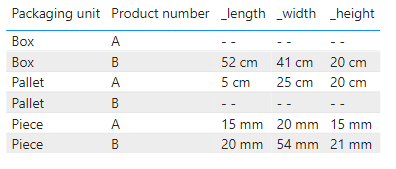
For the first problem, if you want to join two fields, you can try the following:
Create columns,
Column _length = [Length ] & " " & [Dimension unit]
Column _width = [Width] & " " & [Dimension unit]
Column _height = [Height] & " " & [Dimension unit]
Or create measures,
_length = SELECTEDVALUE('Table 2'[Length ]) & " " & SELECTEDVALUE('Table 2'[Dimension unit])
_width = SELECTEDVALUE('Table 2'[Width]) & " " & SELECTEDVALUE('Table 2'[Dimension unit])
_height = SELECTEDVALUE('Table 2'[Height]) & " " & SELECTEDVALUE('Table 2'[Dimension unit])
For the second question, as you said, you can create a matrix.
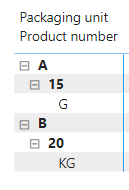
Note, however. table 1 is a table with a hierarchical structure. you may not be able to get a parallel structure using a matrix. It should look like this:
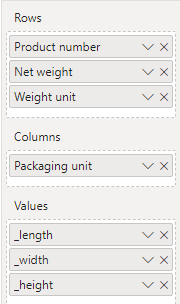
Next, you can put the Packaging unit field of table 2 into "Columns" and the measures you just created into "Values".
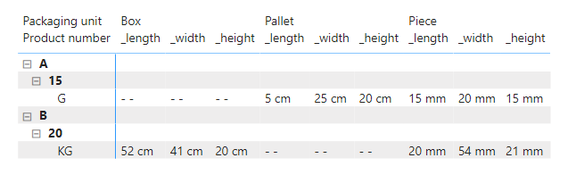
Here is the result.
Regards,
Nono Chen
If this post helps, then please consider Accept it as the solution to help the other members find it more quickly.
For the first problem, if you want to join two fields, you can try the following:
Create columns,
Column _length = [Length ] & " " & [Dimension unit]
Column _width = [Width] & " " & [Dimension unit]
Column _height = [Height] & " " & [Dimension unit]
Or create measures,
_length = SELECTEDVALUE('Table 2'[Length ]) & " " & SELECTEDVALUE('Table 2'[Dimension unit])
_width = SELECTEDVALUE('Table 2'[Width]) & " " & SELECTEDVALUE('Table 2'[Dimension unit])
_height = SELECTEDVALUE('Table 2'[Height]) & " " & SELECTEDVALUE('Table 2'[Dimension unit])
For the second question, as you said, you can create a matrix.
Note, however. table 1 is a table with a hierarchical structure. you may not be able to get a parallel structure using a matrix. It should look like this:
Next, you can put the Packaging unit field of table 2 into "Columns" and the measures you just created into "Values".
Here is the result.
Regards,
Nono Chen
If this post helps, then please consider Accept it as the solution to help the other members find it more quickly.
Check out the April 2026 Power BI update to learn about new features.
Sign up to receive a private message when registration opens and key events begin.
If you have recently started exploring Fabric, we'd love to hear how it's going. Your feedback can help with product improvements.
| User | Count |
|---|---|
| 35 | |
| 32 | |
| 27 | |
| 23 | |
| 16 |
| User | Count |
|---|---|
| 65 | |
| 50 | |
| 30 | |
| 25 | |
| 24 |