Join us at FabCon Atlanta from March 16 - 20, 2026, for the ultimate Fabric, Power BI, AI and SQL community-led event. Save $200 with code FABCOMM.
Register now!The Power BI Data Visualization World Championships is back! It's time to submit your entry. Live now!
I'm trying to create a matrix table to work with in my report e.a. in my charts.
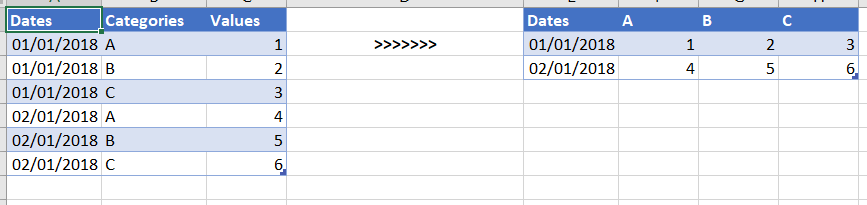
See below's example. On the left my current table and on the right the result I want. I've tried a few things in the query editor and using DAX. However, I did not get the result I want. I know I can create such a table easely in my report but then I cannot use is in other visuals.
The categories are dynamic so I cannot hard code these columns names.
Can someone help me out?
Solved! Go to Solution.
Hi @SanderBI ,
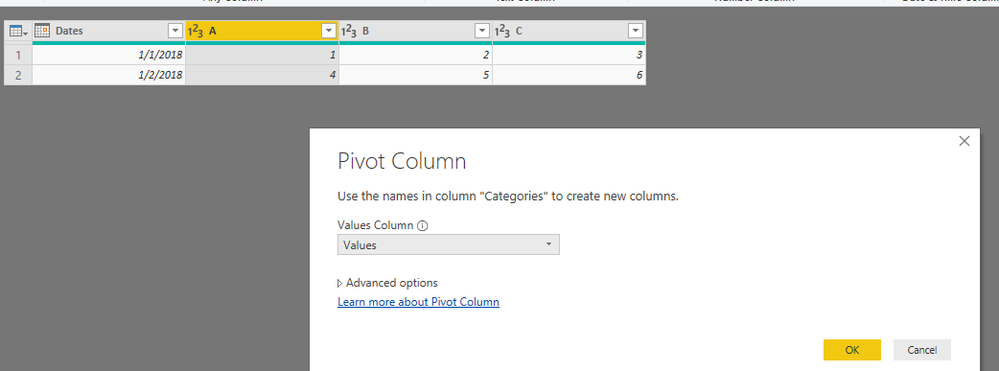
As @Anonymous , we can pivot your table in power query. Here I create one sample for your reference. M code as below.
let
Source = Table.FromRows(Json.Document(Binary.Decompress(Binary.FromText("i45WMtQ31DcyMLRQ0lFyBGJDpVgdFEEnIDZCF3QGYmOooBGydhN0QZB2U3RBkHYzpdhYAA==", BinaryEncoding.Base64), Compression.Deflate)), let _t = ((type text) meta [Serialized.Text = true]) in type table [Dates = _t, Categories = _t, Values = _t]),
#"Changed Type" = Table.TransformColumnTypes(Source,{{"Dates", type date}, {"Categories", type text}, {"Values", Int64.Type}}),
#"Pivoted Column" = Table.Pivot(#"Changed Type", List.Distinct(#"Changed Type"[Categories]), "Categories", "Values", List.Sum)
in
#"Pivoted Column"
Pbix as attached.
Regards,
Frank
Hi @SanderBI ,
As @Anonymous , we can pivot your table in power query. Here I create one sample for your reference. M code as below.
let
Source = Table.FromRows(Json.Document(Binary.Decompress(Binary.FromText("i45WMtQ31DcyMLRQ0lFyBGJDpVgdFEEnIDZCF3QGYmOooBGydhN0QZB2U3RBkHYzpdhYAA==", BinaryEncoding.Base64), Compression.Deflate)), let _t = ((type text) meta [Serialized.Text = true]) in type table [Dates = _t, Categories = _t, Values = _t]),
#"Changed Type" = Table.TransformColumnTypes(Source,{{"Dates", type date}, {"Categories", type text}, {"Values", Int64.Type}}),
#"Pivoted Column" = Table.Pivot(#"Changed Type", List.Distinct(#"Changed Type"[Categories]), "Categories", "Values", List.Sum)
in
#"Pivoted Column"
Pbix as attached.
Regards,
Frank
The Power BI Data Visualization World Championships is back! It's time to submit your entry.
Check out the January 2026 Power BI update to learn about new features.
| User | Count |
|---|---|
| 61 | |
| 49 | |
| 30 | |
| 25 | |
| 23 |
| User | Count |
|---|---|
| 128 | |
| 102 | |
| 57 | |
| 39 | |
| 31 |