Don't miss your chance to take the Fabric Data Engineer (DP-700) exam on us!
Learn moreWe've captured the moments from FabCon & SQLCon that everyone is talking about, and we are bringing them to the community, live and on-demand. Starts on April 14th. Register now
I'm trying to create a matrix table to work with in my report e.a. in my charts.
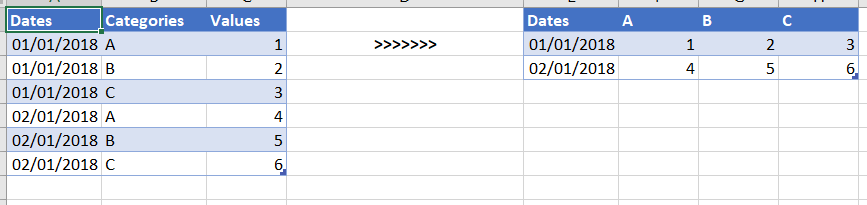
See below's example. On the left my current table and on the right the result I want. I've tried a few things in the query editor and using DAX. However, I did not get the result I want. I know I can create such a table easely in my report but then I cannot use is in other visuals.
The categories are dynamic so I cannot hard code these columns names.
Can someone help me out?
Solved! Go to Solution.
Hi @SanderBI ,
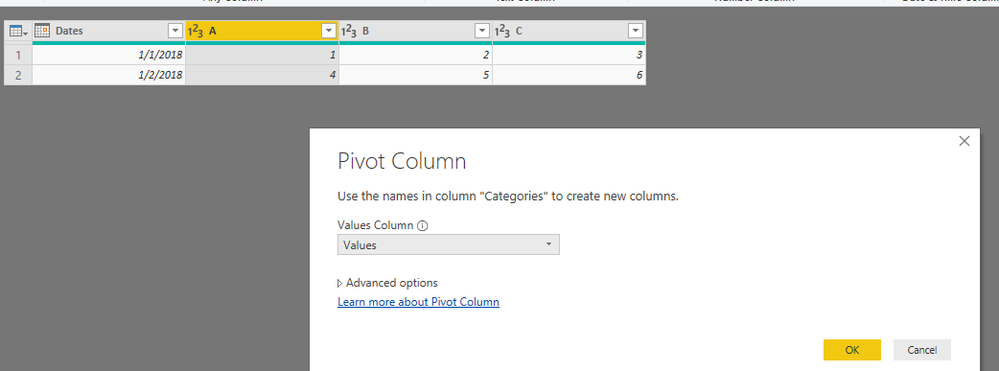
As @Anonymous , we can pivot your table in power query. Here I create one sample for your reference. M code as below.
let
Source = Table.FromRows(Json.Document(Binary.Decompress(Binary.FromText("i45WMtQ31DcyMLRQ0lFyBGJDpVgdFEEnIDZCF3QGYmOooBGydhN0QZB2U3RBkHYzpdhYAA==", BinaryEncoding.Base64), Compression.Deflate)), let _t = ((type text) meta [Serialized.Text = true]) in type table [Dates = _t, Categories = _t, Values = _t]),
#"Changed Type" = Table.TransformColumnTypes(Source,{{"Dates", type date}, {"Categories", type text}, {"Values", Int64.Type}}),
#"Pivoted Column" = Table.Pivot(#"Changed Type", List.Distinct(#"Changed Type"[Categories]), "Categories", "Values", List.Sum)
in
#"Pivoted Column"
Pbix as attached.
Regards,
Frank
Hi @SanderBI ,
As @Anonymous , we can pivot your table in power query. Here I create one sample for your reference. M code as below.
let
Source = Table.FromRows(Json.Document(Binary.Decompress(Binary.FromText("i45WMtQ31DcyMLRQ0lFyBGJDpVgdFEEnIDZCF3QGYmOooBGydhN0QZB2U3RBkHYzpdhYAA==", BinaryEncoding.Base64), Compression.Deflate)), let _t = ((type text) meta [Serialized.Text = true]) in type table [Dates = _t, Categories = _t, Values = _t]),
#"Changed Type" = Table.TransformColumnTypes(Source,{{"Dates", type date}, {"Categories", type text}, {"Values", Int64.Type}}),
#"Pivoted Column" = Table.Pivot(#"Changed Type", List.Distinct(#"Changed Type"[Categories]), "Categories", "Values", List.Sum)
in
#"Pivoted Column"
Pbix as attached.
Regards,
Frank
If you have recently started exploring Fabric, we'd love to hear how it's going. Your feedback can help with product improvements.
A new Power BI DataViz World Championship is coming this June! Don't miss out on submitting your entry.
Share feedback directly with Fabric product managers, participate in targeted research studies and influence the Fabric roadmap.
| User | Count |
|---|---|
| 56 | |
| 40 | |
| 36 | |
| 19 | |
| 18 |
| User | Count |
|---|---|
| 70 | |
| 69 | |
| 38 | |
| 35 | |
| 23 |