cancel
Showing results for 
Search instead for 
Did you mean: 

The Power BI Data Visualization World Championships is back! Get ahead of the game and start preparing now! Learn more

Reply
heidibb
Helper IV
Helper IV

Create column with Earlier value from another row

Hello,


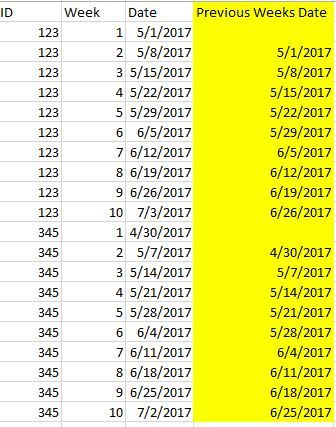
I have a data table similar to this (the first three columns). I would like to create a column that pulls in the previous week's date. I think from my research I should use the EARLIER function, but I'm not sure how to structure the formula. So, for each ID and week, I need to get the date for the previous week for the same ID.


Any thoughts?


Capture.JPG

1 ACCEPTED SOLUTION
v-ljerr-msft
Microsoft Employee
Microsoft Employee

Hi @heidibb,


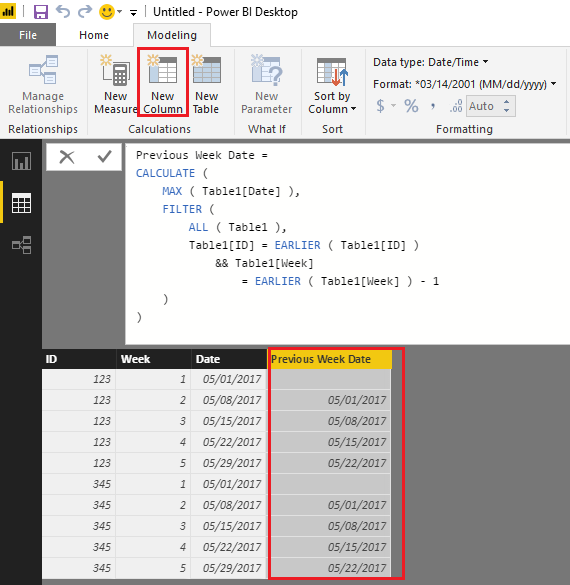
If I understand you correctly, you should be able to use the formula below to create a column that pulls in the previous week's date in your scenario. Smiley Happy

Previous Week Date = 
CALCULATE (
    MAX ( Table1[Date] ),
    FILTER (
        ALL ( Table1 ),
        Table1[ID] = EARLIER ( Table1[ID] )
            && Table1[Week]
                = EARLIER ( Table1[Week] ) - 1
    )
)

c1.PNG


Regards

View solution in original post

3 REPLIES 3
v-ljerr-msft
Microsoft Employee
Microsoft Employee

Hi @heidibb,


If I understand you correctly, you should be able to use the formula below to create a column that pulls in the previous week's date in your scenario. Smiley Happy

Previous Week Date = 
CALCULATE (
    MAX ( Table1[Date] ),
    FILTER (
        ALL ( Table1 ),
        Table1[ID] = EARLIER ( Table1[ID] )
            && Table1[Week]
                = EARLIER ( Table1[Week] ) - 1
    )
)

c1.PNG


Regards

TomMartens
Super User
Super User

Hey,


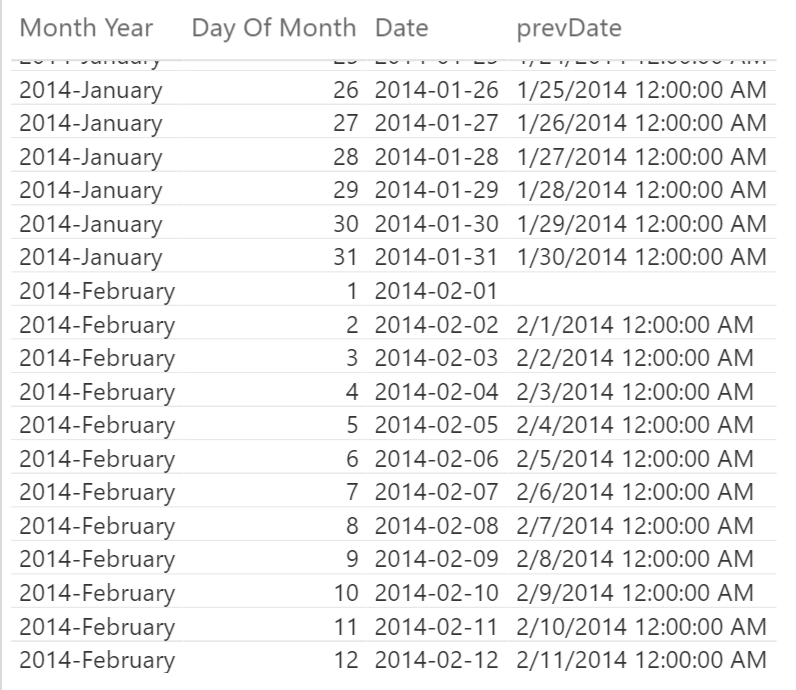
here is a part of my calendar already with the column you want to create "prevDate"

2017-08-17_23-09-58.png


The column "Month Year" corresponds to your column "ID" and the column "Day of Month" to your column "Week" and here is the DAX statement


prevDate = 
var currentGroup = calculate(max('Calendar'[Month Year]))
var currentDayIndex = calculate(max('Calendar'[Day Of Month]))
return
LOOKUPVALUE('Calendar'[Date], 'Calendar'[Month Year], currentGroup, 'Calendar'[Day Of Month], currentDayIndex -1)

I'm storing the column values of the current row into variables and then use these variables inside the LOOKUPVALUE function to retrieve the Date column by adjusting the currentDayIndex value with -1.


Hope this helps


Regards


Did I answer your question? Mark my post as a solution, this will help others!

Proud to be a Super User!
I accept Kudos 😉
Hamburg, Germany
heidibb
Helper IV
Helper IV

As I continue to research, I wonder if LookupValue is a better function. Still unsure how to structure the formula since i need the previous week's date at the ID level.

Helpful resources

Announcements
Power BI DataViz World Championships

Power BI Dataviz World Championships

The Power BI Data Visualization World Championships is back! Get ahead of the game and start preparing now!

December 2025 Power BI Update Carousel

Power BI Monthly Update - December 2025

Check out the December 2025 Power BI Holiday Recap!

FabCon Atlanta 2026 carousel

FabCon Atlanta 2026

Join us at FabCon Atlanta, March 16-20, for the ultimate Fabric, Power BI, AI and SQL community-led event. Save $200 with code FABCOMM.