This is best Fabric, Power BI, SQL and AI community event. How do we know? The last event sold out! Save €200 with code FABCMTY200.
Register nowA new Data Days event is coming soon! This time we’re going bigger than ever. Fabric, Power BI, SQL, AI and more. Don't miss out.
Hi everyone, I am new to Power BI and I am studying for my fundamentals exam. I am working through the GitHub exercises for PL-900 and I am stuck on a task which is "To create chart and time visualisations" [Module 5: Get Started with Power BI, Exercise 1, Task #3].
Step 8 asks you to go to the Visualisations page and click x next to Day and Quarter to leave only Year and Month totals for the Axis. For the life of me I can't find where to do this in the visualisations pane. Can anyone help me with this? Currently the axis is showing Day and Month (per quarter). I just don't know how to change the values of the axis when I can't find the option to remove Day and Quarter.
The link to the exercise - PL-900-Microsoft-Power-Platform-Fundamentals (microsoftlearning.github.io)
Solved! Go to Solution.
@NattyG
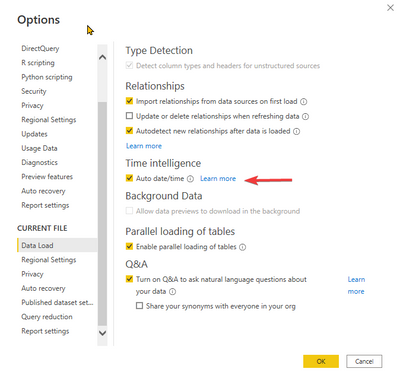
If you are using the default dates table, then ensure you have turned on the Auto Date Time in the options as follows. Masure you re-add the date to the visual
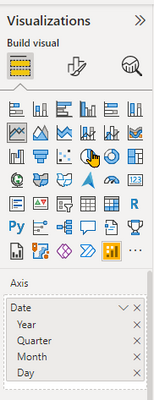
Then you can click on the x next to Day and Quarter as follows in the Visualization Pane
⭕ Subscribe and learn Power BI from these videos
⚪ Website ⚪ LinkedIn ⚪ PBI User Group
@NattyG
If you are using the default dates table, then ensure you have turned on the Auto Date Time in the options as follows. Masure you re-add the date to the visual
Then you can click on the x next to Day and Quarter as follows in the Visualization Pane
⭕ Subscribe and learn Power BI from these videos
⚪ Website ⚪ LinkedIn ⚪ PBI User Group
Check out the May 2026 Power BI update to learn about new features.
Sign up to receive a private message when registration opens and key events begin.
If you have recently started exploring Fabric, we'd love to hear how it's going. Your feedback can help with product improvements.
| User | Count |
|---|---|
| 31 | |
| 26 | |
| 23 | |
| 22 | |
| 15 |
| User | Count |
|---|---|
| 62 | |
| 47 | |
| 28 | |
| 24 | |
| 20 |