cancel
Showing results for 
Search instead for 
Did you mean: 

The FabCon + SQLCon recap series starts April 14th at 8am Pacific. If you’re tracking where AI is going inside Fabric, this first session is a can't miss. Register now

Reply
NattyG
New Member

Create chart and time visualisations

Hi everyone, I am new to Power BI and I am studying for my fundamentals exam. I am working through the GitHub exercises for PL-900 and I am stuck on a task which is "To create chart and time visualisations" [Module 5: Get Started with Power BI, Exercise 1, Task #3]. 


Step 8 asks you to go to the Visualisations page and click  next to Day and Quarter to leave only Year and Month totals for the Axis.  For the life of me I can't find where to do this in the visualisations pane.  Can anyone help me with this? Currently the axis is showing Day and Month (per quarter). I just don't know how to change the values of the axis when I can't find the option to remove Day and Quarter.  


The link to the exercise - PL-900-Microsoft-Power-Platform-Fundamentals (microsoftlearning.github.io)

1 ACCEPTED SOLUTION
Fowmy
Super User
Super User

@NattyG 

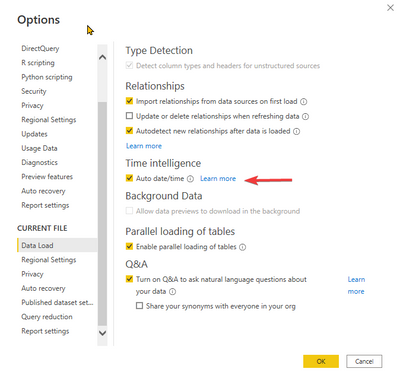
If you are using the default dates table, then ensure you have turned on the Auto Date Time in the options as follows. Masure you re-add the date to the visual 

Fowmy_0-1642920925291.png

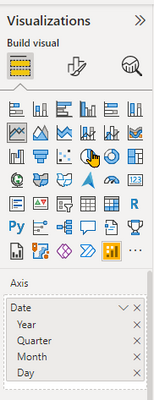
Then you can click on the x next to Day and Quarter as follows in the Visualization Pane

Fowmy_1-1642921046103.png


Did I answer your question? Mark my post as a solution! and hit thumbs up


Subscribe and learn Power BI from these videos

Website LinkedIn PBI User Group

View solution in original post

1 REPLY 1
Fowmy
Super User
Super User

@NattyG 

If you are using the default dates table, then ensure you have turned on the Auto Date Time in the options as follows. Masure you re-add the date to the visual 

Fowmy_0-1642920925291.png

Then you can click on the x next to Day and Quarter as follows in the Visualization Pane

Fowmy_1-1642921046103.png


Did I answer your question? Mark my post as a solution! and hit thumbs up


Subscribe and learn Power BI from these videos

Website LinkedIn PBI User Group

Helpful resources

Announcements
New to Fabric survey Carousel

New to Fabric Survey

If you have recently started exploring Fabric, we'd love to hear how it's going. Your feedback can help with product improvements.

Power BI DataViz World Championships carousel

Power BI DataViz World Championships - June 2026

A new Power BI DataViz World Championship is coming this June! Don't miss out on submitting your entry.

Join our Fabric User Panel

Join our Fabric User Panel

Share feedback directly with Fabric product managers, participate in targeted research studies and influence the Fabric roadmap.

March Power BI Update Carousel

Power BI Community Update - March 2026

Check out the March 2026 Power BI update to learn about new features.