
We've captured the moments from FabCon & SQLCon that everyone is talking about, and we are bringing them to the community, live and on-demand. Starts on April 14th. Register now
Hi everyone,
I'm new to Power BI and I would like your help a problem.
Problem: Create a colum, or a series with the value provided by a slicer (or any manual input data will works)
Example: I would like to generate a table with 1 column that have the Lower and Uper time frame that can be select by a slicer (or any manual input data method on report screen).
it seem like I can not get the value of the parameter from the slicer to input in the generateseries function.
Thank you,
Danh
Solved! Go to Solution.
Hi, @Anonymous
It’s my pleasure to answer for you.
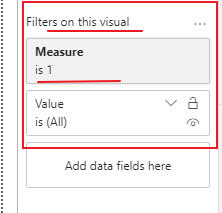
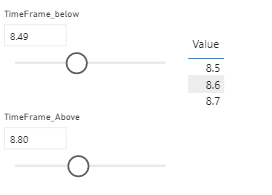
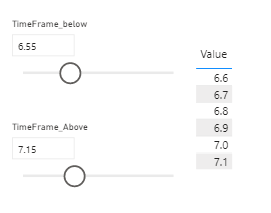
I’m sorry that you can’t use slicer to directly generate dynamic tables, only some aggregate values of dynamic tables can be displayed.I have a workaround for you. You need create a calculated table using generateseries function and a measure used in filter pane.
Like this:
Table =
GENERATESERIES (
MIN ( TimeFrame_below[TimeFrame_below] ),
MAX ( TimeFrame_Above[TimeFrame_Above] ),
0.1
)
Measure =
VAR A =
SELECTEDVALUE ( TimeFrame_below[TimeFrame_below] )
VAR B =
SELECTEDVALUE ( TimeFrame_Above[TimeFrame_Above] )
RETURN
IF (
SELECTEDVALUE ( 'Table'[Value] ) >= A
&& SELECTEDVALUE ( 'Table'[Value] ) <= B,
1
)Here is my sample data. Hope it helps.
If it doesn’t solve your problem, please feel free to ask me.
Best Regards
Janey Guo
If this post helps, then please consider Accept it as the solution to help the other members find it more quickly.
Hi, @Anonymous
It’s my pleasure to answer for you.
I’m sorry that you can’t use slicer to directly generate dynamic tables, only some aggregate values of dynamic tables can be displayed.I have a workaround for you. You need create a calculated table using generateseries function and a measure used in filter pane.
Like this:
Table =
GENERATESERIES (
MIN ( TimeFrame_below[TimeFrame_below] ),
MAX ( TimeFrame_Above[TimeFrame_Above] ),
0.1
)
Measure =
VAR A =
SELECTEDVALUE ( TimeFrame_below[TimeFrame_below] )
VAR B =
SELECTEDVALUE ( TimeFrame_Above[TimeFrame_Above] )
RETURN
IF (
SELECTEDVALUE ( 'Table'[Value] ) >= A
&& SELECTEDVALUE ( 'Table'[Value] ) <= B,
1
)Here is my sample data. Hope it helps.
If it doesn’t solve your problem, please feel free to ask me.
Best Regards
Janey Guo
If this post helps, then please consider Accept it as the solution to help the other members find it more quickly.
Why is every thing that's simple in SSRS a nightmare in PBI?
@Anonymous ,
No clear,
Can you check with the data type of Upper and Lower limits.
Regards,
Manikumar
Proud to be a Super User!
@Anonymous , You can not create a table that uses slicer value. Only a var table in the measure can use that.
Please provide your feedback comments and advice for new videos
Tutorial Series Dax Vs SQL Direct Query PBI Tips
Appreciate your Kudos.
If you have recently started exploring Fabric, we'd love to hear how it's going. Your feedback can help with product improvements.
A new Power BI DataViz World Championship is coming this June! Don't miss out on submitting your entry.
Share feedback directly with Fabric product managers, participate in targeted research studies and influence the Fabric roadmap.
| User | Count |
|---|---|
| 53 | |
| 38 | |
| 33 | |
| 17 | |
| 17 |
| User | Count |
|---|---|
| 67 | |
| 63 | |
| 38 | |
| 34 | |
| 22 |