Join us at FabCon Vienna from September 15-18, 2025
The ultimate Fabric, Power BI, SQL, and AI community-led learning event. Save €200 with code FABCOMM.
Get registered- Power BI forums
- Get Help with Power BI
- Desktop
- Service
- Report Server
- Power Query
- Mobile Apps
- Developer
- DAX Commands and Tips
- Custom Visuals Development Discussion
- Health and Life Sciences
- Power BI Spanish forums
- Translated Spanish Desktop
- Training and Consulting
- Instructor Led Training
- Dashboard in a Day for Women, by Women
- Galleries
- Data Stories Gallery
- Themes Gallery
- Contests Gallery
- Quick Measures Gallery
- Notebook Gallery
- Translytical Task Flow Gallery
- TMDL Gallery
- R Script Showcase
- Webinars and Video Gallery
- Ideas
- Custom Visuals Ideas (read-only)
- Issues
- Issues
- Events
- Upcoming Events
Enhance your career with this limited time 50% discount on Fabric and Power BI exams. Ends August 31st. Request your voucher.
- Power BI forums
- Forums
- Get Help with Power BI
- Desktop
- Re: Create a custom column that show as text if th...
- Subscribe to RSS Feed
- Mark Topic as New
- Mark Topic as Read
- Float this Topic for Current User
- Bookmark
- Subscribe
- Printer Friendly Page

- Mark as New
- Bookmark
- Subscribe
- Mute
- Subscribe to RSS Feed
- Permalink
- Report Inappropriate Content
Create a custom column that show as text if the line is "Record" or "List"
I have a column in which the values are given as "list" and "record", I cannot pre filter it, the data is given me as such.
I would need to be able to filter out lists and records, how can i do that ?
I thought of making a custom column that gives if the line is a list or a record in text so i can filter out, if their a way to do it ?
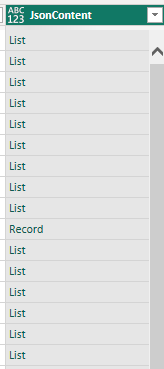
Solved! Go to Solution.
- Mark as New
- Bookmark
- Subscribe
- Mute
- Subscribe to RSS Feed
- Permalink
- Report Inappropriate Content
Hi @Anonymous ,
Please refer to my code and sample.
Whole M Code:
let
    Source = Table.Combine({Table, List, Record}),
    #"Added Custom" = Table.AddColumn(Source, "Custom.1", each Table.SelectRows([Custom])[Column1]),
    #"Removed Columns" = Table.RemoveColumns(#"Added Custom",{"Custom.1"}),
    #"Added Custom1" = Table.AddColumn(#"Removed Columns", "Table", each if
Table.ColumnCount([Custom]) <> Error.Record
then
"Table"
else
"Record"),
    #"Added Custom2" = Table.AddColumn(#"Added Custom1", "List", each if
List.Count([Custom]) <> Error.Record
then
"List"
else
""),
    #"Added Custom3" = Table.AddColumn(#"Added Custom2", "Record", each if
Record.ToList([Custom]) <> Error.Record
then
"Record"
else
""),
    #"Replaced Errors" = Table.ReplaceErrorValues(#"Added Custom3", {{"Table", ""}}),
    #"Replaced Errors1" = Table.ReplaceErrorValues(#"Replaced Errors", {{"List", ""}}),
    #"Replaced Errors2" = Table.ReplaceErrorValues(#"Replaced Errors1", {{"Record", ""}}),
    #"Added Custom4" = Table.AddColumn(#"Replaced Errors2", "Combine", each if [Table] = ""
then
if [List] = ""
then
[Record]
else
[List]
else
[Table])
in
    #"Added Custom4"
Result is as below.
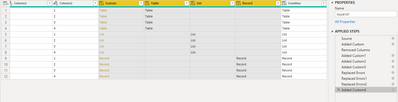
I think [Combine] column is the result you need.
Best Regards,
Rico Zhou
If this post helps, then please consider Accept it as the solution to help the other members find it more quickly.


- Mark as New
- Bookmark
- Subscribe
- Mute
- Subscribe to RSS Feed
- Permalink
- Report Inappropriate Content
@Anonymous
Go to power query edtior and filter that data!
Did I answer your question? Mark my post as a solution! Appreciate your Kudos!!
MY Blog || My YouTube Channel || Connect with me on Linkedin || My Latest Data Story - Ageing Analysis
Proud to be a Super User!
- Mark as New
- Bookmark
- Subscribe
- Mute
- Subscribe to RSS Feed
- Permalink
- Report Inappropriate Content
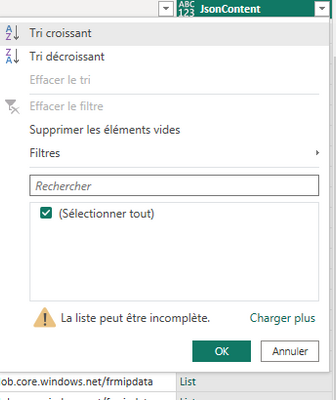
I am already on power query, my problem is that i want to filter out the data but i cannot as power query refuses to consider lines showing as "List" and "Record" lines as filter targets
- Mark as New
- Bookmark
- Subscribe
- Mute
- Subscribe to RSS Feed
- Permalink
- Report Inappropriate Content
Hi @Anonymous ,
Please refer to my code and sample.
Whole M Code:
let
    Source = Table.Combine({Table, List, Record}),
    #"Added Custom" = Table.AddColumn(Source, "Custom.1", each Table.SelectRows([Custom])[Column1]),
    #"Removed Columns" = Table.RemoveColumns(#"Added Custom",{"Custom.1"}),
    #"Added Custom1" = Table.AddColumn(#"Removed Columns", "Table", each if
Table.ColumnCount([Custom]) <> Error.Record
then
"Table"
else
"Record"),
    #"Added Custom2" = Table.AddColumn(#"Added Custom1", "List", each if
List.Count([Custom]) <> Error.Record
then
"List"
else
""),
    #"Added Custom3" = Table.AddColumn(#"Added Custom2", "Record", each if
Record.ToList([Custom]) <> Error.Record
then
"Record"
else
""),
    #"Replaced Errors" = Table.ReplaceErrorValues(#"Added Custom3", {{"Table", ""}}),
    #"Replaced Errors1" = Table.ReplaceErrorValues(#"Replaced Errors", {{"List", ""}}),
    #"Replaced Errors2" = Table.ReplaceErrorValues(#"Replaced Errors1", {{"Record", ""}}),
    #"Added Custom4" = Table.AddColumn(#"Replaced Errors2", "Combine", each if [Table] = ""
then
if [List] = ""
then
[Record]
else
[List]
else
[Table])
in
    #"Added Custom4"
Result is as below.
I think [Combine] column is the result you need.
Best Regards,
Rico Zhou
If this post helps, then please consider Accept it as the solution to help the other members find it more quickly.
- Mark as New
- Bookmark
- Subscribe
- Mute
- Subscribe to RSS Feed
- Permalink
- Report Inappropriate Content
@Anonymous Question is not clear , if you can filter with custom column why cant you filter when the data is in the raw format. what is the business logic
Did I answer your question? Mark my post as a solution! Appreciate your Kudos!!
MY Blog || My YouTube Channel || Connect with me on Linkedin || My Latest Data Story - Ageing Analysis
Proud to be a Super User!
- Mark as New
- Bookmark
- Subscribe
- Mute
- Subscribe to RSS Feed
- Permalink
- Report Inappropriate Content
I cannot i do not have access to the raw data, it is given me as such via an api
Is there a function that would give something like "If column is a record type then "record", else "list" ?
Helpful resources

Power BI Monthly Update - August 2025
Check out the August 2025 Power BI update to learn about new features.

Fabric Community Update - August 2025
Find out what's new and trending in the Fabric community.


| User | Count |
|---|---|
| 76 | |
| 71 | |
| 70 | |
| 66 | |
| 42 |


