Don't miss your chance to take the Fabric Data Engineer (DP-700) exam on us!
Learn moreNext up in the FabCon + SQLCon recap series: The roadmap for Microsoft SQL and Maximizing Developer experiences in Fabric. All sessions are available on-demand after the live show. Register now
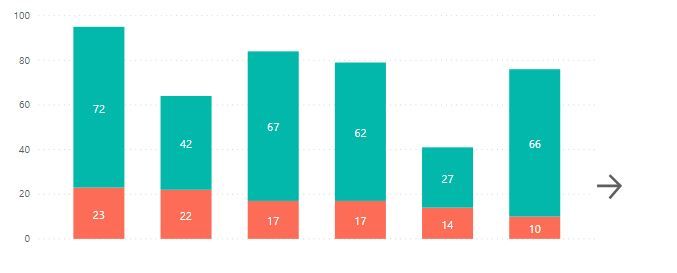
Create a chart with navigation, where it shows only some data, and as the user clicks on the arrow, more information appears.
Solved! Go to Solution.
Aside from bookmarks with buttons, you can try drillthrough functionality - https://docs.microsoft.com/en-us/power-bi/desktop-drillthrough. It will allow you to go to a tab with more detailed visual.
Regards,
Ruslan Zolotukhin (zoloturu)
BI Engineer at Akvelon Inc. / Kharkiv Power BI User Group Leader / DAX & Power BI Trainer
-------------------------------------------------------------------
Did I answer your question? Mark my post as a solution!
It was useful? Press Thumbs Up!
You are from Ukraine? If yes then welcome to Power BI User Group - KhPUG website. Other country? Check and find proper one - Power BI User Groups
1. Create a button with arrow sign.
2. Create an another visual with expanded data.
3. Create a bookmark, where all visuals will be visible except the expanded one. Use Selection Pane to set visibility.
4. Assign a bookmark to the button.
That's it.
If you would need a button to return back, then repeat all steps, but don't forget to set visible/hidden property to visuals at each bookmark.
Regards,
Ruslan Zolotukhin (zoloturu)
BI Engineer at Akvelon Inc. / Kharkiv Power BI User Group Leader / DAX & Power BI Trainer
-------------------------------------------------------------------
Did I answer your question? Mark my post as a solution!
It was useful? Press Thumbs Up!
You are from Ukraine? If yes then welcome to Power BI User Group - KhPUG website. Other country? Check and find proper one - Power BI User Groups
The problem is that I need an automatic solution. I will replicate the dashboard on different bases. Doing something customized for each one would not be feasible.
Aside from bookmarks with buttons, you can try drillthrough functionality - https://docs.microsoft.com/en-us/power-bi/desktop-drillthrough. It will allow you to go to a tab with more detailed visual.
Regards,
Ruslan Zolotukhin (zoloturu)
BI Engineer at Akvelon Inc. / Kharkiv Power BI User Group Leader / DAX & Power BI Trainer
-------------------------------------------------------------------
Did I answer your question? Mark my post as a solution!
It was useful? Press Thumbs Up!
You are from Ukraine? If yes then welcome to Power BI User Group - KhPUG website. Other country? Check and find proper one - Power BI User Groups
If you have recently started exploring Fabric, we'd love to hear how it's going. Your feedback can help with product improvements.
A new Power BI DataViz World Championship is coming this June! Don't miss out on submitting your entry.
Share feedback directly with Fabric product managers, participate in targeted research studies and influence the Fabric roadmap.
| User | Count |
|---|---|
| 49 | |
| 44 | |
| 41 | |
| 18 | |
| 18 |
| User | Count |
|---|---|
| 71 | |
| 66 | |
| 33 | |
| 32 | |
| 32 |