cancel
Showing results for 
Search instead for 
Did you mean: 

We've captured the moments from FabCon & SQLCon that everyone is talking about, and we are bringing them to the community, live and on-demand. Starts on April 14th. Register now

Reply
brettmeyers
Advocate I
Advocate I

Create a caluculation between two tables

I am a NEWBIE to Power BI and DAX. Any help is greatly appreciated!


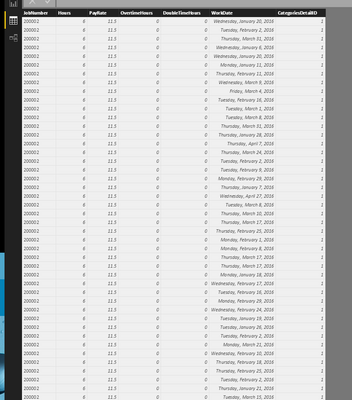
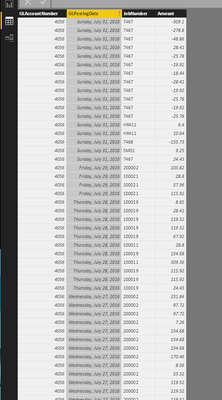
I have 2 tables (screenshots attached).


Table 1: TKHours

Table2: PPEAmounts


What I am trying to acheive is:

  • PPEAmounts[Amount] / TKHours[Hours]

Thank you in advance for any feedback,

Brett


2016-08-29 (1).png2016-08-29.png

2 ACCEPTED SOLUTIONS
ankitpatira
Community Champion
Community Champion

@brettmeyers You need to create relationship between two tables using common field such as Jobnumber in your case. Once relation is there you can simply create calculated column to get value for each row or create a measure to get difference using sum(PPEAmounts[Amount]) / sum(TKHours[Hours]).

View solution in original post

Anonymous
Not applicable

Hi brettmeyers,


Ankipatira ‘s point seems well, you could also use LOOKUPVALUE function to create a measure to achieve your requirement.


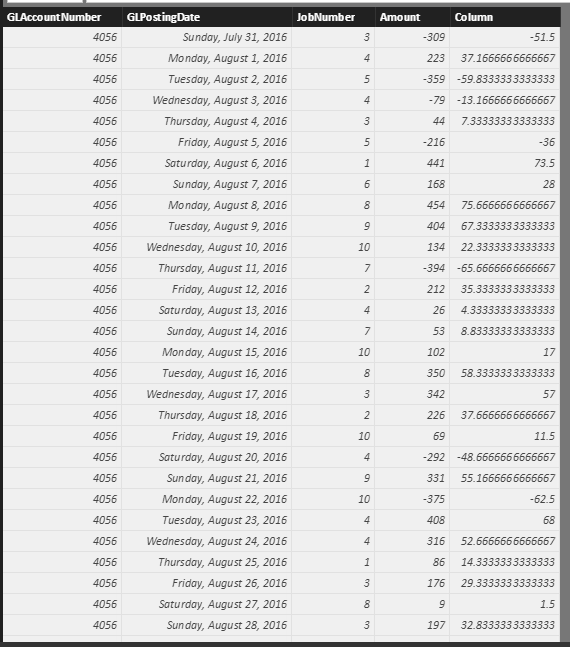
I find these tables all have a jobnumber column, I use this column as the search column: (Since I can’t find a same jobNumber between two tables, I have modified the jobnumber)


Dax:

Measure = SUM(PPEAmounts[Amount])/LOOKUPVALUE(TKHours[Hours],TKHours[JobNumber],VALUES(PPEAmounts[JobNumber]))


Result: (I added a column to store and display the measure)

Capture2.PNG 


Regards,

Xiaoxin Sheng

View solution in original post

2 REPLIES 2
Anonymous
Not applicable

Hi brettmeyers,


Ankipatira ‘s point seems well, you could also use LOOKUPVALUE function to create a measure to achieve your requirement.


I find these tables all have a jobnumber column, I use this column as the search column: (Since I can’t find a same jobNumber between two tables, I have modified the jobnumber)


Dax:

Measure = SUM(PPEAmounts[Amount])/LOOKUPVALUE(TKHours[Hours],TKHours[JobNumber],VALUES(PPEAmounts[JobNumber]))


Result: (I added a column to store and display the measure)

Capture2.PNG 


Regards,

Xiaoxin Sheng

ankitpatira
Community Champion
Community Champion

@brettmeyers You need to create relationship between two tables using common field such as Jobnumber in your case. Once relation is there you can simply create calculated column to get value for each row or create a measure to get difference using sum(PPEAmounts[Amount]) / sum(TKHours[Hours]).

Helpful resources

Announcements
New to Fabric survey Carousel

New to Fabric Survey

If you have recently started exploring Fabric, we'd love to hear how it's going. Your feedback can help with product improvements.

Power BI DataViz World Championships carousel

Power BI DataViz World Championships - June 2026

A new Power BI DataViz World Championship is coming this June! Don't miss out on submitting your entry.

Join our Fabric User Panel

Join our Fabric User Panel

Share feedback directly with Fabric product managers, participate in targeted research studies and influence the Fabric roadmap.

March Power BI Update Carousel

Power BI Community Update - March 2026

Check out the March 2026 Power BI update to learn about new features.