Get Fabric or SQL Certified for Free.
Get certified for free when you join Fabric Data Days 2026 and dive into Fabric, Power BI, SQL, AI, and other essential data skills.
Join now- Power BI forums
- Get Help with Power BI
- Desktop
- Service
- Report Server
- Power Query
- Mobile Apps
- Developer
- DAX Commands and Tips
- Custom Visuals Development Discussion
- Health and Life Sciences
- Power BI Spanish forums
- Translated Spanish Desktop
- Training and Consulting
- Instructor Led Training
- Dashboard in a Day for Women, by Women
- Galleries
- Data Stories Gallery
- Themes Gallery
- Contests Gallery
- QuickViz Gallery
- Quick Measures Gallery
- Visual Calculations Gallery
- Notebook Gallery
- Translytical Task Flow Gallery
- TMDL Gallery
- R Script Showcase
- Webinars and Video Gallery
- Ideas
- Custom Visuals Ideas (read-only)
- Issues
- Issues
- Events
- Upcoming Events
Try your skills in the Power BI Dataviz World Championship! Round one ends June 26. Join now
- Power BI forums
- Forums
- Get Help with Power BI
- Desktop
- Re: Create a calculated table
- Subscribe to RSS Feed
- Mark Topic as New
- Mark Topic as Read
- Float this Topic for Current User
- Bookmark
- Subscribe
- Printer Friendly Page


- Mark as New
- Bookmark
- Subscribe
- Mute
- Subscribe to RSS Feed
- Permalink
- Report Inappropriate Content
Create a calculated table
Hi guys,
I've got a table like this one:
ID COLUMN
1 22;25
2 10;5
3 100;70
from which I'd like to create this new one:
ID COLUMN
1 22
1 25
2 10
2 5
3 100
3 70
What kind of DAX transformation could I apply?
Thanks in advance for any hint
Solved! Go to Solution.


- Mark as New
- Bookmark
- Subscribe
- Mute
- Subscribe to RSS Feed
- Permalink
- Report Inappropriate Content
Yes, this worked the way I expected. I used a slicer for ITEM and a table for the Names table and it worked like a champ. Here are the queries I used.
Items table
let
    Source = Table.FromRows(Json.Document(Binary.Decompress(Binary.FromText("i45WMlTSUfIsSc0F0UZG1kamSrE60UpGUFEQbWhgDRE0hgoagwUNlGJjAQ==", BinaryEncoding.Base64), Compression.Deflate)), let _t = ((type text) meta [Serialized.Text = true]) in type table [ID = _t, ITEMS = _t, TABLE2_IDS = _t]),
    #"Changed Type" = Table.TransformColumnTypes(Source,{{"ID", Int64.Type}, {"ITEMS", type text}, {"TABLE2_IDS", type text}}),
    #"Split Column by Delimiter" = Table.SplitColumn(#"Changed Type","TABLE2_IDS",Splitter.SplitTextByDelimiter(";", QuoteStyle.Csv),{"TABLE2_IDS.1", "TABLE2_IDS.2"}),
    #"Changed Type1" = Table.TransformColumnTypes(#"Split Column by Delimiter",{{"TABLE2_IDS.1", Int64.Type}, {"TABLE2_IDS.2", Int64.Type}}),
    #"Unpivoted Columns" = Table.UnpivotOtherColumns(#"Changed Type1", {"ID", "ITEMS"}, "Attribute", "Value"),
    #"Removed Columns" = Table.RemoveColumns(#"Unpivoted Columns",{"Attribute"}),
    #"Renamed Columns" = Table.RenameColumns(#"Removed Columns",{{"Value", "TABLE2_IDS"}})
in
    #"Renamed Columns"
Names table
let
 Source = Table.FromRows(Json.Document(Binary.Decompress(Binary.FromText("i45WMlXSUfJLzE01VIrViVYyNIByjcBcIyMo1xjChSk2gSqGqTZVio0FAA==", BinaryEncoding.Base64), Compression.Deflate)), let _t = ((type text) meta [Serialized.Text = true]) in type table [ID = _t, NAMES = _t]),
 #"Changed Type" = Table.TransformColumnTypes(Source,{{"ID", Int64.Type}})
in
 #"Changed Type"
Follow on LinkedIn
@ me in replies or I'll lose your thread!!!
Instead of a Kudo, please vote for this idea
Become an expert!: Enterprise DNA
External Tools: MSHGQM
YouTube Channel!: Microsoft Hates Greg
Latest book!: DAX For Humans
DAX is easy, CALCULATE makes DAX hard...


- Mark as New
- Bookmark
- Subscribe
- Mute
- Subscribe to RSS Feed
- Permalink
- Report Inappropriate Content
Hi laciodrom_80,
I would agree with smoupre.
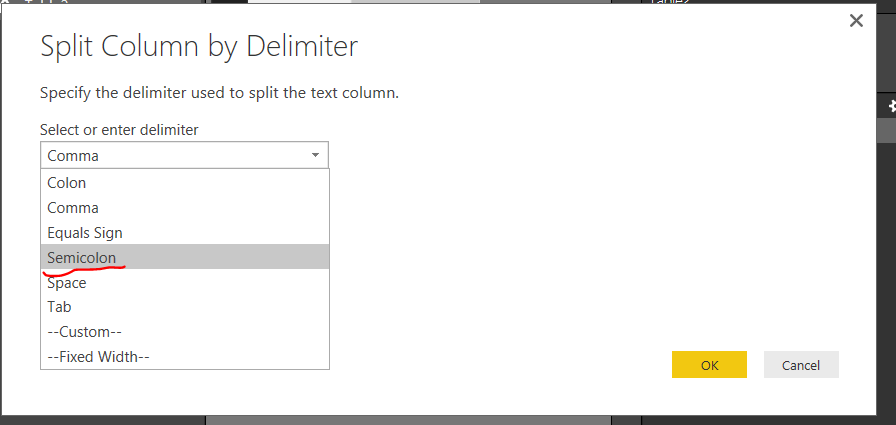
Under Power BI Query Editor, we could first click on Split Column, choose by Delimeter, this would split the column into two,
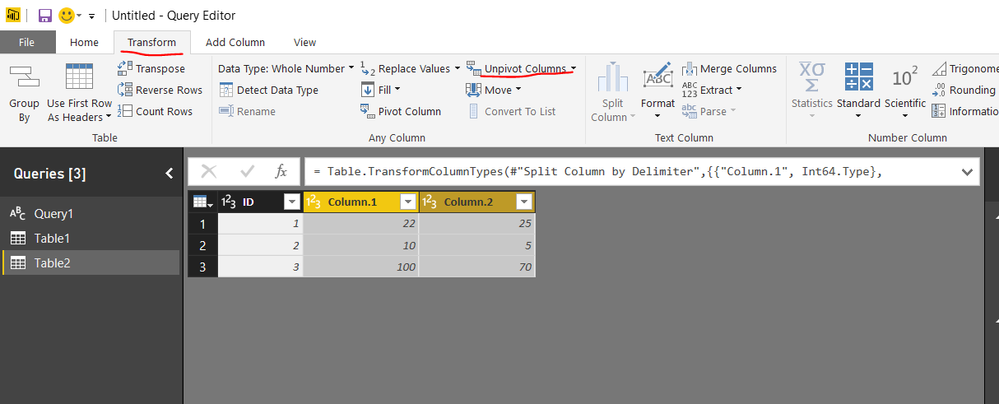
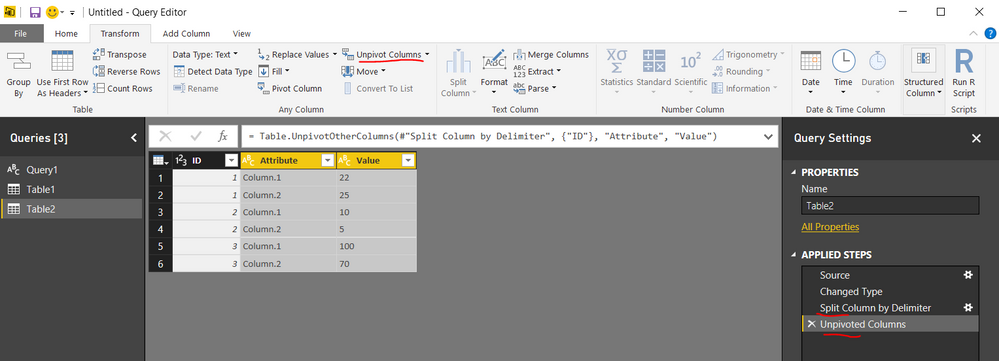
Then under Transform tab, choose upviot column, selecting the two splitted column, click upviot. done.
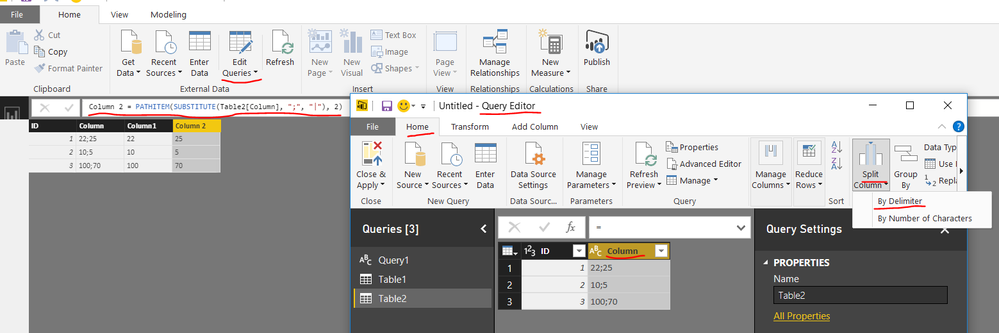
If you would like to split the column using DAX in Data View, try with the following formula in a calculated column:
Please note that even we could seperate the two value in DAX, it is still not available to upviot the column in Data View.
First = PATHITEM(SUBSTITUTE(Table3[Column], ";", "|"), 1)
Second = PATHITEM(SUBSTITUTE(Table3[Column], ";", "|"), 2)
DAX function reference:
If you need any further assistance on this topic, please post back.
Regards
- Mark as New
- Bookmark
- Subscribe
- Mute
- Subscribe to RSS Feed
- Permalink
- Report Inappropriate Content
Thanks both @Greg_Deckler and @v-micsh-msft for useful suggestions, but perhaps I have to face the problem differently :
I wish I have a filter (filter1) which displays all description items of these table
TABLE1
ID ITEMS TABLE2_IDS
1 Item1 22;25
2 Item2 10;5
3 Item3 100
where TABLE2_IDS contains reference ids to this other table:
TABLE2
ID NAMES
5 Name1
10 Name2
22 Name3
25 Name4
100 Name5
When I select an Item from the above filter I'd like to display into another filter (filter2) all associated Names in table2
e.g. If I select Item2 in filter1 I wish to display Name1 and Name2 in filter2
- Mark as New
- Bookmark
- Subscribe
- Mute
- Subscribe to RSS Feed
- Permalink
- Report Inappropriate Content
Yes, this worked the way I expected. I used a slicer for ITEM and a table for the Names table and it worked like a champ. Here are the queries I used.
Items table
let
    Source = Table.FromRows(Json.Document(Binary.Decompress(Binary.FromText("i45WMlTSUfIsSc0F0UZG1kamSrE60UpGUFEQbWhgDRE0hgoagwUNlGJjAQ==", BinaryEncoding.Base64), Compression.Deflate)), let _t = ((type text) meta [Serialized.Text = true]) in type table [ID = _t, ITEMS = _t, TABLE2_IDS = _t]),
    #"Changed Type" = Table.TransformColumnTypes(Source,{{"ID", Int64.Type}, {"ITEMS", type text}, {"TABLE2_IDS", type text}}),
    #"Split Column by Delimiter" = Table.SplitColumn(#"Changed Type","TABLE2_IDS",Splitter.SplitTextByDelimiter(";", QuoteStyle.Csv),{"TABLE2_IDS.1", "TABLE2_IDS.2"}),
    #"Changed Type1" = Table.TransformColumnTypes(#"Split Column by Delimiter",{{"TABLE2_IDS.1", Int64.Type}, {"TABLE2_IDS.2", Int64.Type}}),
    #"Unpivoted Columns" = Table.UnpivotOtherColumns(#"Changed Type1", {"ID", "ITEMS"}, "Attribute", "Value"),
    #"Removed Columns" = Table.RemoveColumns(#"Unpivoted Columns",{"Attribute"}),
    #"Renamed Columns" = Table.RenameColumns(#"Removed Columns",{{"Value", "TABLE2_IDS"}})
in
    #"Renamed Columns"
Names table
let
 Source = Table.FromRows(Json.Document(Binary.Decompress(Binary.FromText("i45WMlXSUfJLzE01VIrViVYyNIByjcBcIyMo1xjChSk2gSqGqTZVio0FAA==", BinaryEncoding.Base64), Compression.Deflate)), let _t = ((type text) meta [Serialized.Text = true]) in type table [ID = _t, NAMES = _t]),
 #"Changed Type" = Table.TransformColumnTypes(Source,{{"ID", Int64.Type}})
in
 #"Changed Type"
Follow on LinkedIn
@ me in replies or I'll lose your thread!!!
Instead of a Kudo, please vote for this idea
Become an expert!: Enterprise DNA
External Tools: MSHGQM
YouTube Channel!: Microsoft Hates Greg
Latest book!: DAX For Humans
DAX is easy, CALCULATE makes DAX hard...
- Mark as New
- Bookmark
- Subscribe
- Mute
- Subscribe to RSS Feed
- Permalink
- Report Inappropriate Content
Thanks, I was wrong setting the cross filter direction in the relationship between the two tables
- Mark as New
- Bookmark
- Subscribe
- Mute
- Subscribe to RSS Feed
- Permalink
- Report Inappropriate Content
So, split and unpivot the column as described, then import Table 2. Relate the two tables on TABLE2_IDS column (should end up with a single colum for this) and ID column from Table 2. Create a slicer for Table1 Items and you should have what you want. I'll check with the example you have given to see if it works the way I expect.
Follow on LinkedIn
@ me in replies or I'll lose your thread!!!
Instead of a Kudo, please vote for this idea
Become an expert!: Enterprise DNA
External Tools: MSHGQM
YouTube Channel!: Microsoft Hates Greg
Latest book!: DAX For Humans
DAX is easy, CALCULATE makes DAX hard...
- Mark as New
- Bookmark
- Subscribe
- Mute
- Subscribe to RSS Feed
- Permalink
- Report Inappropriate Content
I would suggest that you do that in Power Query by just splitting the column on ";" and then unpivoting the resulting columns.
Follow on LinkedIn
@ me in replies or I'll lose your thread!!!
Instead of a Kudo, please vote for this idea
Become an expert!: Enterprise DNA
External Tools: MSHGQM
YouTube Channel!: Microsoft Hates Greg
Latest book!: DAX For Humans
DAX is easy, CALCULATE makes DAX hard...

Helpful resources

Data Days 2026
Don't miss out on Data Days, June 15 through August 7. Learn Fabric, Power BI, SQL, AI and more.

Power BI DataViz World Championships - June 2026
A new Power BI DataViz World Championship is coming this June! Don't miss out on submitting your entry.

| User | Count |
|---|---|
| 23 | |
| 21 | |
| 20 | |
| 20 | |
| 11 |


| User | Count |
|---|---|
| 62 | |
| 55 | |
| 47 | |
| 45 | |
| 35 |


