This time we’re going bigger than ever. Fabric, Power BI, SQL, AI and more. We're covering it all. You won't want to miss it.
Learn moreDid you hear? There's a new SQL AI Developer certification (DP-800). Start preparing now and be one of the first to get certified. Register now
I have a dataset that contains numeric product attributes in separate fields and would like to display these in a radar chart. The radar chart does not seem allow information to be displayed in that way (at least to my logic), i.e. creating a usable radar chart.
In another report I have the radar chart working on text based category data where it is simply counting the incidence of the category information, i.e. I have a single field in the chart (Y-axis, count) and the same field in "category".
Does anyone have a custom solution radar chart that's configured to work with multiple fields in the y-axis?
Thanks.
In Radar Chart, we can't put numeric field into Category. Since this is numeric value is a product attribute, you can change it into "Text" under Modeling tab.
On Y-Axis, you must put a numeric field or measure. If you put a text based filed, it will resolved with "count" aggregation type.
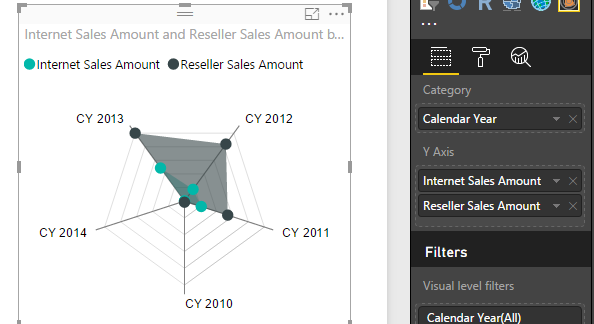
It's supported to include multiple fields (must be numeric) on Y-axis in Radar Chart. See my screenshot below:
Regards,
Thanks, I'll give this a shot with my data once I've reformatted.
Check out the April 2026 Power BI update to learn about new features.
Sign up to receive a private message when registration opens and key events begin.
If you have recently started exploring Fabric, we'd love to hear how it's going. Your feedback can help with product improvements.
| User | Count |
|---|---|
| 36 | |
| 33 | |
| 31 | |
| 21 | |
| 16 |
| User | Count |
|---|---|
| 66 | |
| 55 | |
| 31 | |
| 24 | |
| 23 |