Get Fabric or SQL Certified for Free.
Get certified for free when you join Fabric Data Days 2026 and dive into Fabric, Power BI, SQL, AI, and other essential data skills.
Join now- Power BI forums
- Get Help with Power BI
- Desktop
- Service
- Report Server
- Power Query
- Mobile Apps
- Developer
- DAX Commands and Tips
- Custom Visuals Development Discussion
- Health and Life Sciences
- Power BI Spanish forums
- Translated Spanish Desktop
- Training and Consulting
- Instructor Led Training
- Dashboard in a Day for Women, by Women
- Galleries
- Data Stories Gallery
- Themes Gallery
- Contests Gallery
- QuickViz Gallery
- Quick Measures Gallery
- Visual Calculations Gallery
- Notebook Gallery
- Translytical Task Flow Gallery
- TMDL Gallery
- R Script Showcase
- Webinars and Video Gallery
- Ideas
- Custom Visuals Ideas (read-only)
- Issues
- Issues
- Events
- Upcoming Events
Try your skills in the Power BI Dataviz World Championship! Round one ends June 26. Join now
- Power BI forums
- Forums
- Get Help with Power BI
- Desktop
- Re: Create a calculated row
- Subscribe to RSS Feed
- Mark Topic as New
- Mark Topic as Read
- Float this Topic for Current User
- Bookmark
- Subscribe
- Printer Friendly Page

- Mark as New
- Bookmark
- Subscribe
- Mute
- Subscribe to RSS Feed
- Permalink
- Report Inappropriate Content
Create a calculated row
I have a "User registration date" and "product purchase date" in my dataset...
Simply what I want to do is; when I change date range in slicer, how many of them have become members between these dates (new member)
I cannot create DAX or advanced queries since I have just started using PowerBI and I am not a developer 🙂 Is there anyone who can help me to create measure I need? 😞
Solved! Go to Solution.


- Mark as New
- Bookmark
- Subscribe
- Mute
- Subscribe to RSS Feed
- Permalink
- Report Inappropriate Content
hi, @Anonymous
Use DISTINCTCOUNT in the formula
Result 3 = var _fromdate=CALCULATE(MIN(Sheet1[New Transaction Date]),ALLSELECTED(Sheet1))
var _enddate=CALCULATE(MAX(Sheet1[New Transaction Date]),ALLSELECTED(Sheet1))  return
CALCULATE (
    DISTINCTCOUNT( Sheet1[WalletID] ),
    FILTER (
        Sheet1 ,
        Sheet1[New Wallet Createddate] >= _fromdate
            && Sheet1[New Wallet Createddate] <= _enddate
    )
)
Regards,
Lin
If this post helps, then please consider Accept it as the solution to help the other members find it more quickly.
- Mark as New
- Bookmark
- Subscribe
- Mute
- Subscribe to RSS Feed
- Permalink
- Report Inappropriate Content
hi, @Anonymous
Just adjust the formula as below:
Result 3 = var _fromdate=CALCULATE(MIN(Sheet1[New Transaction Date]),ALLSELECTED(Sheet1))
var _enddate=CALCULATE(MAX(Sheet1[New Transaction Date]),ALLSELECTED(Sheet1))  return
CALCULATE (
    COUNTA ( Sheet1[WalletID] ),
    FILTER (
        Sheet1 ,
        Sheet1[New Wallet Createddate] >= _fromdate
            && Sheet1[New Wallet Createddate] <= _enddate
    )
)
Regards,
Lin
If this post helps, then please consider Accept it as the solution to help the other members find it more quickly.
- Mark as New
- Bookmark
- Subscribe
- Mute
- Subscribe to RSS Feed
- Permalink
- Report Inappropriate Content
Logic is correct, finally I got what I need. I need your help on fixing one thing. Result3 should calculate distinct.
- Mark as New
- Bookmark
- Subscribe
- Mute
- Subscribe to RSS Feed
- Permalink
- Report Inappropriate Content
hi, @Anonymous
Use DISTINCTCOUNT in the formula
Result 3 = var _fromdate=CALCULATE(MIN(Sheet1[New Transaction Date]),ALLSELECTED(Sheet1))
var _enddate=CALCULATE(MAX(Sheet1[New Transaction Date]),ALLSELECTED(Sheet1))  return
CALCULATE (
    DISTINCTCOUNT( Sheet1[WalletID] ),
    FILTER (
        Sheet1 ,
        Sheet1[New Wallet Createddate] >= _fromdate
            && Sheet1[New Wallet Createddate] <= _enddate
    )
)
Regards,
Lin
If this post helps, then please consider Accept it as the solution to help the other members find it more quickly.


- Mark as New
- Bookmark
- Subscribe
- Mute
- Subscribe to RSS Feed
- Permalink
- Report Inappropriate Content
Hi @Anonymous
What would determine if the member?
Mariusz
Please feel free to connect with me.
- Mark as New
- Bookmark
- Subscribe
- Mute
- Subscribe to RSS Feed
- Permalink
- Report Inappropriate Content
According to dataset;
Transaction Date= purchase date
Wallet Createddate= membership date
- Mark as New
- Bookmark
- Subscribe
- Mute
- Subscribe to RSS Feed
- Permalink
- Report Inappropriate Content
Hi @Anonymous
I've attached the file with the solution.
You will need to create a calendar table / date dimension with one active and one inactive relationship to achieve this.
Mariusz
If this post helps, then please consider Accepting it as the solution.
Please feel free to connect with me.
- Mark as New
- Bookmark
- Subscribe
- Mute
- Subscribe to RSS Feed
- Permalink
- Report Inappropriate Content
Thank you so much for answer but I think I couldnt explain myself clearly. Therefore, your calculation doesnt give me what I need.
***Slicer should be based on sales date, "transaction date" in dataset. But you setted it as "Wallet Createddate"
In short, what I want to calculate is; sales qty of new members within the specified date range
Example;
If I choose the dates between 2019-09-18 and 2019-10-12(***),
It should check the "Wallet Created Date" column and verify the dates are same as selected in slicer and then calculate as "5" (example below)
- Mark as New
- Bookmark
- Subscribe
- Mute
- Subscribe to RSS Feed
- Permalink
- Report Inappropriate Content
hi, @Anonymous
For your requirement, you could just use this simple way:
Create a measure by this formula:
Result =
CALCULATE (
    COUNTA ( Sheet1[WalletID] ),
    FILTER (
        ALL ( Sheet1 ),
        Sheet1[Wallet Createddate] >= MIN ( Sheet1[Transaction Date] )
            && Sheet1[Wallet Createddate] <= MAX ( Sheet1[Transaction Date] )
    )
)
And for your case, Wallet Createddate and Transaction Date are all DateTime column, you'd better create a date column for them in the calculation.
For example:
New Wallet Createddate = DATE(YEAR(Sheet1[Wallet Createddate]),MONTH(Sheet1[Wallet Createddate]),DAY(Sheet1[Wallet Createddate]))
New Transaction Date = DATE(YEAR(Sheet1[Transaction Date]),MONTH(Sheet1[Transaction Date]),DAY(Sheet1[Transaction Date]))
then just adjust the formula as below:
Result 2 =
CALCULATE (
    COUNTA ( Sheet1[WalletID] ),
    FILTER (
        ALL ( Sheet1 ),
        Sheet1[New Wallet Createddate] >= MIN ( Sheet1[New Transaction Date] )
            && Sheet1[New Wallet Createddate] <= MAX ( Sheet1[New Transaction Date] )
    )
)
Result:

and here is sample pbix file, please try it.
Regards,
Lin
If this post helps, then please consider Accept it as the solution to help the other members find it more quickly.
- Mark as New
- Bookmark
- Subscribe
- Mute
- Subscribe to RSS Feed
- Permalink
- Report Inappropriate Content
Hi @Anonymous
Sorry but I'm struggling to understand, how 2019-09-10 could be considered within 2019-10-10 to 2019-10-12 range?
Mariusz
Please feel free to connect with me.
- Mark as New
- Bookmark
- Subscribe
- Mute
- Subscribe to RSS Feed
- Permalink
- Report Inappropriate Content
Hi @Mariusz , Im so sorry, I updated my previous post. Please kindly check it again.
- Mark as New
- Bookmark
- Subscribe
- Mute
- Subscribe to RSS Feed
- Permalink
- Report Inappropriate Content
Hi @Anonymous
Please see the below and the attached file.
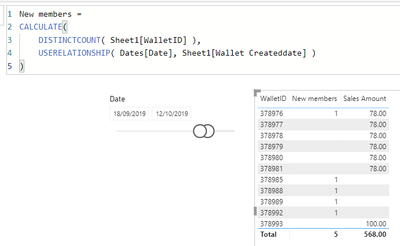
The only change I have made is adjusted WalltID 878982 Wallet Createddate date back to 02/09/2019.
according to your recent post, the result should be correct.
Mariusz
If this post helps, then please consider Accepting it as the solution.
Please feel free to connect with me.
- Mark as New
- Bookmark
- Subscribe
- Mute
- Subscribe to RSS Feed
- Permalink
- Report Inappropriate Content
Hi @Anonymous
Can you create a data sample that represents your data model logic?
Mariusz
If this post helps, then please consider Accepting it as the solution.
Please feel free to connect with me.
- Mark as New
- Bookmark
- Subscribe
- Mute
- Subscribe to RSS Feed
- Permalink
- Report Inappropriate Content
I dont know how to add it, therefore I shared in link below.
Helpful resources

Data Days 2026
Don't miss out on Data Days, June 15 through August 7. Learn Fabric, Power BI, SQL, AI and more.

Power BI Monthly Update - May 2026
Check out the May 2026 Power BI update to learn about new features.

Power BI DataViz World Championships - June 2026
A new Power BI DataViz World Championship is coming this June! Don't miss out on submitting your entry.

| User | Count |
|---|---|
| 24 | |
| 21 | |
| 20 | |
| 17 | |
| 12 |


| User | Count |
|---|---|
| 66 | |
| 55 | |
| 42 | |
| 38 | |
| 30 |


