Join us at FabCon Atlanta from March 16 - 20, 2026, for the ultimate Fabric, Power BI, AI and SQL community-led event. Save $200 with code FABCOMM.
Register now!The Power BI Data Visualization World Championships is back! Get ahead of the game and start preparing now! Learn more
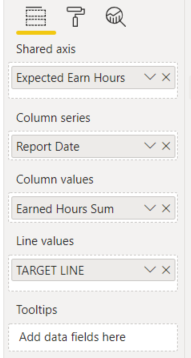
I currently have a Line and Cluster Column Chart with a Target line for my line values.
How can I convert this to Line chart. Would line to see values in line form compared to my target line.
Thanks in advanced for any help
Solved! Go to Solution.
Hi @josstan,
Nope, current power bi does not support to use legend fields and multiple values field at the same time. (Analysis panel excited triage line, but it is static values. if you want to make it dynamic, you need to add your value field to the visual fields, then you can choose it in the options)
I think you may need to modify your table structure to unpivot these fields to attribute and value, then you can use attribute on legend and value in the Value field to achieve your requirement.
Unpivot columns (Power Query)
Regards,
Xiaoxin Sheng
Hi @josstan,
Nope, current power bi does not support to use legend fields and multiple values field at the same time. (Analysis panel excited triage line, but it is static values. if you want to make it dynamic, you need to add your value field to the visual fields, then you can choose it in the options)
I think you may need to modify your table structure to unpivot these fields to attribute and value, then you can use attribute on legend and value in the Value field to achieve your requirement.
Unpivot columns (Power Query)
Regards,
Xiaoxin Sheng
These values are column values. Id like the Earn Hours Sum column to appear as line. Cant figure out how to put two columns in for values. Is that possible.
The Power BI Data Visualization World Championships is back! Get ahead of the game and start preparing now!
| User | Count |
|---|---|
| 45 | |
| 40 | |
| 32 | |
| 30 | |
| 21 |
| User | Count |
|---|---|
| 127 | |
| 125 | |
| 94 | |
| 78 | |
| 65 |