This time we’re going bigger than ever. Fabric, Power BI, SQL, AI and more. We're covering it all. You won't want to miss it.
Learn moreDid you hear? There's a new SQL AI Developer certification (DP-800). Start preparing now and be one of the first to get certified. Register now
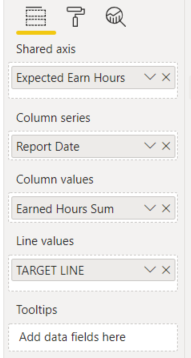
I currently have a Line and Cluster Column Chart with a Target line for my line values.
How can I convert this to Line chart. Would line to see values in line form compared to my target line.
Thanks in advanced for any help
Solved! Go to Solution.
Hi @Anonymous,
Nope, current power bi does not support to use legend fields and multiple values field at the same time. (Analysis panel excited triage line, but it is static values. if you want to make it dynamic, you need to add your value field to the visual fields, then you can choose it in the options)
I think you may need to modify your table structure to unpivot these fields to attribute and value, then you can use attribute on legend and value in the Value field to achieve your requirement.
Unpivot columns (Power Query)
Regards,
Xiaoxin Sheng
Hi @Anonymous,
Nope, current power bi does not support to use legend fields and multiple values field at the same time. (Analysis panel excited triage line, but it is static values. if you want to make it dynamic, you need to add your value field to the visual fields, then you can choose it in the options)
I think you may need to modify your table structure to unpivot these fields to attribute and value, then you can use attribute on legend and value in the Value field to achieve your requirement.
Unpivot columns (Power Query)
Regards,
Xiaoxin Sheng
These values are column values. Id like the Earn Hours Sum column to appear as line. Cant figure out how to put two columns in for values. Is that possible.
Check out the April 2026 Power BI update to learn about new features.
Sign up to receive a private message when registration opens and key events begin.
If you have recently started exploring Fabric, we'd love to hear how it's going. Your feedback can help with product improvements.
| User | Count |
|---|---|
| 34 | |
| 31 | |
| 25 | |
| 20 | |
| 16 |
| User | Count |
|---|---|
| 61 | |
| 49 | |
| 28 | |
| 23 | |
| 23 |