This time we’re going bigger than ever. Fabric, Power BI, SQL, AI and more. We're covering it all. You won't want to miss it.
Learn moreDid you hear? There's a new SQL AI Developer certification (DP-800). Start preparing now and be one of the first to get certified. Register now
Hi,
I have a column of data with about 200 distinct values over thousands of rows. I'd like to create a column that assigns one of about 20 different categories to the values. The only way I've found to do this is to create a conditional column that has a new rule for each of the 200 distinct values. This is very inefficient. Is there a better way to do this?
Thanks for your help!
Hi @Anonymous,
Could you please offer a sample data and post your desired result if possible?
Regards,
Daniel He
@Anonymous
Could you show a visual example?
Did I answer your question correctly? Mark my answer as a solution!
Proud to be a Datanaut!
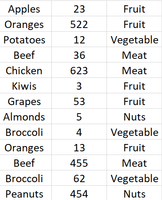
For example, if I had a table like this, with the first two columns, but I wanted to create the third column, categorizing the values in the first into about 20 different categories. But imagine that the first column has about 200+ distinct values over thousands of rows.
Unfortunately this can't just be offloaded onto someone else as a data management issue.
Hi @Anonymous,
Based on my test, you could refer to below steps:
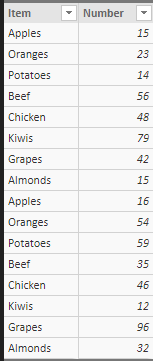
Sample data:
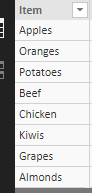
Create a distinct table:
Distinct table = DISTINCT('Table1'[Item])
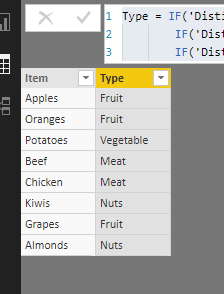
Create a calculate column in this table:
Type = IF('Distinct table'[Item]="Apples"||'Distinct table'[Item]="Oranges"||'Distinct table'[Item]="Grapes","Fruit",
IF('Distinct table'[Item]="Beef"||'Distinct table'[Item]="Chicken","Meat",
IF('Distinct table'[Item]="Potatoes","Vegetable","Nuts")))
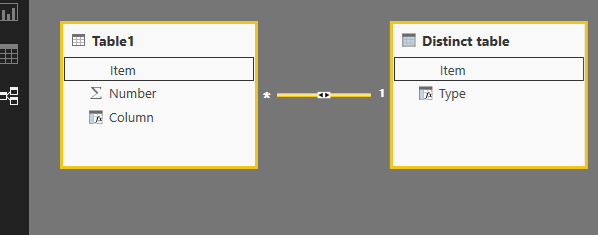
Create relationships between the two tables:
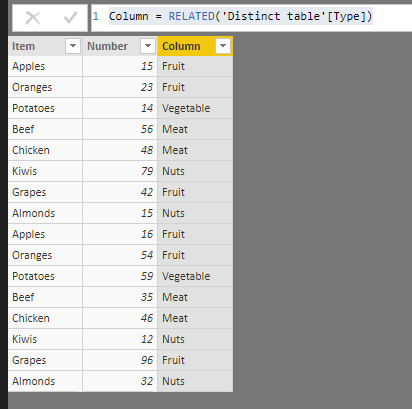
Create a calculated column in your row table:
Column = RELATED('Distinct table'[Type])
Result:
You could also download the pbix file to have a view.
Regards,
Daniel He
Check out the April 2026 Power BI update to learn about new features.
Sign up to receive a private message when registration opens and key events begin.
If you have recently started exploring Fabric, we'd love to hear how it's going. Your feedback can help with product improvements.
| User | Count |
|---|---|
| 36 | |
| 33 | |
| 31 | |
| 21 | |
| 16 |
| User | Count |
|---|---|
| 66 | |
| 55 | |
| 31 | |
| 24 | |
| 23 |