This time we’re going bigger than ever. Fabric, Power BI, SQL, AI and more. We're covering it all. You won't want to miss it.
Learn moreLevel up your Power BI skills this month - build one visual each week and tell better stories with data! Get started
Hi,
I have a column of data with about 200 distinct values over thousands of rows. I'd like to create a column that assigns one of about 20 different categories to the values. The only way I've found to do this is to create a conditional column that has a new rule for each of the 200 distinct values. This is very inefficient. Is there a better way to do this?
Thanks for your help!
Hi @Anonymous,
Could you please offer a sample data and post your desired result if possible?
Regards,
Daniel He
@Anonymous
Could you show a visual example?
Did I answer your question correctly? Mark my answer as a solution!
Proud to be a Datanaut!
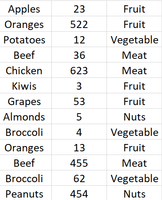
For example, if I had a table like this, with the first two columns, but I wanted to create the third column, categorizing the values in the first into about 20 different categories. But imagine that the first column has about 200+ distinct values over thousands of rows.
Unfortunately this can't just be offloaded onto someone else as a data management issue.
Hi @Anonymous,
Based on my test, you could refer to below steps:
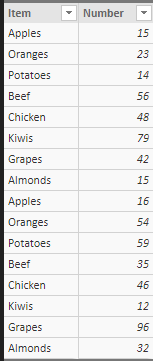
Sample data:
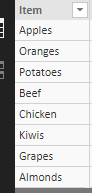
Create a distinct table:
Distinct table = DISTINCT('Table1'[Item])
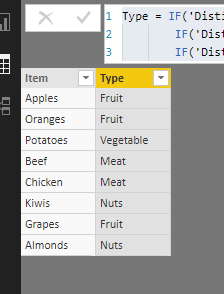
Create a calculate column in this table:
Type = IF('Distinct table'[Item]="Apples"||'Distinct table'[Item]="Oranges"||'Distinct table'[Item]="Grapes","Fruit",
IF('Distinct table'[Item]="Beef"||'Distinct table'[Item]="Chicken","Meat",
IF('Distinct table'[Item]="Potatoes","Vegetable","Nuts")))
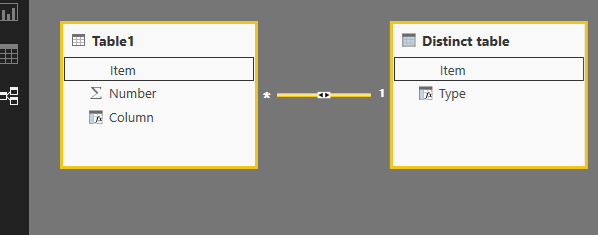
Create relationships between the two tables:
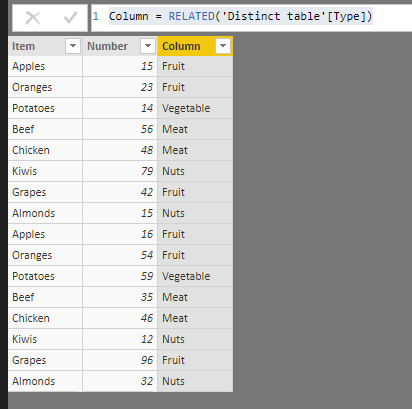
Create a calculated column in your row table:
Column = RELATED('Distinct table'[Type])
Result:
You could also download the pbix file to have a view.
Regards,
Daniel He
Check out the April 2026 Power BI update to learn about new features.
Sign up to receive a private message when registration opens and key events begin.
If you have recently started exploring Fabric, we'd love to hear how it's going. Your feedback can help with product improvements.
| User | Count |
|---|---|
| 35 | |
| 32 | |
| 25 | |
| 22 | |
| 18 |
| User | Count |
|---|---|
| 65 | |
| 35 | |
| 32 | |
| 25 | |
| 23 |