Join us at FabCon Atlanta from March 16 - 20, 2026, for the ultimate Fabric, Power BI, AI and SQL community-led event. Save $200 with code FABCOMM.
Register now!Get Fabric Certified for FREE during Fabric Data Days. Don't miss your chance! Request now
I have a date table that has calculated column counting all requests submitted on a given day.
There are two KPIs that need to be tracked. The first KPI is that each weekday has a capacity for 10 new requests.
This I can track quite easily.
The other KPI is that wekends have a capacity of 5 new requests in total over the weekend.
How can I create a column that sums the number of requests made on a Saturday and Sunday of each week?
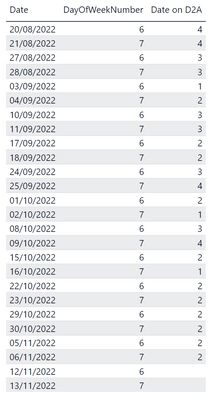
My table currently looks like this:
I want a column that sums 20/08 & 21/08 and places the value in 21/08 so that I can display it as a time series visual
e.g.
Date Weekend Requests
21/08/22 8
28/08/22 6
Solved! Go to Solution.
I think I have the answer. I used a variable to get teh value of the previous row...
Thanks for the reply. This goes part way. The total is placed in Day 7 but the final sum places the total for the whole column in the cell and not just the total of the 2 days of that week's day 6&7.
Hi @Anonymous,
You can use:
Weekend Requests = IF(DayOfWeekNumber=7, IF(DayOfWeekNumber=6 || DayOfWeekNumber=7, SUM('Table'[Requests])))
Works for you? Mark this post as a solution if it does!
Check out this blog of mine: How to Export Telemetry Data from Azure IoT Central into Power BI
Check out the November 2025 Power BI update to learn about new features.
Advance your Data & AI career with 50 days of live learning, contests, hands-on challenges, study groups & certifications and more!