Join us at FabCon Atlanta from March 16 - 20, 2026, for the ultimate Fabric, Power BI, AI and SQL community-led event. Save $200 with code FABCOMM.
Register now!Vote for your favorite vizzies from the Power BI Dataviz World Championship submissions. Vote now!
I have a date table that has calculated column counting all requests submitted on a given day.
There are two KPIs that need to be tracked. The first KPI is that each weekday has a capacity for 10 new requests.
This I can track quite easily.
The other KPI is that wekends have a capacity of 5 new requests in total over the weekend.
How can I create a column that sums the number of requests made on a Saturday and Sunday of each week?
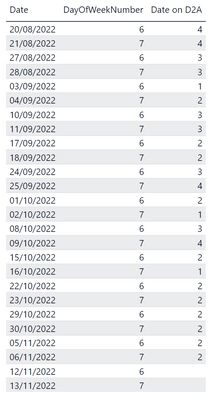
My table currently looks like this:
I want a column that sums 20/08 & 21/08 and places the value in 21/08 so that I can display it as a time series visual
e.g.
Date Weekend Requests
21/08/22 8
28/08/22 6
Solved! Go to Solution.
I think I have the answer. I used a variable to get teh value of the previous row...
Thanks for the reply. This goes part way. The total is placed in Day 7 but the final sum places the total for the whole column in the cell and not just the total of the 2 days of that week's day 6&7.
Hi @Anonymous,
You can use:
Weekend Requests = IF(DayOfWeekNumber=7, IF(DayOfWeekNumber=6 || DayOfWeekNumber=7, SUM('Table'[Requests])))
Works for you? Mark this post as a solution if it does!
Check out this blog of mine: How to Export Telemetry Data from Azure IoT Central into Power BI
Vote for your favorite vizzies from the Power BI World Championship submissions!
If you love stickers, then you will definitely want to check out our Community Sticker Challenge!
Check out the January 2026 Power BI update to learn about new features.
| User | Count |
|---|---|
| 63 | |
| 53 | |
| 42 | |
| 20 | |
| 17 |
| User | Count |
|---|---|
| 123 | |
| 105 | |
| 45 | |
| 32 | |
| 24 |