cancel
Showing results for 
Search instead for 
Did you mean: 

Data Days is here! Join us now for 60+ days of learning, challenges, and connection. Learn more

Reply
Anonymous
Not applicable

Create Two Measures

Hi Team,

I am struggling to create two measures and I am attaching the Power BI File with Data and Measures logic/definition and expected output document in the attachment your help will be much appreciated.

Power BI File:

https://drive.google.com/file/d/1v_SCWRJev5bzC9zSzZN29uMVIH3dVWsk/view?usp=sharing

Measure definition and Output Document:

https://drive.google.com/file/d/1ALiB-eGhc7sZm5p4xf8Yeakkp5kCn34Z/view?usp=sharing


Content of Measure definition and Output Document:

Sushil_Kumar777_0-1610459630455.png


4 REPLIES 4
v-xulin-mstf
Community Support
Community Support

Hi @Anonymous,


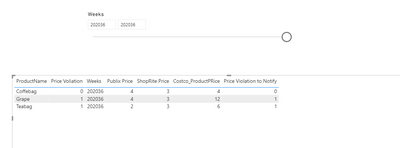
I create the measure2 as:


Price Violation to Notify =

SUMX (

    ADDCOLUMNS (

        SUMMARIZE ( CostcoBasket, CostcoBasket[ProductName] ),

        "Measure2",

            VAR CostoPrice =

                MAX ( CostcoBasket[Costco_ProductPRice] )

            VAR PublixPrice =

                CALCULATE (

                    SUM ( CostcoBasket[competitor_Price] ),

                    FILTER ( CostcoBasket, CostcoBasket[Comp_Company] = "Publix" )

                )

            VAR ShopRitePrice =

                CALCULATE (

                    SUM ( CostcoBasket[competitor_Price] ),

                    FILTER ( CostcoBasket, CostcoBasket[Comp_Company] = "ShopRite" )


                )

            var PublixFlag=

            CALCULATE(

            MAX(CostcoBasket[Flag]),

            FILTER(

                ALL(CostcoBasket),

                CostcoBasket[Comp_Company]="Publix"

            )

            )

            var ShopRiteFlag=

             CALCULATE(

            MAX(CostcoBasket[Flag]),

            FILTER(

                ALL(CostcoBasket),

                CostcoBasket[Comp_Company]="ShopRite"

            )

            )

            var countweek=

            CALCULATE(

                COUNT(CostcoBasket[Weeks]),

                FILTER(

                    ALL(CostcoBasket),

                    PublixPrice<CostoPrice && (CostcoBasket[Weeks])<MAX(CostcoBasket[Weeks])-5 || ShopRitePrice<CostoPrice && (CostcoBasket[Weeks])<MAX(CostcoBasket[Weeks])-5

                )

                )


             RETURN

            IF(

                   IF(

                   (CostoPrice > PublixPrice || CostoPrice > ShopRitePrice ),


                   OR((PublixFlag=1 && countweek>=3 || ShopRitePrice=1 && countweek>=3),(PublixFlag=0 || ShopRiteFlag=0))

                   ),

                   1, 0 )


    ),

    [Measure2]

)


Here is the output:

2.png

Here is the demo, please try it: Create Two Measures

I’m not sure what does measure3 mean.

How to define consecutive weeks? For example, the corresponding values for each week are “1 0 1 0 1”, does the measure return 0, or 1?

What is the range that contains consecutive weeks? Please details.


Best Regards,

Link

Anonymous
Not applicable

Thanks team and  it is really helpfull .


I have uploaded the Latest Power BI File where Mearue 2 is wokring for  seleceted week.


https://drive.google.com/file/d/10EepFFKFEmz2KIEIuJlZ--9PW5ADGICr/view?usp=sharing 


Now lets consider below output of Measure2 because Measure 3 is depedent on it.

Measure 3: Price Violation Notify consecutive weeks count

Scenario 1 : When i select Weeks =202036 the output of Measure3 is

Coffebag   0  

i will check outputs of Measure 2(0,0,0,0,0,0,0) from all available weeks(202036-202030) for Coffebag and count the latest consecutive weeks

Grape        1  

i will check outputs of Measure 2(1,0,0,1,1,1,0) from all available weeks(202036-202030) for Grape and count the latest consecutive weeks

Teabag      2  

i will check outputs of Measure 2(1,1,0,1,0,1,0) from all available weeks(202036-202030) for Teabag  and count the latest consecutive weeks


Scenario 2 : When i select Weeks =202035 the output of Measure3 is

Coffebag   0  

i will check outputs of Measure 2(0,0,0,0,0,0) from all available weeks(202035-202030) for Coffebag and count the latest consecutive weeks

Grape        0 

i will check outputs of Measure 2(0,0,1,1,1,0) from all available weeks(202035-202030) for Grape and count the latest consecutive weeks

Teabag      1

i will check outputs of Measure 2(1,0,1,0,1,0) from all available weeks(202035-202030) for Teabag  and count the latest consecutive weeks


Scenario 3 : When i select Weeks =202034 the output of Measure3 is

Coffebag   0  

i will check outputs of Measure 2(0,0,0,0,0) from all available weeks(202034-202030) for Coffebag and count the latest consecutive weeks

Grape        0 

i will check outputs of Measure 2(0,1,1,1,0) from all available weeks(202034-202030) for Grape and count the latest consecutive weeks

Teabag      0

i will check outputs of Measure 2(0,1,0,1,0) from all available weeks(202034-202030) for Teabag  and count the latest consecutive weeks
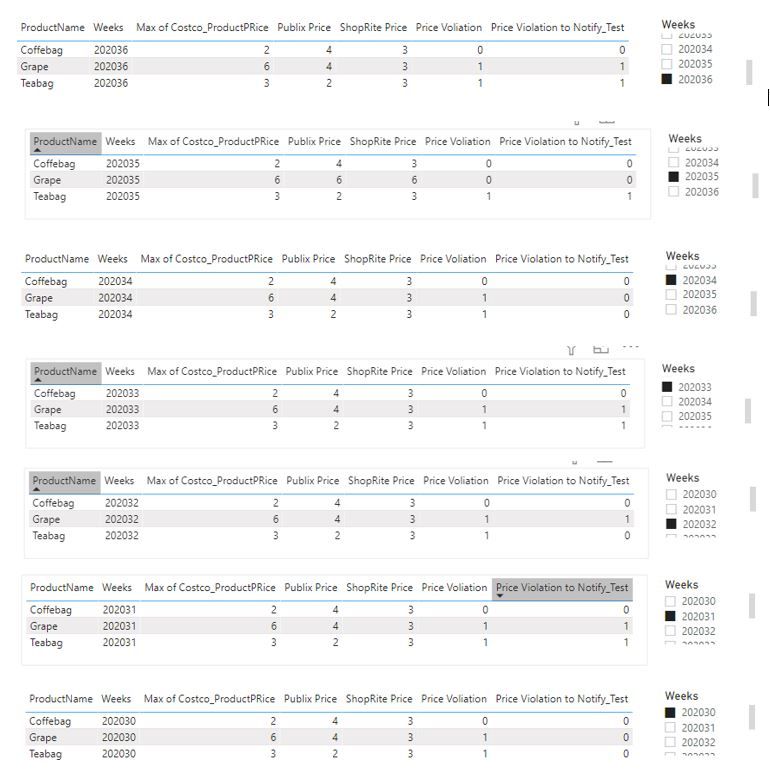
 

output.JPG


Let me know if you need more information.


Hi @Anonymous,


I don't have permission to open this link, could you provide a public link?


Best Regards,

Link

Anonymous
Not applicable

Sorry my bad , i have updated the Public link please find the same below.


https://drive.google.com/file/d/10EepFFKFEmz2KIEIuJlZ--9PW5ADGICr/view?usp=sharing 


Helpful resources

Announcements
Fabric Data Days is here Carousel

Fabric Data Days 2026

Don't miss out on Data Days, June 15 through August 7. Learn Fabric, Power BI, SQL, AI and more.

May Power BI Update Carousel

Power BI Monthly Update - May 2026

Check out the May 2026 Power BI update to learn about new features.

Power BI DataViz World Championships carousel

Power BI DataViz World Championships - June 2026

A new Power BI DataViz World Championship is coming this June! Don't miss out on submitting your entry.