cancel
Showing results for 
Search instead for 
Did you mean: 

Learn from the best! Meet the four finalists headed to the FINALS of the Power BI Dataviz World Championships! Register now

Reply
AndyTrezise
Advocate IV
Advocate IV

Create Table using a measure

I'm trying to create a table based on another table by filtering using a measure.


Table2 = 
VAR
SeletedYear = IF ( COUNTROWS( ALLSELECTED( TimeSet[Year] ) ) = 1, VALUES(TimeSet[Year]), BLANK())
RETURN
FILTER(Table1, YEAR( Table1[Date] ) = SelectedYear )


The result is blank (i.e. no rows).


Yet, if I make SelectedYear = 2017 (i.e. a static number) then it works.


I need Table2 to be created as a result of a selected year from a slicer.


Is that possible?


1 ACCEPTED SOLUTION

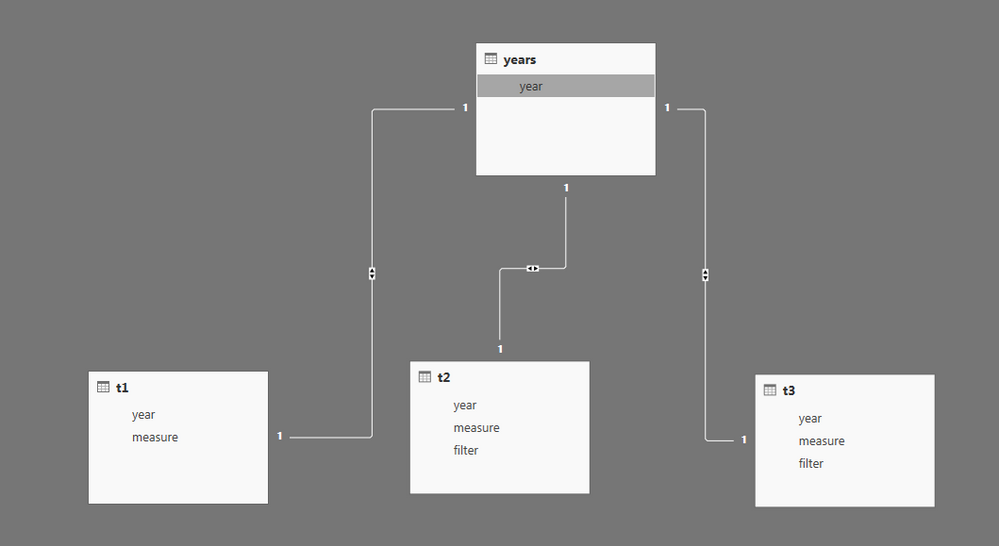
You define calculated tables with DAX but they are not dynamic. Basic workaround could look like this:

  • Reference your original table twice
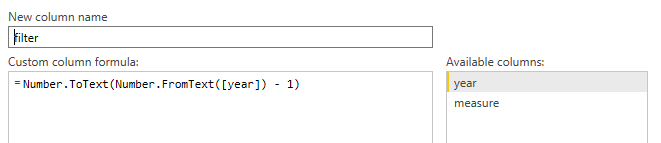
  • Create calculated column
    • For the second table with year - 1
    • For the third table with year - 2
  • Create look-up table for years

pbi-19-1_1.PNGpbi-19-1_3.PNG


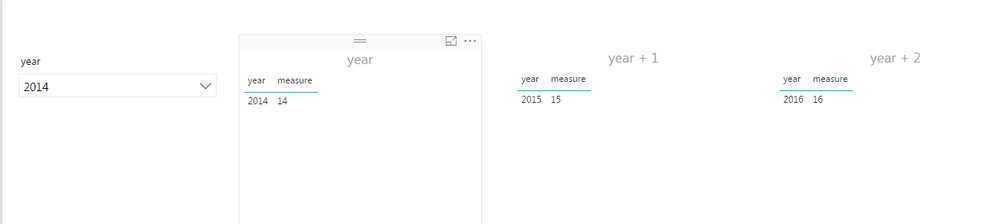
Now you can create slicer out of your look-up table and slice all three tables:

pbi-19-1_2.PNG

View solution in original post

3 REPLIES 3
Phil_Seamark
Microsoft Employee
Microsoft Employee

Hi @AndyTrezise


No, you can't dynamically re-populate a calculated table based on interactive selections made to a slicer.


You are better off putting all the data you need in the calculated table and then use the slicer to filter the data down to what you need.


To learn more about DAX visit : aka.ms/practicalDAX

Proud to be a Datanaut!

Thanks for the response


What I failed to put in the previous post is that I also need a third table - so I would end up with Table 1, Table 2 and Table 3.


Its not not practicle to get the user to filter each table seperately. That's 3 x slicers when I only need them to pick from one so I need to do this interactively through DAX - I think 🙂


I just want to be able to select a year (or year & month) from a single slicer and then filter table 1 to that selection, table 2 to year+1 and table 3 to year+2.


I'm not quite sure why in my previous example if I set the variabe to a static number it works but if I get the number from the selected value in the slicer it doesn't.


Is there any other way of filtering 3 tables via one slicer through code/DAX?

You define calculated tables with DAX but they are not dynamic. Basic workaround could look like this:

  • Reference your original table twice
  • Create calculated column
    • For the second table with year - 1
    • For the third table with year - 2
  • Create look-up table for years

pbi-19-1_1.PNGpbi-19-1_3.PNG


Now you can create slicer out of your look-up table and slice all three tables:

pbi-19-1_2.PNG

Helpful resources

Announcements
Power BI DataViz World Championships carousel

Power BI DataViz World Championships - June 2026

A new Power BI DataViz World Championship is coming this June! Don't miss out on submitting your entry.

Join our Fabric User Panel

Join our Fabric User Panel

Share feedback directly with Fabric product managers, participate in targeted research studies and influence the Fabric roadmap.

March Power BI Update Carousel

Power BI Community Update - March 2026

Check out the March 2026 Power BI update to learn about new features.