Get certified for free when you join Fabric Data Days 2026 and dive into Fabric, Power BI, SQL, AI, and other essential data skills.
Join nowJuly 7 - July 17 | Round 2 of the Power BI Dataviz World Championships. Don't miss your chance! Learn more
Hello,
How do you create a table with 1 row and multiple columns with data?
I am trying to get this into a table
EOMONTH(DATE (YEAR(TODAY()), MONTH(TODAY()), 1 ), -1)
EOMONTH(DATE (YEAR(TODAY()), MONTH(TODAY()), 1),-2)
I've had a go at using the DATATABLE function, had no success.
Solved! Go to Solution.
This works:
new table =
{
( EOMONTH ( DATE ( YEAR ( TODAY () ), MONTH ( TODAY () ), 1 ), -1 ), EOMONTH ( DATE ( YEAR ( TODAY () ), MONTH ( TODAY () ), 1 ), -2 ) )
}
Proud to be a Super User!
Paul on Linkedin.
This is the error I get when using the DATA Table Function.
Try
{(EOMONTH(DATE (YEAR(TODAY()), MONTH(TODAY()), 1 ), -1),
EOMONTH(DATE (YEAR(TODAY()), MONTH(TODAY()), 1),-2)}
Proud to be a Super User!
Paul on Linkedin.
Hello,
Thanks for your input.
I have tried this also, which gave me this error.
@Anonymous
Quesion is bit unclear! Can you share a snapshot how you want to see the data!
Matrix table should help you right?!!
Proud to be a Super User!
Hello,
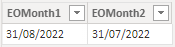
This is what I want to see if the date is 11 September 2022.
This works:
new table =
{
( EOMONTH ( DATE ( YEAR ( TODAY () ), MONTH ( TODAY () ), 1 ), -1 ), EOMONTH ( DATE ( YEAR ( TODAY () ), MONTH ( TODAY () ), 1 ), -2 ) )
}
Proud to be a Super User!
Paul on Linkedin.
Join us in Barcelona for FabCon and SQLCon, the Fabric, Power BI, SQL, and AI community event. Save €200 with code FABCMTY200.
Join Fabric Data Days 2026: 60 days of free live/on-demand sessions, challenges, study groups, and certification opportunities.
| User | Count |
|---|---|
| 22 | |
| 22 | |
| 18 | |
| 17 | |
| 13 |
| User | Count |
|---|---|
| 63 | |
| 50 | |
| 46 | |
| 41 | |
| 39 |