Learn from the best! Meet the four finalists headed to the FINALS of the Power BI Dataviz World Championships! Register now
Hi All -
What is the best way to create a subtotal in a Matrix?
The final table should look like the following. Basically, the question is how to get the subtotal "R+N".
| Status | Sales | Profit % |
| E | 1000 | 10.0% |
| R | 200 | 8.0% |
| N | 200 | 7.0% |
| R+N | 300 | 7.5% |
The usual Matrix total gives E+R+N, but I only want to subtotal of R+N.
Thank you, Mark
Solved! Go to Solution.
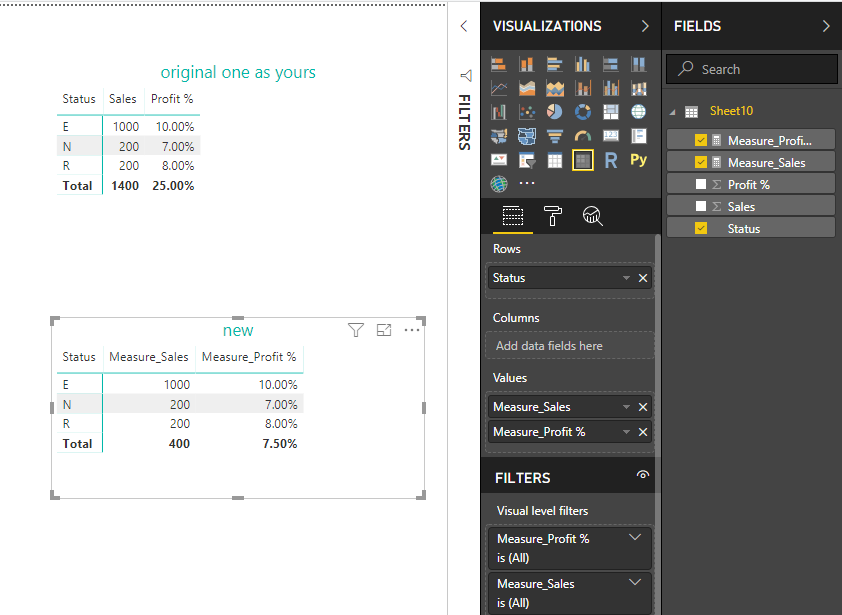
Hi @Anonymous
If your data structure as below
| Status | Sales | Profit % |
| E | 1000 | 10.0% |
| R | 200 | 8.0% |
| N | 200 | 7.0% |
create measures
Measure_Sales =IF (
HASONEVALUE ( Sheet10[Status] ),
SUM ( Sheet10[Sales] ),
CALCULATE (
SUM ( Sheet10[Sales] ),
FILTER ( ALL ( Sheet10 ), [Status] IN { "R", "N" } )
)
)
Measure_Profit % =
IF (
HASONEVALUE ( Sheet10[Status] ),
SUM ( Sheet10[Profit %] ),
CALCULATE (
AVERAGE ( Sheet10[Profit %] ),
FILTER ( ALL ( Sheet10 ), [Status] IN { "R", "N" } )
)
)
Best Regards
Maggie
Community Support Team _ Maggie Li
If this post helps, then please consider Accept it as the solution to help the other members find it more quickly.
Thank you Maggie ... that worked!
One thing that I can't get to work is to rename the "Total" in the matrix to "N + R".
Also I included some code below (for the next person I suppose) to shows how I applied the formula you provided ...
ECR_RN_Subtotal =
IF (
HASONEVALUE ( Sheet1[Contract_Status]),
[WECR],
CALCULATE (
[WECR],
FILTER ( ALL ( Sheet1 ), [Contract_Status] IN { "Renewal", "New" } )
)
)
WECR = DIVIDE(SUMX(Sheet1, Key_Measures[EP] * Key_Measures[ECR]), Key_Measures[EP])
EP = SUM(Sheet1[EP])
ERC = SUM(Sheet1[ERC])
Hi @Anonymous
If your data structure as below
| Status | Sales | Profit % |
| E | 1000 | 10.0% |
| R | 200 | 8.0% |
| N | 200 | 7.0% |
create measures
Measure_Sales =IF (
HASONEVALUE ( Sheet10[Status] ),
SUM ( Sheet10[Sales] ),
CALCULATE (
SUM ( Sheet10[Sales] ),
FILTER ( ALL ( Sheet10 ), [Status] IN { "R", "N" } )
)
)
Measure_Profit % =
IF (
HASONEVALUE ( Sheet10[Status] ),
SUM ( Sheet10[Profit %] ),
CALCULATE (
AVERAGE ( Sheet10[Profit %] ),
FILTER ( ALL ( Sheet10 ), [Status] IN { "R", "N" } )
)
)
Best Regards
Maggie
Community Support Team _ Maggie Li
If this post helps, then please consider Accept it as the solution to help the other members find it more quickly.
Thank you Maggie ... that worked!
One thing that I can't get to work is to rename the "Total" in the matrix to "N + R".
Also I included some code below (for the next person I suppose) to shows how I applied the formula you provided ...
ECR_RN_Subtotal =
IF (
HASONEVALUE ( Sheet1[Contract_Status]),
[WECR],
CALCULATE (
[WECR],
FILTER ( ALL ( Sheet1 ), [Contract_Status] IN { "Renewal", "New" } )
)
)
WECR = DIVIDE(SUMX(Sheet1, Key_Measures[EP] * Key_Measures[ECR]), Key_Measures[EP])
EP = SUM(Sheet1[EP])
ERC = SUM(Sheet1[ERC])
Please note that there was a slight error in the above table. The R+N sales total should be $400 (not $300).
Corrected table:
| Status | Sales | Profit % |
| E | 1000 | 10.0% |
| R | 200 | 8.0% |
| N | 200 | 7.0% |
| R+N | 400 | 7.5% |
A new Power BI DataViz World Championship is coming this June! Don't miss out on submitting your entry.
Share feedback directly with Fabric product managers, participate in targeted research studies and influence the Fabric roadmap.
| User | Count |
|---|---|
| 56 | |
| 33 | |
| 33 | |
| 18 | |
| 16 |
| User | Count |
|---|---|
| 67 | |
| 67 | |
| 45 | |
| 30 | |
| 26 |