
cancel
Showing results for 
Search instead for 
Did you mean: 

Join the FabCon + SQLCon recap series. Up next: Power BI, Real-Time Intelligence, IQ and AI, and Data Factory take center stage. All sessions are available on-demand after the live show. Register now

Reply
OSS
Helper III
Helper III

Create Pivot table

Dear members

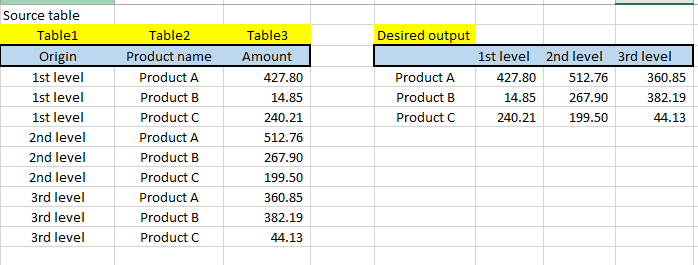
I have source table which I would like to turn in pivot table. Since my source table is formed from different table columns I cant use simple pivot function.

Matrix view is not a choise also, since I need to use 1st level measure, 2nd level measure etc. separately. 


I need to create this desired table as a new table. 


Please help me with this issue.


view.PNG

1 ACCEPTED SOLUTION
v-lili6-msft
Community Support
Community Support

hi, @OSS 

Do mean that the three columns are from different table and you haven't put them into one table like this:

2.JPG

If so you need to put them into one table, use Merge queries function in edit query to merge basic tables and then remove the other columns to get a table that contains these three columns.

then pivot the table as below:

Select Origin column click Transform -> Pivot column

3.JPG

Result:

4.JPG


Best Regards,

Lin


Community Support Team _ Lin
If this post helps, then please consider Accept it as the solution to help the other members find it more quickly.

View solution in original post

3 REPLIES 3
v-lili6-msft
Community Support
Community Support

hi, @OSS 

Do mean that the three columns are from different table and you haven't put them into one table like this:

2.JPG

If so you need to put them into one table, use Merge queries function in edit query to merge basic tables and then remove the other columns to get a table that contains these three columns.

then pivot the table as below:

Select Origin column click Transform -> Pivot column

3.JPG

Result:

4.JPG


Best Regards,

Lin


Community Support Team _ Lin
If this post helps, then please consider Accept it as the solution to help the other members find it more quickly.


@v-lili6-msft wrote:

hi, @OSS 

Do mean that the three columns are from different table and you haven't put them into one table like this:

2.JPG

If so you need to put them into one table, use Merge queries function in edit query to merge basic tables and then remove the other columns to get a table that contains these three columns.

then pivot the table as below:

Select Origin column click Transform -> Pivot column

3.JPG

Result:

4.JPG


Best Regards,

Lin


How do I do this for a table with more than one column?


I have a table like this.

Month - YearTot AvailRentedVacatedNet
12/1/201871995531521304501071
11/1/2018707765312443121628
10/1/20187286073484834184664
9/1/2018713773353203524872
8/1/20186954553813443183-5049
7/1/201868752540915336247291


I want it to look like this.

Month - Year12/1/201811/1/201810/1/20189/1/20188/1/20187/1/2018
Tot Avail719955707765728607713773695455687525
Rented315213124434848353203813440915
Vacated304503121634184352484318333624
Net10712866472-50497291

@v-lili6-msft Thank you very much. This is exactly what I was looking for.

Helpful resources

Announcements
April Power BI Update Carousel

Power BI Monthly Update - April 2026

Check out the April 2026 Power BI update to learn about new features.

New to Fabric survey Carousel

New to Fabric Survey

If you have recently started exploring Fabric, we'd love to hear how it's going. Your feedback can help with product improvements.

Power BI DataViz World Championships carousel

Power BI DataViz World Championships - June 2026

A new Power BI DataViz World Championship is coming this June! Don't miss out on submitting your entry.

FabCon and SQLCon Highlights Carousel

FabCon &SQLCon Highlights

Experience the highlights from FabCon & SQLCon, available live and on-demand starting April 14th.