
Join us at FabCon Atlanta from March 16 - 20, 2026, for the ultimate Fabric, Power BI, AI and SQL community-led event. Save $200 with code FABCOMM.
Register now!Get Fabric Certified for FREE during Fabric Data Days. Don't miss your chance! Request now
Hi
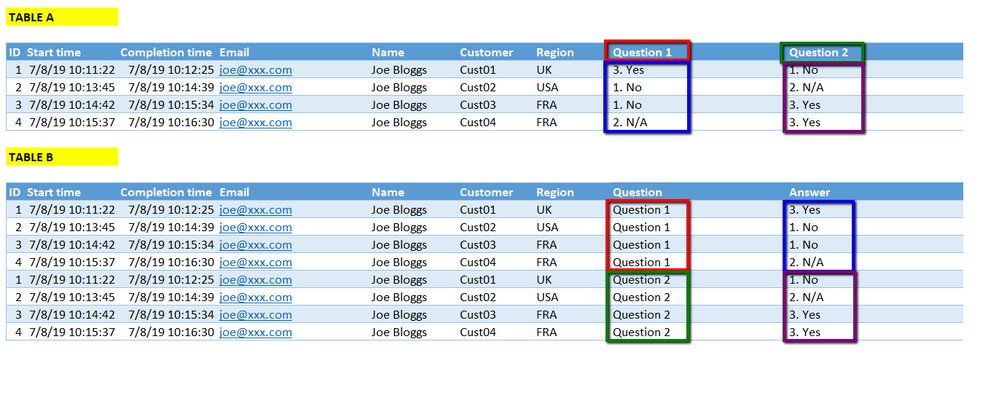
I'd like to convert / pivot a table using the name of its columns into rows in a tabular format
The source data looks something like TABLE A below. I'd like it to per as TABLE B...i.e. the column names become data in the appropriate rows:
Is this possible?
Solved! Go to Solution.
You can select all the question columns, right click on them and choose Unpivot Columns
Hi @ATREZISE ,
Enter into Query Editor, click on column Question 1 and Question 2 at the same time, click "Unpivot Columns", rename this result column with "Question". Don't forget to click the "Close & Apply" button.
Best Regards,
Amy
If this post helps, then please consider Accept it as the solution to help the other members find it more quickly.
Hi @ATREZISE ,
Enter into Query Editor, click on column Question 1 and Question 2 at the same time, click "Unpivot Columns", rename this result column with "Question". Don't forget to click the "Close & Apply" button.
Best Regards,
Amy
If this post helps, then please consider Accept it as the solution to help the other members find it more quickly.
Thanks - that works perfectly
You can select all the question columns, right click on them and choose Unpivot Columns
Thanks - Perfect
Check out the November 2025 Power BI update to learn about new features.
Advance your Data & AI career with 50 days of live learning, contests, hands-on challenges, study groups & certifications and more!