
Join us at FabCon Atlanta from March 16 - 20, 2026, for the ultimate Fabric, Power BI, AI and SQL community-led event. Save $200 with code FABCOMM.
Register now!Vote for your favorite vizzies from the Power BI Dataviz World Championship submissions. Vote now!
Hi
I'd like to convert / pivot a table using the name of its columns into rows in a tabular format
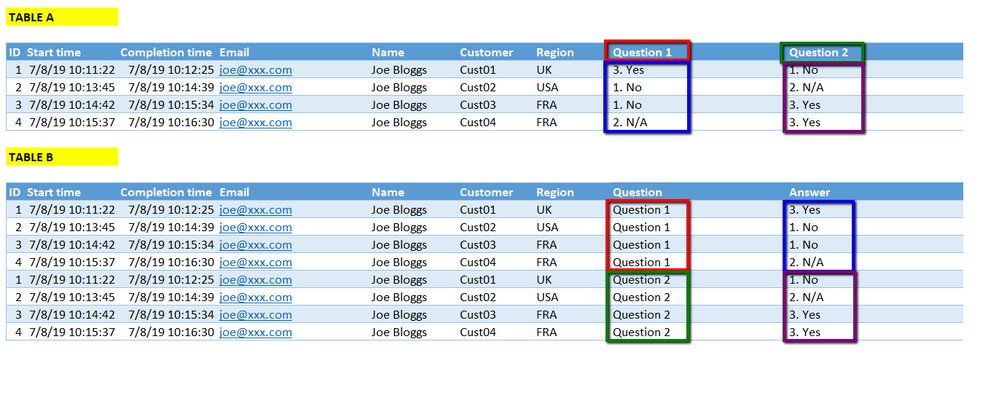
The source data looks something like TABLE A below. I'd like it to per as TABLE B...i.e. the column names become data in the appropriate rows:
Is this possible?
Solved! Go to Solution.
You can select all the question columns, right click on them and choose Unpivot Columns
Hi @ATREZISE ,
Enter into Query Editor, click on column Question 1 and Question 2 at the same time, click "Unpivot Columns", rename this result column with "Question". Don't forget to click the "Close & Apply" button.
Best Regards,
Amy
If this post helps, then please consider Accept it as the solution to help the other members find it more quickly.
Hi @ATREZISE ,
Enter into Query Editor, click on column Question 1 and Question 2 at the same time, click "Unpivot Columns", rename this result column with "Question". Don't forget to click the "Close & Apply" button.
Best Regards,
Amy
If this post helps, then please consider Accept it as the solution to help the other members find it more quickly.
Thanks - that works perfectly
You can select all the question columns, right click on them and choose Unpivot Columns
Thanks - Perfect
Vote for your favorite vizzies from the Power BI World Championship submissions!
If you love stickers, then you will definitely want to check out our Community Sticker Challenge!
Check out the January 2026 Power BI update to learn about new features.
| User | Count |
|---|---|
| 60 | |
| 54 | |
| 43 | |
| 20 | |
| 17 |
| User | Count |
|---|---|
| 123 | |
| 108 | |
| 44 | |
| 32 | |
| 24 |