cancel
Showing results for 
Search instead for 
Did you mean: 

The Power BI Data Visualization World Championships is back! Get ahead of the game and start preparing now! Learn more

Reply
Anonymous
Not applicable

Create Measure Unaffected by Slicer(s)

I have a dataset similar to below. Each row represents an event and the Count column is always populated with a (numeric) 1.


I'm trying to create two measures counting the number of events, one that's affected by slicers on EventType and Flag_YN, the other affected by Flag_YN only. It should be fairly simple but I just can't get it to work. 


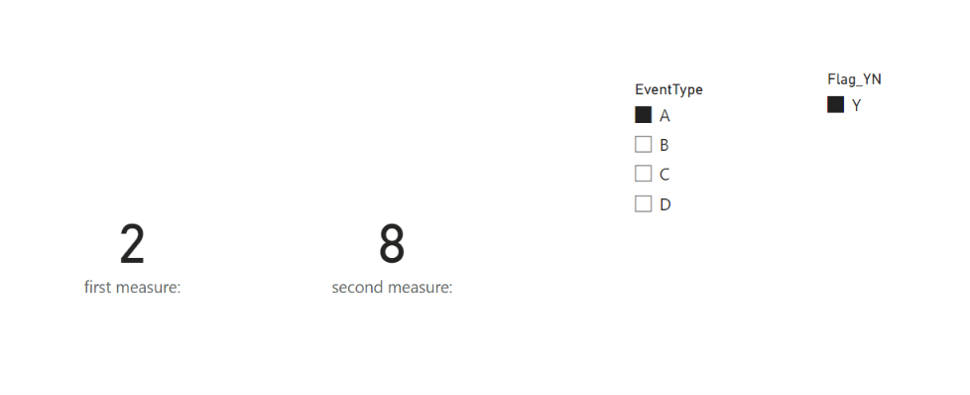
For example, if a user has Flag_YN = Y and EventType = A, what I would like displayed is "2" and "8".


I've tried:

EventLevel = CALCULATE(SUM(Table[Count]),ALLEXCEPT(Table,Table[Flag_YN],Table[EventType]))

EventLevel = CALCULATE(VALUES(Table[Count]),ALLEXCEPT(Table,Table[Flag_YN],Table[EventType]))

EventLevel = CALCULATE(COUNTROWS(Table),ALLEXCEPT(Table,Table[Flag_YN],Table[EventType]))


Also tried the above with REMOVEFILTERS. For the Flag_YN level measure I tried the above with the EventType portion removed.


No matter what I try both measures change with the EventType slicers and end up displaying the same numbers. What am I overlooking here? Would appreciate any help.


EventIDEventTypeFlag_YNCount
236AY1
336AY1
180BY1
41BY1
455BN1
454CY1
203DN1
79DY1
367DY1
94DY1
1 ACCEPTED SOLUTION
Jihwan_Kim
Super User
Super User

Hi,

I am not sure if I understood correctly your question, but please check the below picture and the attached pbix file.


Picture1.png


first measure: = 
CALCULATE (
    COUNTROWS ( Data ),
    ALLEXCEPT ( Data, Data[EventType], Data[Flag_YN] )
)


second measure: = 
CALCULATE (
    COUNTROWS ( Data ),
    ALLEXCEPT ( Data, Data[Flag_YN] )
)

If this post helps, then please consider accepting it as the solution to help other members find it faster, and give a big thumbs up.


Click here to visit my LinkedIn page

Click here to schedule a short Teams meeting to discuss your question.

View solution in original post

2 REPLIES 2
Anonymous
Not applicable

Thanks, not sure what I was doing wrong but creating a new set of measures using those formulas seemed to do the trick.

Jihwan_Kim
Super User
Super User

Hi,

I am not sure if I understood correctly your question, but please check the below picture and the attached pbix file.


Picture1.png


first measure: = 
CALCULATE (
    COUNTROWS ( Data ),
    ALLEXCEPT ( Data, Data[EventType], Data[Flag_YN] )
)


second measure: = 
CALCULATE (
    COUNTROWS ( Data ),
    ALLEXCEPT ( Data, Data[Flag_YN] )
)

If this post helps, then please consider accepting it as the solution to help other members find it faster, and give a big thumbs up.


Click here to visit my LinkedIn page

Click here to schedule a short Teams meeting to discuss your question.

Helpful resources

Announcements
Power BI DataViz World Championships

Power BI Dataviz World Championships

The Power BI Data Visualization World Championships is back! Get ahead of the game and start preparing now!

December 2025 Power BI Update Carousel

Power BI Monthly Update - December 2025

Check out the December 2025 Power BI Holiday Recap!

FabCon Atlanta 2026 carousel

FabCon Atlanta 2026

Join us at FabCon Atlanta, March 16-20, for the ultimate Fabric, Power BI, AI and SQL community-led event. Save $200 with code FABCOMM.