This time we’re going bigger than ever. Fabric, Power BI, SQL, AI and more. We're covering it all. You won't want to miss it.
Learn moreDid you hear? There's a new SQL AI Developer certification (DP-800). Start preparing now and be one of the first to get certified. Register now
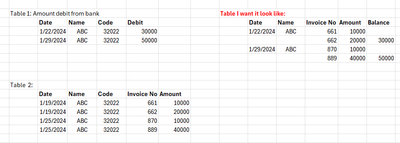
Hi everyone, I have Table 1 and Table2 like the picture.
I want create new table, using matrix table for showing transaction from the bank in Table1. Each invoice No. will match with that transaction.
There are two thing will alway happen:
First: the total Amount of Invoice No in Table 2 will alway be the same with Table1[Debit]. For example, if Table1[Date] 1/22/2024 have Debit is 30000, then the Invoice will be 661 and 662 because these two sum will be 30000.
Second: The Table1[Date] will alway after the Table2[Date]. Because the transaction from the bank will alway happen after the Date in Table2
Please help me!!!!!!
Solved! Go to Solution.
Hi @VictorV ,
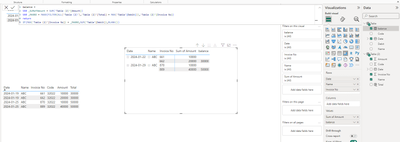
I made simple samples and you can check the results below:
Total = CALCULATE(SUMX('Table (2)',[Amount]),FILTER('Table (2)',[Date]=EARLIER([Date])))
balance =
VAR _MAXNO = MAXX(FILTER(ALL('Table (2)'),'Table (2)'[Total] = MAX('Table'[Debit])),'Table (2)'[Invoice No])
return
IF(MAX('Table (2)'[Invoice No]) = _MAXNO,SUM('Table'[Debit]),BLANK())
An attachment for your reference. Hope it helps!
Best regards,
Community Support Team_ Scott Chang
If this post helps then please consider Accept it as the solution to help the other members find it more quickly.
Hi @VictorV ,
I made simple samples and you can check the results below:
Total = CALCULATE(SUMX('Table (2)',[Amount]),FILTER('Table (2)',[Date]=EARLIER([Date])))
balance =
VAR _MAXNO = MAXX(FILTER(ALL('Table (2)'),'Table (2)'[Total] = MAX('Table'[Debit])),'Table (2)'[Invoice No])
return
IF(MAX('Table (2)'[Invoice No]) = _MAXNO,SUM('Table'[Debit]),BLANK())
An attachment for your reference. Hope it helps!
Best regards,
Community Support Team_ Scott Chang
If this post helps then please consider Accept it as the solution to help the other members find it more quickly.
Check out the April 2026 Power BI update to learn about new features.
If you have recently started exploring Fabric, we'd love to hear how it's going. Your feedback can help with product improvements.
A new Power BI DataViz World Championship is coming this June! Don't miss out on submitting your entry.
| User | Count |
|---|---|
| 38 | |
| 38 | |
| 31 | |
| 22 | |
| 15 |
| User | Count |
|---|---|
| 74 | |
| 61 | |
| 31 | |
| 31 | |
| 23 |