cancel
Showing results for 
Search instead for 
Did you mean: 

July 7 - July 17 | Round 2 of the Power BI Dataviz World Championships. Don't miss your chance! Learn more

Reply
VictorV
Helper I
Helper I

Create Matrix table, with data from multiple table

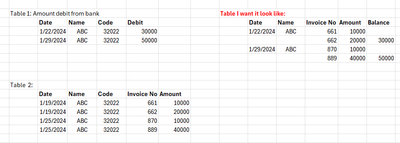
Hi everyone, I have Table 1 and Table2 like the picture.

I want create new table, using matrix table for showing transaction from the bank in Table1. Each invoice No. will match with that transaction.

There are two thing will alway happen:


First: the total Amount of Invoice No in Table 2 will alway be the same with Table1[Debit]. For example, if Table1[Date] 1/22/2024 have Debit is 30000, then the Invoice will be 661 and 662 because these two sum will be 30000.


Second: The Table1[Date] will alway after the Table2[Date]. Because the transaction from the bank will alway happen after the Date in Table2

VictorV_0-1713261022712.png


Please help me!!!!!!


1 ACCEPTED SOLUTION
Anonymous
Not applicable

Hi @VictorV ,


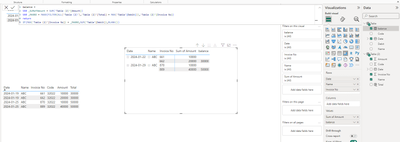
I made simple samples and you can check the results below:

vtianyichmsft_2-1713338004528.png

Total = CALCULATE(SUMX('Table (2)',[Amount]),FILTER('Table (2)',[Date]=EARLIER([Date])))

balance = 
VAR _MAXNO = MAXX(FILTER(ALL('Table (2)'),'Table (2)'[Total] = MAX('Table'[Debit])),'Table (2)'[Invoice No])
return
IF(MAX('Table (2)'[Invoice No]) = _MAXNO,SUM('Table'[Debit]),BLANK())


An attachment for your reference. Hope it helps!


Best regards,
Community Support Team_ Scott Chang


If this post helps then please consider Accept it as the solution to help the other members find it more quickly.

View solution in original post

1 REPLY 1
Anonymous
Not applicable

Hi @VictorV ,


I made simple samples and you can check the results below:

vtianyichmsft_2-1713338004528.png

Total = CALCULATE(SUMX('Table (2)',[Amount]),FILTER('Table (2)',[Date]=EARLIER([Date])))

balance = 
VAR _MAXNO = MAXX(FILTER(ALL('Table (2)'),'Table (2)'[Total] = MAX('Table'[Debit])),'Table (2)'[Invoice No])
return
IF(MAX('Table (2)'[Invoice No]) = _MAXNO,SUM('Table'[Debit]),BLANK())


An attachment for your reference. Hope it helps!


Best regards,
Community Support Team_ Scott Chang


If this post helps then please consider Accept it as the solution to help the other members find it more quickly.

Helpful resources

Announcements
FabCon and SQLCon Barcelona 2026

FabCon & SQLCon – Barcelona 2026

Join us in Barcelona for FabCon and SQLCon, the Fabric, Power BI, SQL, and AI community event. Save €200 with code FABCMTY200.

60 days of Data Days Carousel

Data Days 2026

Join Data Days 2026: 60 days of free live/on-demand sessions, challenges, study groups, and certification opportunities.

Power BI DataViz World Championships carousel

Power BI DataViz World Championships - June 2026

A new Power BI DataViz World Championship is coming this June! Don't miss out on submitting your entry.

Top Solution Authors