cancel
Showing results for 
Search instead for 
Did you mean: 

The Power BI Data Visualization World Championships is back! Get ahead of the game and start preparing now! Learn more

Reply
PabloGiraldo
Helper IV
Helper IV

Create IF statement from column

Hi,


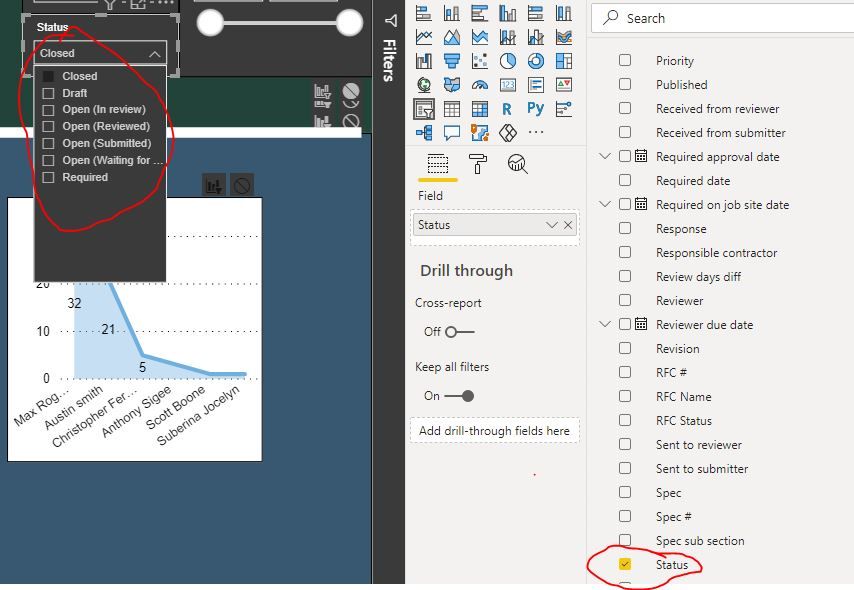
Trying to create a Ball in Court filter. I currently have a Status column with multiple statuses (i.e., closed, draft, open (in review), etc.)


If Status =

Closed = AW

Draft = AW

Open (In review) = BC

Open (Reviewed) = AW

Open (Submitted) = AW

Open (Waiting for Submission) = Sub


Capture.JPG


Thanks,

Pablo

1 ACCEPTED SOLUTION
timg
Solution Sage
Solution Sage

Hi Pablo,


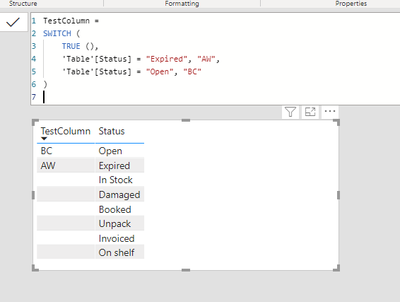
here's a reference formula based on test data. If you complete it with your case categories it should work. 


TestColumn =
SWITCH (
    TRUE (),
    'Table'[Status] = "Expired", "AW",
    'Table'[Status] = "Open", "BC"
)


 1.PNG


Best regards,

Tim


Did I answer your question? Mark my post as a solution!

Proud to be a Super User!


View solution in original post

4 REPLIES 4
robinHH
Frequent Visitor

Hi Pablo,

I am not sure if I got your question correct: You want to aggregate the different status e.g. Open (reviewed) and Open (Submitted) should be summarized as "AW"?

If so, I would suggest to create a calculated column in DAX that uses the SWITCH-function (https://docs.microsoft.com/en-us/dax/switch-function-dax). 

The formula could look like this:
= SWITCH ( [Status_short], "Closed" = "AW", "Draft" = "AW" [...further expressions])

Looking forward to see if I was able to help you!

Cheers
Robin

negi007
Community Champion
Community Champion

@PabloGiraldo  I guess you are trying create three groups basis the status. I would suggest you to use the group function. Right click on the status column and select new group


negi007_0-1612368101631.png


then you can create three groups for your values and you can use it instead of values of status column. I hope it helps you


Did I answer your question? Mark my post as a solution!
Appreciate your Kudos


Proud to be a Super User!


Follow me on linkedin

timg
Solution Sage
Solution Sage

Hi Pablo,


here's a reference formula based on test data. If you complete it with your case categories it should work. 


TestColumn =
SWITCH (
    TRUE (),
    'Table'[Status] = "Expired", "AW",
    'Table'[Status] = "Open", "BC"
)


 1.PNG


Best regards,

Tim


Did I answer your question? Mark my post as a solution!

Proud to be a Super User!


Got it working. Thanks!

Helpful resources

Announcements
Power BI DataViz World Championships

Power BI Dataviz World Championships

The Power BI Data Visualization World Championships is back! Get ahead of the game and start preparing now!

December 2025 Power BI Update Carousel

Power BI Monthly Update - December 2025

Check out the December 2025 Power BI Holiday Recap!

FabCon Atlanta 2026 carousel

FabCon Atlanta 2026

Join us at FabCon Atlanta, March 16-20, for the ultimate Fabric, Power BI, AI and SQL community-led event. Save $200 with code FABCOMM.